
If it was considered cheating to use an audio processing chip to improve the sound quality of an iPod accessory, Creative would definitely be guilty: it has added X-Fi audio enhancing chips to several devices, including the previously-reviewed Xdock wireless docking system. But it’s not cheating: chips like these have appeared in numerous iPod speaker systems, including some of the most popular ones out there. Creative’s brand new Aurvana X-Fi Noise-Canceling Headphones ($300) are interesting in that they bring the same technology—the equivalent of a simple equalizer and spatializer—into a pair of headphones, and let you turn the features on and off.
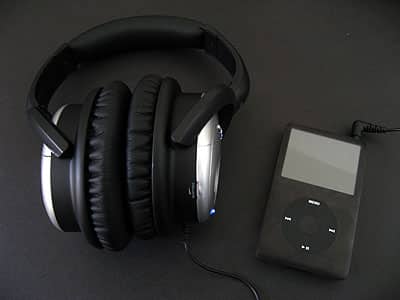
At its core, Aurvana X-Fi was clearly designed to be a competitor to Bose’s popular QuietComfort 2 noise-canceling headphones: Creative went with similar-sized circumaural earcups, which use soft interior memory foam padding with very similar silver and black plastic exterior styling, and includes the same pack-ins, such as 1/4” stereo and airline adapters, a semi-hard carrying case, and cabling. Here, there’s a standard cable, as well as a five-foot extension cable to connect to your iPhone.

The two headphones are functionally quite similar as well. Creative uses its memory pads and noise-sampling technology to filter out a promised 90% of ambient noise, with particular strength in limiting low-frequency rumbling and midrange sounds. With only one caveat—the fact that the earcups aren’t huge, like Sennheiser’s PXC450s, and can fatigue from isolation-related pressure and moisture after an hour or so of use—we found Aurvana X-Fi’s noise reduction to be as good as in Bose’s QuietComfort 2 and the PXC450s, which is to say quite effective with most ambient noises, but as billed, not perfect.
Bose’s QC2 earpieces are a bit more comfortable than these; its QC3 headphones are not.

The active noise-cancellation feature can be turned on and off through a two-switch combination: an on-off switch that activates all of its two AAA battery-powered electronics, and a button marked “NC.” Aurvana X-Fi remembers whether the NC button—and others—had been activated or deactivated the last time it was used. Next to them is a simple volume knob to enable on-headphone level control; it’s best kept turned up, and used to lower the iPod’s output volume, rather than the other way around.

Two other buttons are what help differentiate Creative’s design from Bose’s and Sennheiser’s. Discussed in our review of the company’s Xdock, the X-Fi Crystalizer is an intelligent equalizer that enhances the highs and lows of songs to improve their sound, while slightly smoothing out rougher sonic edges created during the compression process. You can activate the Crystalizer with or without turning on noise cancellation. The third button, X-Fi CMSS-3D, is designed to create virtual surround sound from flat recordings. It attempts to separate vocals from instruments and place them on different parts of a soundstage, with very mixed success depending on what you’re listening to. As with Xdock, we found the feature not worth using, especially if it eats into battery life, but some users may enjoy playing with it.

Frankly, at a time when many companies have been creating very good noise-canceling headphones at half of Bose’s $300 QuietComfort 2 price, the X-Fi Crystalizer is the single feature that keeps these same-priced earphones worthwhile.
By default, without any X-Fi features turned on, the headphones sound good. But with the Crystalizer turned on, Aurvana sounds really good, with even better highs and slightly lower, more controlled lows than the considerably more expensive Sennheisers, as well as detail that surpasses the QuietComfort series. Again, this may be “cheating,” as the X-Fi feature lets you optionally change the sound in a way that the other headphones don’t, but that doesn’t really matter: X-Fi gives you the option to turn on that equalizer without hurting the iPod’s battery life, and other headphones don’t.
There are a couple of flip sides. As with all of the noise-cancellers we’ve tested, there’s a small hiss in the audio that you’ll notice during silences in songs—assuming that you’re not on a plane or elsewhere with strong, earcup-piercing ambient distractions. And the audio processing adds a commensurate demand on the Aurvana’s own batteries. Nine hours of run time are promised with all of the buttons turned on using the two AAA batteries, which of course is extended if you turn some of the features off; you’ll get closer to 12 hours with the limited utility 3-D feature off, but the other features on. And you can use the headphones without anything turned on, even if the batteries are dead, and still receive the benefits of passive noise cancellation from the snug earcups.











