
iLoungeiLounge
  • News
    • Apple
      • AirPods Pro
      • AirPlay
      • Apps
        • Apple Music
      • iCloud
      • iTunes
      • HealthKit
      • HomeKit
      • HomePod
      • iOS 13
      • Apple Pay
      • Apple TV
      • Siri
    • Rumors
    • Humor
    • Technology
      • CES
    • Daily Deals
    • Articles
    • Web Stories
  • iPhone
    • iPhone Accessories
  • iPad
  • iPod
    • iPod Accessories
  • Apple Watch
    • Apple Watch Accessories
  • Mac
    • MacBook Air
    • MacBook Pro
  • Reviews
    • App Reviews
  • How-to
    • Ask iLounge
Font ResizerAa
iLoungeiLounge
Font ResizerAa
Search
  • News
    • Apple
    • Rumors
    • Humor
    • Technology
    • Daily Deals
    • Articles
    • Web Stories
  • iPhone
    • iPhone Accessories
  • iPad
  • iPod
    • iPod Accessories
  • Apple Watch
    • Apple Watch Accessories
  • Mac
    • MacBook Air
    • MacBook Pro
  • Reviews
    • App Reviews
  • How-to
    • Ask iLounge
Follow US

Reviews

Reviews

Review: Concord Keystone Booster 2.0i Portable Battery Pack

Last updated: May 17, 2021 2:35 am UTC
By Nick Guy
Review: Concord Keystone Booster 2.0i Portable Battery Pack

After months of delay, proper iPhone 5 battery cases are beginning to become available, most notably including Mophie’s Juice Pack Helium and Juice Pack Air. There are still companies putting out makeshift alternative solutions, though, including Concord Keystone with its Booster 2.0i ($50). While it may look like a standard backup battery, it’s actually accessorized to work with your iPhone 4, 4S, or 5, and has some unique features.


Review: Concord Keystone Booster 2.0i Portable Battery Pack

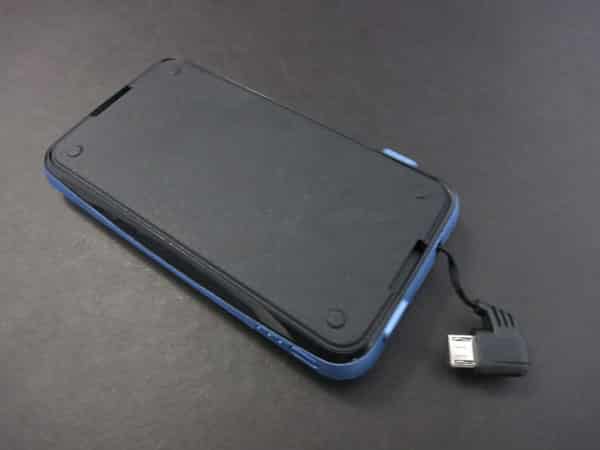
Physically, Booster 2.0i seems just about the right size for a 2000mAh battery. At 4” long, 2.3” wide, and 0.4” tall, it can easily slip into a pocket or bag. Made with a plastic exterior shell, it’s mostly matte with some glossy segments. Like most battery packs, it has a Micro-USB port for recharging, and a button next to a set of three lights, used to indicate the remaining charge. Along one of the short edges is a Micro-USB plug on a flat, retractable cable, measuring about 3.25” when fully extended.


That cable is extremely thin, and it’s unclear how well it’ll hold up over time. The plug fits into an adjacent recess when not in use.


Review: Concord Keystone Booster 2.0i Portable Battery Pack

To provide compatibility with your iPhone, Concord Keystone includes two separate adapters in the box. One is glossy black, converting the Micro-USB plug to a 30-Pin Dock Connector; we’ve seen similar accessories before. The other is a Lightning adapter, although there’s no confusing it for Apple’s. It’s significantly larger in every dimension, cheaper-feeling, and doesn’t have a shiny silver connector; instead, the adapter is a white rectangle with gold pins and a red connector running down from the pins on either side. Despite its cosmetic issues, it’s a little bit longer than any Lightning plug we’ve seen, so it will be compatible with more iPhone cases. As we’ve noted in prior reviews of unlicensed Lightning accessories, customers are taking the risk that this adapter might become unusable if Apple decides to shut out unlicensed connectors in a future software update.


Review: Concord Keystone Booster 2.0i Portable Battery Pack

When it comes time to recharge your device, you can simply plug Booster 2.0i into the iPhone’s bottom and leave it dangling, but it’s actually made to attach to the back of the iPhone for convenience. A side panel is removable, exposing an adhesive pad that can stick to the back of a bare phone, or one in a flat case. It stays in place surprisingly well, and can be washed off if it loses stickiness. The removed panel can then be attached to the battery’s back, and a fold-out stand can hold the iPhone in landscape orientation.


Review: Concord Keystone Booster 2.0i Portable Battery Pack

Review: Concord Keystone Booster 2.0i Portable Battery Pack

We tested Booster 2.0i with an iPhone 5, and the results were somewhat mixed. While we were impressed to see the battery deliver a 95% charge to the fully depleted iPhone, it was disappointing that it took almost three hours to reach this level. This is because the power output is only 600mA, which might have something to do with the thin enclosure or Micro-USB cable.



Latest News
The AirPods Pro 3 is $20 Off
1 Min Read
Exynos 2600 Chip 2nm Process Revealed by Samsung
1 Min Read
New Celebrity Ad Campaign Featuring Travis Scott Released by Beats
1 Min Read
Australia Getting Hypertension Notification Feature
1 Min Read
The 14-inch MacBook Pro with M5 Chip 16GB RAM/512GB is $250 Off
1 Min Read
Noise and Static on AirPods Pro 3 Still Unfixed
1 Min Read
New iMac with 24-inch OLED Display May be Brighter With 600 Nits
1 Min Read
The 15-inch M4 MacBook Air 256GB Is $250 Off
1 Min Read
Internal Kernel Debug Kit from Apple Reveals Tests for a MacBook with A15 Chip
1 Min Read
Apple Currently In Talks With Suppliers for Chip Assembly & Packaging of iPhones in India
1 Min Read
Apple Allows Easier Battery Replacement For M5 MacBook Pro with 14-inch Display
1 Min Read
The Apple Watch SE 3 44mm GPS is $50 Off
1 Min Read

iLounge logo

iLounge is an independent resource for all things iPod, iPhone, iPad, and beyond. iPod, iPhone, iPad, iTunes, Apple TV, and the Apple logo are trademarks of Apple Inc.

This website is not affiliated with Apple Inc.
iLounge © 2001 - 2025. All Rights Reserved.
  • Contact Us
  • Submit News
  • About Us
  • Forums
  • Privacy Policy
  • Terms Of Use
Welcome Back!

Sign in to your account

Lost your password?








