
iLoungeiLounge
  • News
    • Apple
      • AirPods Pro
      • AirPlay
      • Apps
        • Apple Music
      • iCloud
      • iTunes
      • HealthKit
      • HomeKit
      • HomePod
      • iOS 13
      • Apple Pay
      • Apple TV
      • Siri
    • Rumors
    • Humor
    • Technology
      • CES
    • Daily Deals
    • Articles
    • Web Stories
  • iPhone
    • iPhone Accessories
  • iPad
  • iPod
    • iPod Accessories
  • Apple Watch
    • Apple Watch Accessories
  • Mac
    • MacBook Air
    • MacBook Pro
  • Reviews
    • App Reviews
  • How-to
    • Ask iLounge
Font ResizerAa
iLoungeiLounge
Font ResizerAa
Search
  • News
    • Apple
    • Rumors
    • Humor
    • Technology
    • Daily Deals
    • Articles
    • Web Stories
  • iPhone
    • iPhone Accessories
  • iPad
  • iPod
    • iPod Accessories
  • Apple Watch
    • Apple Watch Accessories
  • Mac
    • MacBook Air
    • MacBook Pro
  • Reviews
    • App Reviews
  • How-to
    • Ask iLounge
Follow US

Reviews

Reviews

Review: Coby CS-MP165 Digital Boombox for iPod

Last updated: May 15, 2021 1:37 pm UTC
By Jeremy Horwitz
Review: Coby CS-MP165 Digital Boombox for iPod

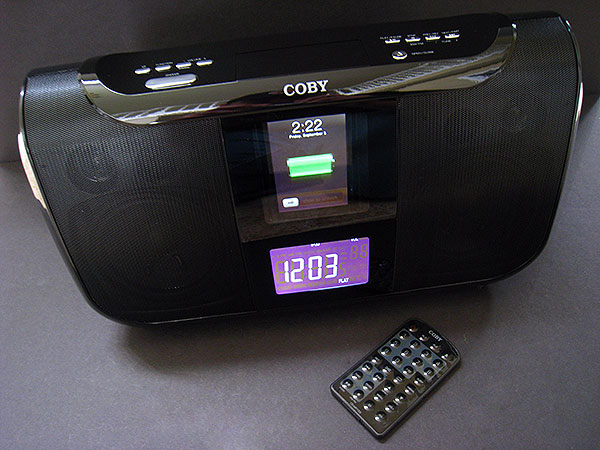
Ah, 2006 and 2007, we remember you well. You were the years when six percent of China’s population was assembling cheap and often senseless iPod speakers, all of which seemed to wind up in our offices. We did not shed a tear when you left us, and since then, we’ve never looked back wistfully on those days. And yet, when the Coby CS-MP165 Digital Boombox for iPod ($100) appeared, we remembered you, your confusingly huge multi-button remote controls, your random USB ports for connecting flash players, and your juxtapositions of oh so many features — say, a boombox with dual alarm clocks and a motorized iPod dock — in one enclosure, even when they didn’t make sense together. That’s when we rejoiced, as we realized that the holiday season was upon us, and that our old love affair might well be rekindled again.

Review: Coby CS-MP165 Digital Boombox for iPod

In all seriousness, though the CS-MP165 might be the exact hodgepodge product mentioned above, most of those individual features—and others—aren’t controversial. It comes with an Infrared remote control, a wall power adapter, an auxiliary audio cable and four somewhat odd Dock Adapters, enabling you to use the system like a boombox, control it from afar indoors, and even tune in FM and AM radio stations.

There are, as suggested above, two alarms for the clock, each with a wake from buzzer, radio, or iPod selection, and the system offers six equalization modes, ranging from “flat” to “arena,” “club” to mega bass.


Review: Coby CS-MP165 Digital Boombox for iPod

Sonically, the CS-MP165 is fine. While the speakers aren’t great, they’re not bad, especially when it’s either flat or when the bass booster is turned on to produce warmer audio. They’re offset by a droning sound that continues whenever the system’s in iPod mode and charging a connected iPod. You can’t hear it during music, but it’s obvious during quiet pauses. Similarly, the radio is alright; it pulls in local stations with relative ease, though it does so with a fair amount of static that’s eliminated by filters in better competitors.


Review: Coby CS-MP165 Digital Boombox for iPod

Other parts of the design could have benefitted from more attention. The front clock and radio interface, while large, are kludgy; the clock displays times as “02:15 PM” and the radio tunes in .1 frequencies, making tuning slower than it need be, offset only by the massive number of preset buttons (10 plus a +10) on the remote control. On a related note, the sheer size of the CS-MP165—roughly 14.5” wide by 8” tall by 5.5” deep—poorly suits it to serve as a typical nightstand clock radio; it was clearly designed as a boombox first and foremost, with the clock functionality tossed in later as an extra.


Review: Coby CS-MP165 Digital Boombox for iPod

If viewed or intended to be used primarily as a clock radio, the system’s motorized dock seems like an odd choice. Press an eject button and the dock slowly slides upwards; press it again and the iPod on the dock slowly slides downwards. You’re supposed to use the remote’s integrated menu buttons to interact with the iPod once it recesses inside, behind a hard clear plastic shield. While a protective interior dock isn’t a bad idea, the motorized mechanism makes using the iPod’s controls more of a hassle than they need be for frequent indoor use, especially touchscreen iPods that are saddled with that “Slide to Unlock” prompt.



Latest News
The AirPods Pro 3 is $20 Off
1 Min Read
Exynos 2600 Chip 2nm Process Revealed by Samsung
1 Min Read
New Celebrity Ad Campaign Featuring Travis Scott Released by Beats
1 Min Read
Australia Getting Hypertension Notification Feature
1 Min Read
The 14-inch MacBook Pro with M5 Chip 16GB RAM/512GB is $250 Off
1 Min Read
Noise and Static on AirPods Pro 3 Still Unfixed
1 Min Read
New iMac with 24-inch OLED Display May be Brighter With 600 Nits
1 Min Read
The 15-inch M4 MacBook Air 256GB Is $250 Off
1 Min Read
Internal Kernel Debug Kit from Apple Reveals Tests for a MacBook with A15 Chip
1 Min Read
Apple Currently In Talks With Suppliers for Chip Assembly & Packaging of iPhones in India
1 Min Read
Apple Allows Easier Battery Replacement For M5 MacBook Pro with 14-inch Display
1 Min Read
The Apple Watch SE 3 44mm GPS is $50 Off
1 Min Read

iLounge logo

iLounge is an independent resource for all things iPod, iPhone, iPad, and beyond. iPod, iPhone, iPad, iTunes, Apple TV, and the Apple logo are trademarks of Apple Inc.

This website is not affiliated with Apple Inc.
iLounge © 2001 - 2025. All Rights Reserved.
  • Contact Us
  • Submit News
  • About Us
  • Forums
  • Privacy Policy
  • Terms Of Use
Welcome Back!

Sign in to your account

Lost your password?








