
App-enhanced accessories for iPods, iPhones, and iPads have continued to grow in numbers over the past half year, though in all honesty, the question of whether these items are truly accessories or really just standalone products that happen to have optional iOS software links is beginning to loom large over every new release. Such is the case with Cobra Electronics’ iRadar ($130*), an in-car radar, laser, and red light camera detector that we’ve been testing and largely scratching our heads over for the past couple of months, hoping that a new and improved version of the company’s free software would add some justification for wasting the screen of an iPhone, iPod touch, or iPad while driving.
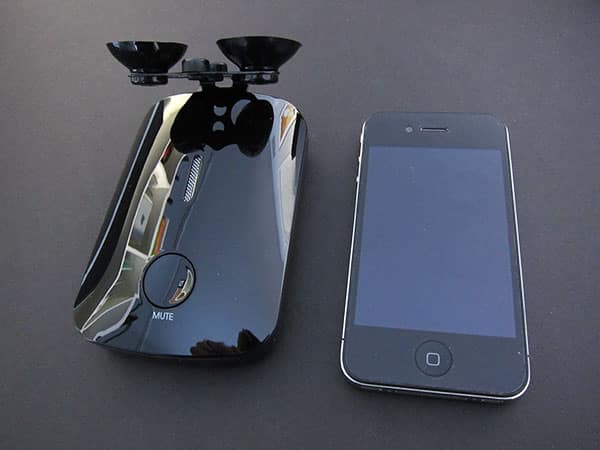
On the plus side, iRadar is an attractively designed radar detector. Made from glossy black plastic and possessing a footprint that’s similar to a thicker, rounder iPhone 4, the base unit can be mounted either with adhesive on your dashboard or a suction cup frame on your windshield, each included in the package. You need to run a car power adapter from iRadar to your car’s cigarette lighter or in-vehicle power port, and can use a pass-through USB port in its hilt to connect your own Apple Dock Connector to USB cable for power. Unless you have an in-car Bluetooth system or a second in-car power outlet and a second iPod/iPhone/iPad charging device with audio-out support, you may find iRadar’s dependence on an outlet—an issue common to radar detectors—somewhat limiting.

Like most radar detectors, iRadar is turned on using a dial on the side that doubles as a volume toggle, making the unit’s sonic alerts louder or quieter. And not surprisingly, it can be used without any iOS device’s involvement.
Loud beeps of various sorts indicate different types of police speed tracking devices, which you’re supposed to learn to understand on your own. Turn the application on and you’ll also get an on-screen display such as “Ka,” “X,” or “K” to indicate cryptically that something has been detected; different types of radars are signaled with these different letters.


After you see and hear a warning, you’re supposed to tap “real” or “false” on the screen so that the app can report back to Cobra’s database of speed traps, hopefully using the device’s integrated location services hardware. For display purposes, the iRadar app depends largely upon a slightly modified version of the iPhone/iPod touch Maps application. Ideally, you’ll zoom out the map and be able to see traps discovered by other users prior to your arrival. Using the maps, you’ll also supposedly be alerted to red light traffic cameras and dangerous intersections, as well. True iPad support is not integrated into the app as of the current version 1.70 revision.


In our testing with an iPhone 4, which we will state up front was far less conclusive than would normally be the case because of our relative inexperience with radar detectors, iRadar’s utility was truly very modest.
Alerts of radar and laser guns appeared to pop up only when we were very close to visible police, and we never saw any reported traps on the application’s maps. The unit’s sound effects were annoying in the same way as most radar detectors we’ve heard in the past, and the app’s visual alerts did little more than put letters on the screen. It just didn’t seem like a useful thing to keep open on a device during a drive. But perhaps in areas where radar detectors are extremely common, and users are actively contributing to a database of traps and hazards on a daily basis, the results would be better. We aren’t sure because we just haven’t seen that happen, and user complaints about iRadar’s app performance have continued unabated since our review unit first arrived. Some have complained of false alerts, while others have found that alerts only come when it’s too late to do anything about them.

Our impression is that iRadar really would benefit from a comprehensive overhaul to provide a user experience that fundamentally transforms rather than mimics what’s been done on radar and laser detectors in the past.











