
iLoungeiLounge
  • News
    • Apple
      • AirPods Pro
      • AirPlay
      • Apps
        • Apple Music
      • iCloud
      • iTunes
      • HealthKit
      • HomeKit
      • HomePod
      • iOS 13
      • Apple Pay
      • Apple TV
      • Siri
    • Rumors
    • Humor
    • Technology
      • CES
    • Daily Deals
    • Articles
    • Web Stories
  • iPhone
    • iPhone Accessories
  • iPad
  • iPod
    • iPod Accessories
  • Apple Watch
    • Apple Watch Accessories
  • Mac
    • MacBook Air
    • MacBook Pro
  • Reviews
    • App Reviews
  • How-to
    • Ask iLounge
Font ResizerAa
iLoungeiLounge
Font ResizerAa
Search
  • News
    • Apple
    • Rumors
    • Humor
    • Technology
    • Daily Deals
    • Articles
    • Web Stories
  • iPhone
    • iPhone Accessories
  • iPad
  • iPod
    • iPod Accessories
  • Apple Watch
    • Apple Watch Accessories
  • Mac
    • MacBook Air
    • MacBook Pro
  • Reviews
    • App Reviews
  • How-to
    • Ask iLounge
Follow US

Reviews

Reviews

Review: ChargerLeash Charge & Sync Smart Lightning Cable

Last updated: May 16, 2021 7:56 pm UTC
By Nick Guy
Review: ChargerLeash Charge & Sync Smart Lightning Cable

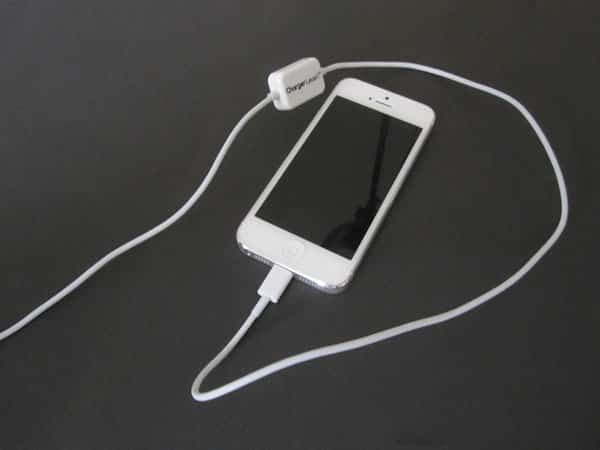
Other than aesthetics — think colors and materials — there’s never much innovation when it comes to Lightning cables. Sure, some are longer than others, or have coiled cables rather than straight ones, but almost always, there’s a USB plug on one end, a Lightning connector on the other, some length of cable in-between, and that’s it. ChargerLeash’s Charge & Sync Smart Lightning Cable ($35) adds one small feature that differentiates it from all the others out there: a small white plastic box right in the middle of the 38″-long cable.

Review: ChargerLeash Charge & Sync Smart Lightning Cable

Look past the box, and there’s nothing that stands out about this cable. That’s not a bad thing, there’s just not a lot that a cable can do.

The plugs both rise out of glossy white plastic, and the sheath below the Lightning connector is small enough to be compatible with almost any case. Thankfully, it’s MFi-certified, which means there won’t be any compatibility issues with future iOS updates.


Review: ChargerLeash Charge & Sync Smart Lightning Cable

So why the box? It’s designed to prevent the cable from being left behind, and possibly, to serve as an anti-theft device. On one side, you’ll find a small light, which alternates between green and red, and a speaker. When the cable is plugged in to a power source, and the iDevice is connected, the light will show green and everything will work normally. Unplug the iPad, iPhone, or iPod, though, and within a few seconds, the light will turn red, and a shrill alarm will go off until you disconnect the cable from the USB port.


We measured it at upwards of 98dB.


Review: ChargerLeash Charge & Sync Smart Lightning Cable

Despite ChargerLeash’s claims that if you connect to a 2.1A or 3.1A charger “you will be able to charge your Apple device at maximum speeds,” we found the recharge rate to be lacking. With an iPad Air connected to a full-speed power source, we only saw speeds up to 1.6A. Switching over to another Lightning cable on the same charger, the speeds shot up to the proper rate.


Review: ChargerLeash Charge & Sync Smart Lightning Cable

As a go-to cable for most people, Charge & Sync Smart Lightning Cable is not the right solution.



Latest News
The Apple Watch Series 11 46mm GPS Is $100 Off
1 Min Read
Clamshell Style iPhone Being Looked Into By Apple
1 Min Read
Foldable iPhones May Have the Largest Battery Ever
1 Min Read
Apple and TSMC’s 10-Year Collaboration May Be Ending
1 Min Read
The 13-inch M5 iPad Pro 256GB Wi-Fi Is $149 Off
1 Min Read
M5 Pro and M5 Max Chips for the MacBook Pro could Roll Out with macOS 26.3
1 Min Read
Mac Ordering Process Revamped
1 Min Read
Check Signed By Steve Wozniak and Steve Jobs Sold For $2.4 Million
1 Min Read
The Anker 140W 4-Port GaN USB-C Charger is $35 Off
1 Min Read
No iPhone Air 2 This Year, according to Latest Report
1 Min Read
New Report Corroborates Split iPhone Release Dates
1 Min Read
Apple Losing More Researchers As They Plan To Release 2 Siri Versions
1 Min Read

iLounge logo

iLounge is an independent resource for all things iPod, iPhone, iPad, and beyond. iPod, iPhone, iPad, iTunes, Apple TV, and the Apple logo are trademarks of Apple Inc.

This website is not affiliated with Apple Inc.
iLounge © 2001 - 2025. All Rights Reserved.
  • Contact Us
  • Submit News
  • About Us
  • Forums
  • Privacy Policy
  • Terms Of Use
Welcome Back!

Sign in to your account

Lost your password?








