
iLoungeiLounge
  • News
    • Apple
      • AirPods Pro
      • AirPlay
      • Apps
        • Apple Music
      • iCloud
      • iTunes
      • HealthKit
      • HomeKit
      • HomePod
      • iOS 13
      • Apple Pay
      • Apple TV
      • Siri
    • Rumors
    • Humor
    • Technology
      • CES
    • Daily Deals
    • Articles
    • Web Stories
  • iPhone
    • iPhone Accessories
  • iPad
  • iPod
    • iPod Accessories
  • Apple Watch
    • Apple Watch Accessories
  • Mac
    • MacBook Air
    • MacBook Pro
  • Reviews
    • App Reviews
  • How-to
    • Ask iLounge
Font ResizerAa
iLoungeiLounge
Font ResizerAa
Search
  • News
    • Apple
    • Rumors
    • Humor
    • Technology
    • Daily Deals
    • Articles
    • Web Stories
  • iPhone
    • iPhone Accessories
  • iPad
  • iPod
    • iPod Accessories
  • Apple Watch
    • Apple Watch Accessories
  • Mac
    • MacBook Air
    • MacBook Pro
  • Reviews
    • App Reviews
  • How-to
    • Ask iLounge
Follow US

Reviews

Reviews

Review: Catamount Software PocketMoney

Last updated: May 13, 2021 7:32 am UTC
By Charles Starrett
Review: Catamount Software PocketMoney

On August 25, 2008, we reviewed a collection of 15 different personal finance applications for the iPhone and iPod touch in a roundup entitled iPhone Gems: Every Personal Finance Application, Reviewed. This review contains a review of one application from that roundup; additional comparative details can be found in the original full story.


Having initially been released on the Apple Newton 14 years ago, PocketMoney ($10) from Catamount Software is a finance manager offering management of potentially unlimited financial accounts. Upon launch, users are dropped at a main account screen containing each account previously set up, as well as their balances.
Review: Catamount Software PocketMoney

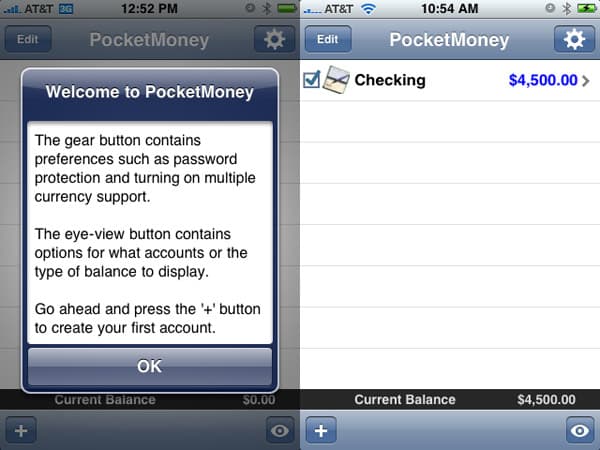
An add button permits creation of new accounts, an edit button enables the deletion of accounts, a gear button provides access to the app’s preferences, including toggling the pop-up tips on and off, setting a password, and choosing a currency, and an eye button lets users choose which accounts appear on the main screen and what balance to show, from future, cleared, current, or available balances.


The new account screen gives options for name, type, icon, expiration date, account #, institution name, phone number, website, ATM fee (to be applied to each ATM transaction), limit (either credit or balance limit, based on the type of account), check number (add the number of the next check in the account and the app keeps track automatically), and notes. An account view screen offers a list of recent transactions, an add button to add new transactions, a tools button that lets users run account, category, class, or payee reports, each with a pie chart provided by Google Charts. It also includes the ability to adjust the account’s balance, and an eye button to provide nearly complete control of which transactions are listed, the order in which they appear, and the amount of information shown for each.


Review: Catamount Software PocketMoney

Each transaction offers editable fields for the date, account, to (payee or payer), amount, ID#, a cleared toggle for checks, category, memo, and class (for classification). Luckily, the program provides an eye button at the bottom of the transaction detail view that allows users to toggle the ID#, cleared, category, memo, and class fields on and off, as well as a toggle to adjust the position of the category to above or below the payee.


Review: Catamount Software PocketMoney

PocketMoney will likely be familiar to any user of the app on another platform, but for others, the app’s built-in tutorial system is terrific. The first time it is used, alert-style pop-up windows appear above each screen, explaining in detail how to use the application.



Latest News
The AirPods Pro 3 is $20 Off
1 Min Read
Exynos 2600 Chip 2nm Process Revealed by Samsung
1 Min Read
New Celebrity Ad Campaign Featuring Travis Scott Released by Beats
1 Min Read
Australia Getting Hypertension Notification Feature
1 Min Read
The 14-inch MacBook Pro with M5 Chip 16GB RAM/512GB is $250 Off
1 Min Read
Noise and Static on AirPods Pro 3 Still Unfixed
1 Min Read
New iMac with 24-inch OLED Display May be Brighter With 600 Nits
1 Min Read
The 15-inch M4 MacBook Air 256GB Is $250 Off
1 Min Read
Internal Kernel Debug Kit from Apple Reveals Tests for a MacBook with A15 Chip
1 Min Read
Apple Currently In Talks With Suppliers for Chip Assembly & Packaging of iPhones in India
1 Min Read
Apple Allows Easier Battery Replacement For M5 MacBook Pro with 14-inch Display
1 Min Read
The Apple Watch SE 3 44mm GPS is $50 Off
1 Min Read

iLounge logo

iLounge is an independent resource for all things iPod, iPhone, iPad, and beyond. iPod, iPhone, iPad, iTunes, Apple TV, and the Apple logo are trademarks of Apple Inc.

This website is not affiliated with Apple Inc.
iLounge © 2001 - 2025. All Rights Reserved.
  • Contact Us
  • Submit News
  • About Us
  • Forums
  • Privacy Policy
  • Terms Of Use
Welcome Back!

Sign in to your account

Lost your password?








