
Future-focused though it may have been, Apple’s decision to have iPods and iPhones support only two video formats — MPEG-4 and the newer, more impressive H.264 — has had some seriously negative consequences for typical users. Since most DVRs and camcorders use older MPEG-2 formats, user-created videos commonly have to be converted before iPods or iPhones can play them back, requiring time, a decent computer processor, and extra storage space. Rather than adding additional format support to their devices, Apple has sent developers a message: join the bandwagon and support our chosen formats.
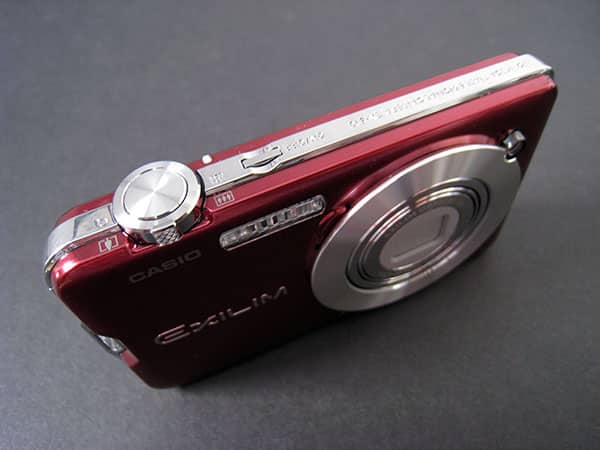
It’s perhaps not a surprise that only one company—Sanyo—has previously followed that suggestion, releasing certain less than warmly received Xacti movie cameras with iPod-friendly recording modes. Now Casio has joined the fray with the Exilim EX-S10 ($250), an alternative that comes at the iPod/iPhone ecosystem from a different direction: the EX-S10 is an ultra-slim digital still camera first and foremost, with the ability to record high-quality iTunes-ready H.264 movies as a bonus. Designed to fit into your pocket, it boasts a 3x, 6.3-18.9mm zoom lens, 2.7” LCD screen and 10.1-Megapixel sensor for still photography, with a heavy focus on automatic modes, and yet is nearly half the thickness of a typical Canon Elph camera. Casio also offers the thicker, less powerful EX-Z80 as an alternative for only $200.

Since the vast majority of EX-S10’s modes don’t interest us, we’re not giving the product a full review or official rating, but rather spotlighting the positives and negatives of its video recording feature below. It suffices to say that it is a generally good still camera from a performance standpoint, impressive more for its svelte frame, reasonably large screen and choice of red, purple, silver or black body colors than for the sharpness of its pictures or its color renditions relative to top pocket options we’ve tested, but will appeal to iPod and iPhone fans who need an extremely easy way to create movies without conversion.

EX-S10’s back has a series of buttons, but the only one that’s strictly necessary for movie making is one with a red dot near the top right corner.
Press that button and you can start recording a movie immediately, stopping recording with a second press. During recording, the camera’s top-mounted zoom dial works, as does its still camera shutter, which can interrupt the video to snap a shot with or without the flash. When you’re done recording, you can use an included cable to transfer the video directly to your computer, or pull the SD memory card out and transfer it with a separate reader. You supply the memory card, Casio supplies the battery and charger, a wrist strap, and a video cable for on-TV viewing.

The best part of this experience is, unquestionably, the ease with which the Exilim videos become iPod and iPhone videos. Videos carry a .MOV file extension, and open by default in QuickTime rather than iTunes, but inspection of the files shows that a 640×480 H.264 video’s inside, with audio in 44.1KHz AAC format. Assuming you have manual management turned on for the device in iTunes, you can literally drag and drop these videos directly from the memory card onto your iPod or iPhone, and start watching them right away; no Convert For iPod process is necessary. We were very surprised that we were able to do this with even the camera’s Ultra HQ (5.6MB/sec) files, as well as its lower bitrate (1.8-1.9MB/sec) ones.
At high bitrates, the videos look quite detailed; at lower ones, they’re more softer-looking and not as impressive. Notably, both of the Exilim models also offer a YouTube video mode, with the option to record in a wide 16:9 ratio with 848×480 resolution if you so desire, though these wide, DVD-ready videos can’t be played on the iPod or iPhone without conversion. Higher-quality recording consumes more memory, and also a lot more of the camera’s battery life.

As a movie-making device, EX-S10’s limitations are somewhat predictable. Most seriously, its zoom system permits only digital—not optical—zoom adjustment, enabling you to do “close ups” that are basically magnifications of the still frame the camera was seeing. In low light, the camera’s graininess doesn’t look too hot, and “zooming” only makes the noise more apparent. Like other still cameras with movie modes, EX-S10 isn’t designed to continually adjust its focus, either, so whatever it picks first remains sharp, while everything outside that depth of field stays blurry. Less important is the fact that there’s only a single microphone inside, creating a monaural rather than stereo audio track, though it’s worth noting that the “stereo” in many camcorders is limited by how close the two microphones are to each other.











