
iLoungeiLounge
  • News
    • Apple
      • AirPods Pro
      • AirPlay
      • Apps
        • Apple Music
      • iCloud
      • iTunes
      • HealthKit
      • HomeKit
      • HomePod
      • iOS 13
      • Apple Pay
      • Apple TV
      • Siri
    • Rumors
    • Humor
    • Technology
      • CES
    • Daily Deals
    • Articles
    • Web Stories
  • iPhone
    • iPhone Accessories
  • iPad
  • iPod
    • iPod Accessories
  • Apple Watch
    • Apple Watch Accessories
  • Mac
    • MacBook Air
    • MacBook Pro
  • Reviews
    • App Reviews
  • How-to
    • Ask iLounge
Font ResizerAa
iLoungeiLounge
Font ResizerAa
Search
  • News
    • Apple
    • Rumors
    • Humor
    • Technology
    • Daily Deals
    • Articles
    • Web Stories
  • iPhone
    • iPhone Accessories
  • iPad
  • iPod
    • iPod Accessories
  • Apple Watch
    • Apple Watch Accessories
  • Mac
    • MacBook Air
    • MacBook Pro
  • Reviews
    • App Reviews
  • How-to
    • Ask iLounge
Follow US

Reviews

Reviews

Review: Canopy Kapok for iPhone 4

Last updated: May 17, 2021 1:14 pm UTC
By Nick Guy
Review: Canopy Kapok for iPhone 4

It’s a case, it’s a camera tool, it’s a stand — it’s Canopy’s Kapok for iPhone 4 ($70). After spending five or more minutes struggling to figure out how to open the packaging — nice-looking, but one of the most confusing boxes we’ve seen — we found a unique black matte hard plastic case and desktop stand inside. Kapok isn’t your everyday iPhone 4 case; it’s designed largely for frequent camera users who sometimes need the extra stability of a stand, and often would benefit from extra integrated camera control buttons.

Review: Canopy Kapok for iPhone 4

Available in five different colors, the case has a slider-style design, and is a bit unwieldy. A narrow, long bump along the bottom portion’s back holds it together with the top. While the left and top edges have the same sort of thickness as most iPhone 4 cases, the right and bottom are much thicker; the latter adds 5/8”, extra bulk to house the electronic components contained in the case. Notably, there’s no button coverage, but there is a slight raised lip against the screen. Along the bottom of the iPhone 4 are grooves carved out for the speaker and microphone.


Because the Dock Connector port is covered, there’s a Mini USB pass-through on the bottom edge, and a very short USB to Mini USB cable is included for syncing and charging.


Review: Canopy Kapok for iPhone 4

Review: Canopy Kapok for iPhone 4

Most cases that have a Dock Connector built in have it for battery charging. Kapok’s, on the other hand, is for connecting to the physical buttons on the case. Along the right side, there are two silver plastic buttons, designed to work in conjunction with the company’s free Canopy Camera Tools app. The button closer to the bottom is a shutter control—the first that we’ve seen integrated in to a case. It’s a pretty cool idea, but mostly unnecessary since the upcoming iOS 5 will repurpose the volume-up button to do the same thing. The other button locks and unlocks the white balance and exposure settings in the app.


When pressed together, they hide and unhide the side menus in the app. Unfortunately the buttons don’t control the factory-standard Camera application or any others for that matter; Canopy hopes that other developers will adopt the buttons, but we wouldn’t hold our breath.


Review: Canopy Kapok for iPhone 4

Review: Canopy Kapok for iPhone 4

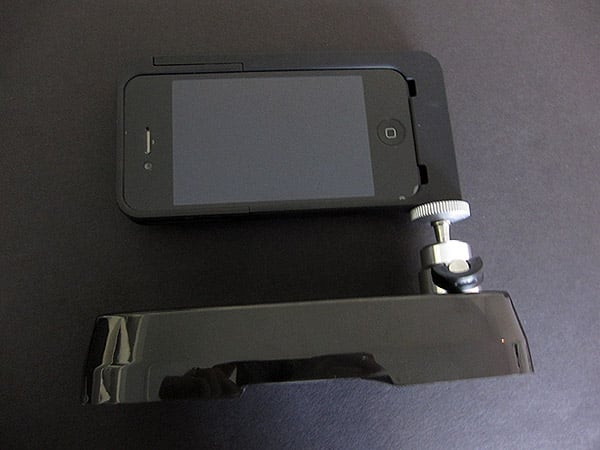
At the bottom of the case’s left edge is a 1/4” threaded opening for attaching it to a tripod. This is a universal size so users can connect to their own existing tripods, or use the base of Kapok’s packaging. A weighted black stand, it has an insert on one side that fits in to the case. There’s even an adjustable ball joint, though it’s more than a bit hard to loosen. Assuming you can get it into the right position, the whole thing is sturdy, and does just what it’s supposed to do.


Review: Canopy Kapok for iPhone 4

Review: Canopy Kapok for iPhone 4

It seems that Canopy had a good idea, but one that came too late and whose execution is too bulky.



Latest News
The Apple Watch Series 11 46mm GPS Is $100 Off
1 Min Read
Clamshell Style iPhone Being Looked Into By Apple
1 Min Read
Foldable iPhones May Have the Largest Battery Ever
1 Min Read
Apple and TSMC’s 10-Year Collaboration May Be Ending
1 Min Read
The 13-inch M5 iPad Pro 256GB Wi-Fi Is $149 Off
1 Min Read
M5 Pro and M5 Max Chips for the MacBook Pro could Roll Out with macOS 26.3
1 Min Read
Mac Ordering Process Revamped
1 Min Read
Check Signed By Steve Wozniak and Steve Jobs Sold For $2.4 Million
1 Min Read
The Anker 140W 4-Port GaN USB-C Charger is $35 Off
1 Min Read
No iPhone Air 2 This Year, according to Latest Report
1 Min Read
New Report Corroborates Split iPhone Release Dates
1 Min Read
Apple Losing More Researchers As They Plan To Release 2 Siri Versions
1 Min Read

iLounge logo

iLounge is an independent resource for all things iPod, iPhone, iPad, and beyond. iPod, iPhone, iPad, iTunes, Apple TV, and the Apple logo are trademarks of Apple Inc.

This website is not affiliated with Apple Inc.
iLounge © 2001 - 2025. All Rights Reserved.
  • Contact Us
  • Submit News
  • About Us
  • Forums
  • Privacy Policy
  • Terms Of Use
Welcome Back!

Sign in to your account

Lost your password?








