
iLoungeiLounge
  • News
    • Apple
      • AirPods Pro
      • AirPlay
      • Apps
        • Apple Music
      • iCloud
      • iTunes
      • HealthKit
      • HomeKit
      • HomePod
      • iOS 13
      • Apple Pay
      • Apple TV
      • Siri
    • Rumors
    • Humor
    • Technology
      • CES
    • Daily Deals
    • Articles
    • Web Stories
  • iPhone
    • iPhone Accessories
  • iPad
  • iPod
    • iPod Accessories
  • Apple Watch
    • Apple Watch Accessories
  • Mac
    • MacBook Air
    • MacBook Pro
  • Reviews
    • App Reviews
  • How-to
    • Ask iLounge
Font ResizerAa
iLoungeiLounge
Font ResizerAa
Search
  • News
    • Apple
    • Rumors
    • Humor
    • Technology
    • Daily Deals
    • Articles
    • Web Stories
  • iPhone
    • iPhone Accessories
  • iPad
  • iPod
    • iPod Accessories
  • Apple Watch
    • Apple Watch Accessories
  • Mac
    • MacBook Air
    • MacBook Pro
  • Reviews
    • App Reviews
  • How-to
    • Ask iLounge
Follow US

Reviews

Reviews

Review: Camalen Hexa for iPad 2 + iPhone 4/4S

Last updated: May 17, 2021 11:54 am UTC
By Nick Guy
Review: Camalen Hexa for iPad 2 + iPhone 4/4S

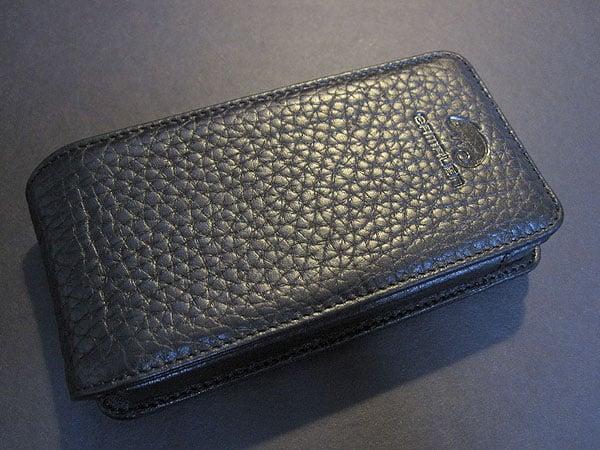
We first got wind of the new Hexa cases for iPad 2 ($115) and iPhone 4/4S ($59) from Camalen at this year’s Consumer Electronics Show. Although they share a name, materials, and fold-out stand mechanisms, they’re conceptually different cases. Both are made of real leather and are available in a variety of colors, including two different blacks — one’s flat and the other’s textured floater leather.


Review: Camalen Hexa for iPad 2 + iPhone 4/4S

Camalen’s iPhone version of Hexa is a flip-open style case: the front cover is attached to the back and comes up from underneath, magnetically latching at the top when the phone’s not in use. While the floater leather in our review unit is very nice—soft cowhide with a bit of padding—the magnets are very visible, taking away somewhat from the overall appeal. There’s a leather frame to hold the phone in place inside, with the device slipping in through the top and secured by a snap. The frame covers the sides while leaving the bottom corners and most of the top edge exposed; it’s more protective than most, however, with coverage above the screen and alongside the Home Button, using one hole for the front camera and sensors. 


Review: Camalen Hexa for iPad 2 + iPhone 4/4S

Review: Camalen Hexa for iPad 2 + iPhone 4/4S

Hexa’s cover doubles as a stand, with two ridges sewn in to provide different viewing angles. That articulating cover rotates all the way around, clicking every eighth of a turn, which allows for multiple viewing orientations.

The iPhone stands well at both stages when in portrait orientation, but it only works with the deeper of the two in landscape. We’re not fans of flip-open cases as a general rule, but we do appreciate the functionality that this one adds, even if it is less important on an iPhone than an iPad.


Review: Camalen Hexa for iPad 2 + iPhone 4/4S

The larger version of Hexa resembles many of the less distinctive frames we’ve seen for Apple’s tablet. The back of the case is one big flat panel, while the front frames the iPad 2’s screen and completely covers the bezel, including a hole for the camera at the top and a scoop for the Home button at the bottom. Unlike the iPhone model, this one is lined with soft suede, a nice touch that helps prevent scratches. Instead of a snap, there’s a tab with Velcro that tucks in behind the iPad 2 to hold it in place, leaving an unattractive bulge. Hexa also leaves all of the tablet’s aluminum corners exposed, and like most cases styled this way, makes it more difficult to access the volume rocker.


The side switch is particularly hard to use because of how the curved device is positioned against the flat back.


Review: Camalen Hexa for iPad 2 + iPhone 4/4S

Review: Camalen Hexa for iPad 2 + iPhone 4/4S

We found the stand mechanism to be more valuable on the tablet version of the case, though it’s also a bit more complex. Rather than a cover, this stand folds flat against the back of the case when not in use, and is held in place with the same obviously protruding magnets. The arm is hinged, folding back on itself, then extending out when use. There are four stand positions on this one, rather than two. As with the iPhone model, portrait orientation supports all of the angles, while the iPad 2 will stand in all but the one set furthest back. This does add the benefit of a typing angle, although we found that at the most comfortable—the one closest to the outside edge—even a slight push caused the stand to collapse in on itself.



Latest News
The Apple Watch Series 11 42mm GPS is $100 Off
1 Min Read
Apple Launching A New Education Hub In India Teaching Robotics and Swift Programming
1 Min Read
Women’s and Men’s Golf Added to Apple Sports
1 Min Read
Apple Adding Civilization VII and Other Games To Apple Arcade
1 Min Read
AirPods 4 ANC Is $59 Off
1 Min Read
Apple Using 2NM Process For Their M6 and A20 Chip
1 Min Read
iPhone 18 Models Will Not Have a Big Redesign
1 Min Read
Launch of MacBook Pro M5 Pro and M5 Max Models is Approaching
1 Min Read
Get the iPad Mini 7 256GB Wi-Fi at $99 Off
1 Min Read
Mozilla Now Allows Turning AI Features Off
1 Min Read
Barcelona Passeig de Gràcia Apple Store Temporarily Closing
1 Min Read
Apple’s Plans to Enter the Smart Glasses Market is Changing the Industry
1 Min Read

iLounge logo

iLounge is an independent resource for all things iPod, iPhone, iPad, and beyond. iPod, iPhone, iPad, iTunes, Apple TV, and the Apple logo are trademarks of Apple Inc.

This website is not affiliated with Apple Inc.
iLounge © 2001 - 2025. All Rights Reserved.
  • Contact Us
  • Submit News
  • About Us
  • Forums
  • Privacy Policy
  • Terms Of Use
Welcome Back!

Sign in to your account

Lost your password?








