
Pros: Affordable adapter provides in-air and in-car power to any 3G, 4G, mini or photo iPod.
Cons: Adapter doesn’t charge iPod or provide audio line output while in air or car, and as such is not a complete replacement for a car charger.
American Airlines promised that our cross-country flight would be off the ground at 12:16, but it was 4:00 and we hadn’t left yet – no surprise given the airline’s recently mediocre reputation. Thankfully, we were counting on our juiced-up iPod photo to keep us entertained, but after four hours, the battery of a 3G iPod or mini would have been almost half gone, and a 4G battery would be down to two-thirds strength – before we even took off. Would there have been any way to keep the music playing all trip long, even despite the delays?
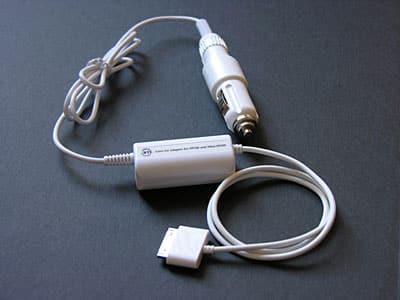
Answer: yes. Assuming that you’re in the airplane’s correct seating section – something you can plan for in advance – Battery Technology Incorporated’s new iPod Auto/Air Adapter ($24.99, available $18.99 and up) will provide the energy you need for as long as you’re on the plane. Made from two interconnecting pieces of iPod-matching white plastic, the power adapter doesn’t charge your iPod, but it otherwise acts like a direct AC power source, keeping your music playing until it’s unplugged.

The Auto/Air Adapter’s first piece consists of an Apple Dock Connector plug and cable that leads into and out of a white power regulating box, then to an airline power adapter plug. Apple’s Dock Connector plug is the thinnest and most compatible one we’ve seen with third-party cases, so we always like to see it in accessories.
A second white and metal piece transforms the airline plug to an auto-ready power plug so that the Adapter can be used in your car, locking firmly to the airline plug with a clasp. BTI includes a single greenish light on the power box that illuminates whenever power is running through the Adapter.
In-Air/In-Car Tests
We tested the Auto/Air Adapter four hours into the aforedescribed American Airlines itinerary when our test iPod’s battery began to show signs of discharge, plugging it in to one of the plane’s in-seat power adapters. Surprisingly, though many planes have been equipped with smaller ports that fit the Adapter’s air plug, this flight instead had a full DC power jack identical to the one in an automobile. Equipped with the Adapter’s auto plug, we had no problem switching over to a compatible power plug standard.

By design, the iPod’s battery meter instantly showed full power when the Adapter was connected, but didn’t display a charging icon as it normally would with devices described as “car chargers.�? It turns out that Apple for some reason has advised BTI not to provide battery recharge from the Adapter, and thus you shouldn’t expect to use it for that purpose in either a plane or a car. This was just fine for our air travel purposes, but does suggest that the Auto/Air Adapter is best connected early in a flight rather than after your iPod’s battery has been drained downwards. It also suggests that there are devices better suited to in-car use, offering both battery recharge capability and other features such as line out.

Full power from the Auto/Air Adapter gave us the luxury of doing something with our test iPod photo that we wouldn’t have tried without spare power: we ran an extended backlit photo slide show with music, generally the most battery-draining use of the hardware, and there was no hit on the iPod’s battery life.
We could imagine the Adapter being even more useful on an extended intercontinental flight, and of course if Apple adds additional graphics-intensive features to the iPod photo (or future Dock Connector-compatible devices).
The Auto/Air Adapter works just the same in a car, which is to say that it enables a battery-drained iPod to be used immediately when driving, or keeps you from depleting your iPod’s battery in the car. Truthfully, we can’t strongly recommend it for car use, though, because so many other car adapters offer battery recharging and line-out audio through the Dock Connector port. BTI’s design means that you’ll need to listen to music in your car through the iPod’s headphone jack, which isn’t optimal given many users’ desire to draw line-quality audio from the iPod’s Dock Connector.

BTI’s design limitation on battery recharging may satisfy recent Apple suggestions to developers, and perhaps it’s safer for certain iPods in the long run. But in the absence of a good explanation from Apple or a developer as to why this power charging restriction is necessary, especially given that it’s contrary to products previously developed by other authorized iPod developers, we’re inclined to prefer more fully-featured iPod chargers when we’re driving.
Conclusions
Especially when used in a plane, BTI’s Auto/Air Adapter does what people want it to do – provide power to keep your iPod playing for hours at a time. And there aren’t many other in-air options. Monster makes the iAir Charger ($29.95), which features an almost identical two-piece physical design, but with a black casing and Monster’s oversized, case-unfriendly Dock Connector adaptor.











