
iLoungeiLounge
  • News
    • Apple
      • AirPods Pro
      • AirPlay
      • Apps
        • Apple Music
      • iCloud
      • iTunes
      • HealthKit
      • HomeKit
      • HomePod
      • iOS 13
      • Apple Pay
      • Apple TV
      • Siri
    • Rumors
    • Humor
    • Technology
      • CES
    • Daily Deals
    • Articles
    • Web Stories
  • iPhone
    • iPhone Accessories
  • iPad
  • iPod
    • iPod Accessories
  • Apple Watch
    • Apple Watch Accessories
  • Mac
    • MacBook Air
    • MacBook Pro
  • Reviews
    • App Reviews
  • How-to
    • Ask iLounge
Font ResizerAa
iLoungeiLounge
Font ResizerAa
Search
  • News
    • Apple
    • Rumors
    • Humor
    • Technology
    • Daily Deals
    • Articles
    • Web Stories
  • iPhone
    • iPhone Accessories
  • iPad
  • iPod
    • iPod Accessories
  • Apple Watch
    • Apple Watch Accessories
  • Mac
    • MacBook Air
    • MacBook Pro
  • Reviews
    • App Reviews
  • How-to
    • Ask iLounge
Follow US

Reviews

Reviews

Review: Brydge BrydgeMini II Keyboard for iPad mini 4

Last updated: May 19, 2021 9:22 pm UTC
By Phil Dzikiy
Review: Brydge BrydgeMini II Keyboard for iPad mini 4

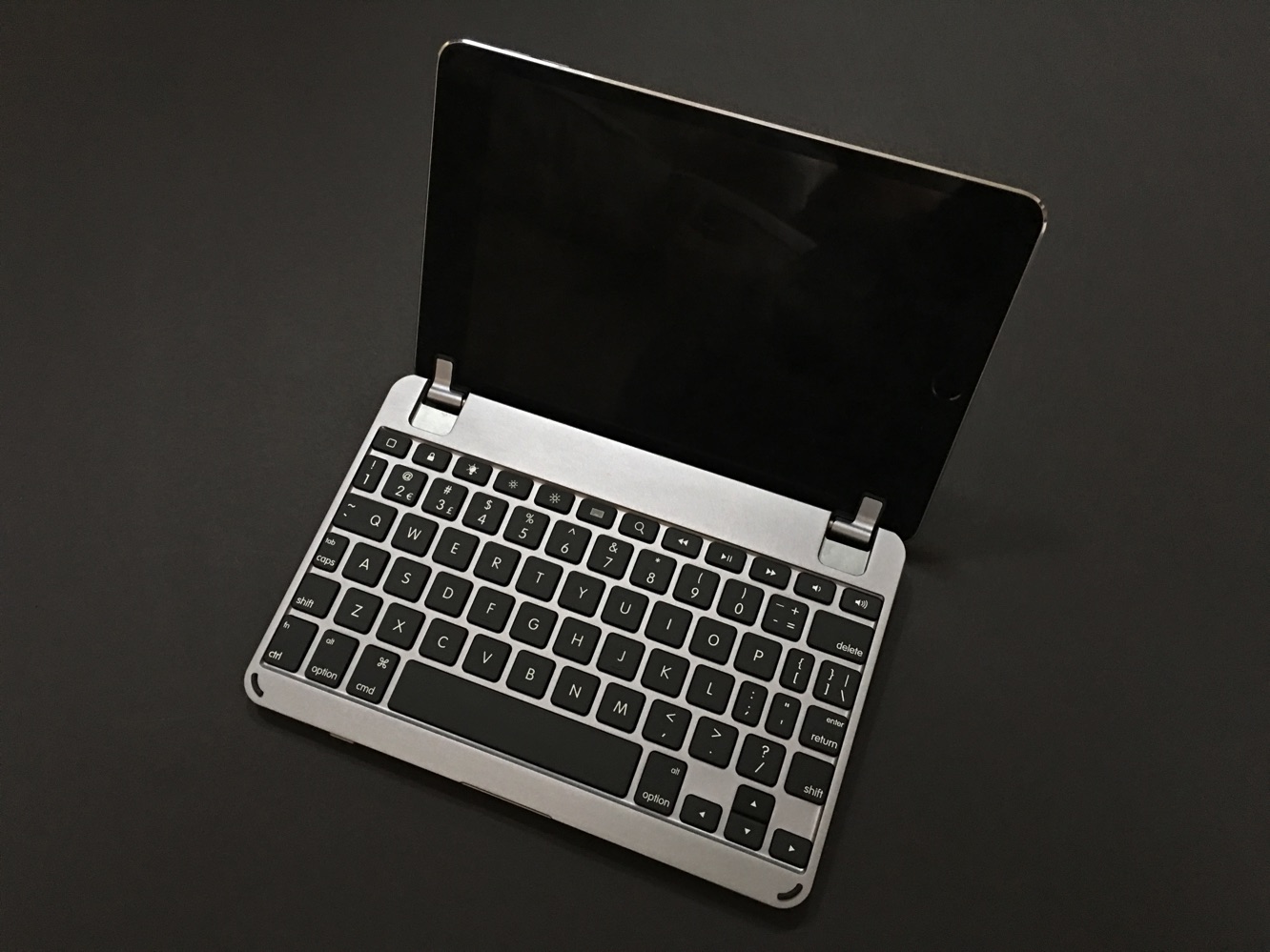
Brydge’s new BrydgeMini II is an aluminum Bluetooth keyboard ($130) for iPad mini 4. The keyboard’s design, like other Brydge keyboards, contains two cushioned hinges to hold an iPad mini — the hinges can be moved to display the iPad at any angle up to 180 degrees. When folded in completely, BrydgeMini II covers the screen of the iPad mini 4, but it does leave the back and sides of the device exposed. Brydge claims the keyboard’s battery life is three months before it needs recharging — a USB charging cable is included. BrydgeMini II comes in silver, space gray, or gold.

Review: Brydge BrydgeMini II Keyboard for iPad mini 4

BrydgeMini II weighs about .75 pounds, and its size matches up perfectly with an iPad mini 4, making it look like a folded book with the device when not in use. The two padded hinges work as well as you’d hope, holding the iPad mini securely and moving back and forth with ease when proper pressure is applied.

Those hinges are placed just outside of the iPad mini 4’s screen, so the display isn’t blocked in any way. BrydgeMini II’s power switch and Bluetooth button are found on the front-facing side of the keyboard. A micro-USB port for recharging is located on the left side of the keyboard. Overall, BrydgeMini makes for a nice, clean, attractive package when paired with a mini 4 — it looks like a miniature laptop.


Review: Brydge BrydgeMini II Keyboard for iPad mini 4

As always, when dealing with an iPad mini keyboard, a company is required to make decisions due to the limited space. BrydgeMini II has six rows of backlit keys — the top row is used for shortcuts. The majority of BrydgeMini II’s keys are close to “full” size, but as you reach the sides of the keyboard, the keys shrink.

Sometimes this shrinkage is dramatic — the combined tab/caps lock key is a mere sliver. BrydgeMini II uses a number of these “combined” keys, such as the dash button being coupled with the plus/minus button. That’s when another “combined key” — function/control — comes into play. All things considered, though, Brydge’s decision works out pretty well, as BrydgeMini II felt pretty good to us when typing. We didn’t get as many errors as we expected. Writers who plan on frequently using quotation marks might be perturbed, however.

Review: Brydge BrydgeMini II Keyboard for iPad mini 4

BrydgeMini II is a well-designed keyboard for iPad mini 4.


Latest News
The Apple Watch Series 11 46mm GPS Is $100 Off
1 Min Read
Clamshell Style iPhone Being Looked Into By Apple
1 Min Read
Foldable iPhones May Have the Largest Battery Ever
1 Min Read
Apple and TSMC’s 10-Year Collaboration May Be Ending
1 Min Read
The 13-inch M5 iPad Pro 256GB Wi-Fi Is $149 Off
1 Min Read
M5 Pro and M5 Max Chips for the MacBook Pro could Roll Out with macOS 26.3
1 Min Read
Mac Ordering Process Revamped
1 Min Read
Check Signed By Steve Wozniak and Steve Jobs Sold For $2.4 Million
1 Min Read
The Anker 140W 4-Port GaN USB-C Charger is $35 Off
1 Min Read
No iPhone Air 2 This Year, according to Latest Report
1 Min Read
New Report Corroborates Split iPhone Release Dates
1 Min Read
Apple Losing More Researchers As They Plan To Release 2 Siri Versions
1 Min Read

iLounge logo

iLounge is an independent resource for all things iPod, iPhone, iPad, and beyond. iPod, iPhone, iPad, iTunes, Apple TV, and the Apple logo are trademarks of Apple Inc.

This website is not affiliated with Apple Inc.
iLounge © 2001 - 2025. All Rights Reserved.
  • Contact Us
  • Submit News
  • About Us
  • Forums
  • Privacy Policy
  • Terms Of Use
Welcome Back!

Sign in to your account

Lost your password?










