
iLoungeiLounge
  • News
    • Apple
      • AirPods Pro
      • AirPlay
      • Apps
        • Apple Music
      • iCloud
      • iTunes
      • HealthKit
      • HomeKit
      • HomePod
      • iOS 13
      • Apple Pay
      • Apple TV
      • Siri
    • Rumors
    • Humor
    • Technology
      • CES
    • Daily Deals
    • Articles
    • Web Stories
  • iPhone
    • iPhone Accessories
  • iPad
  • iPod
    • iPod Accessories
  • Apple Watch
    • Apple Watch Accessories
  • Mac
    • MacBook Air
    • MacBook Pro
  • Reviews
    • App Reviews
  • How-to
    • Ask iLounge
Font ResizerAa
iLoungeiLounge
Font ResizerAa
Search
  • News
    • Apple
    • Rumors
    • Humor
    • Technology
    • Daily Deals
    • Articles
    • Web Stories
  • iPhone
    • iPhone Accessories
  • iPad
  • iPod
    • iPod Accessories
  • Apple Watch
    • Apple Watch Accessories
  • Mac
    • MacBook Air
    • MacBook Pro
  • Reviews
    • App Reviews
  • How-to
    • Ask iLounge
Follow US

Reviews

Reviews

Review: Brookstone Rover 2.0 App-Controlled Wireless Spy Tank

Last updated: May 17, 2021 9:56 am UTC
By Nick Guy
Review: Brookstone Rover 2.0 App-Controlled Wireless Spy Tank

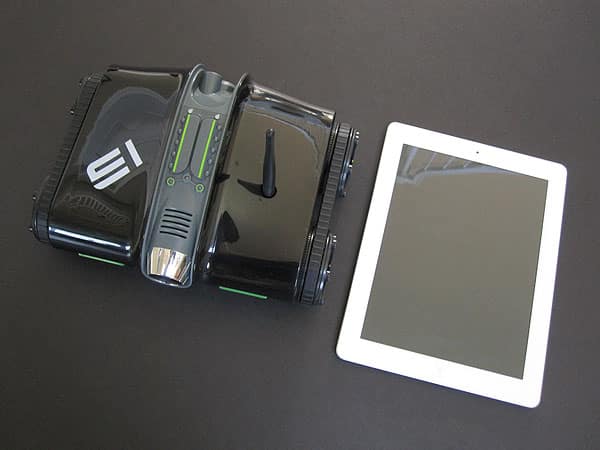
We really liked the first version of Brookstone’s app-controlled tank Rover, a toy that let kids “spy” indoors using a moving, wirelessly controlled camera. Now Rover 2.0 ($150) adds a handful of new features for the same price point. Along with the new hardware, the company has launched an updated version of its remote app for controlling the device.


Review: Brookstone Rover 2.0 App-Controlled Wireless Spy Tank

Other than a color shift—Rover 2.0 is black and green rather than white and orange—the newer tank is almost physically identical to the older one. The dimensions are the same, as are most of the exterior details, and the requirement of six included AA batteries. And as was the case before, Rover 2.0 uses Wi-Fi rather than Bluetooth to communicate with your iOS device, so the tank has plenty of range and bandwidth for transmitting data.

Unfortunately, we experienced some serious issues switching back and forth between our test network and the one Rover 2.0 establishes, as it doesn’t join your existing network. For reasons unknown, we repeatedly received an “Unable to join the network” message, and sometimes even when Rover 2.0 appeared to be properly set up, the connection wasn’t actually recognized. After more testing, we found ourselves unable to establish a connection despite multiple power cycles and manual resets, an issue we verified across multiple devices in multiple locations. Connectivity sometimes popped into place, but it was spotty at best.


Review: Brookstone Rover 2.0 App-Controlled Wireless Spy Tank

Review: Brookstone Rover 2.0 App-Controlled Wireless Spy Tank

Review: Brookstone Rover 2.0 App-Controlled Wireless Spy Tank

One new mechanical feature is the ability to remotely adjust the camera’s angle up or down from your iOS device, which previously had to be done by hand on Rover.

A speaker has also been added, so you can send audio from wherever you’re sitting through Rover 2.0. Although the instruction booklet says this feature is for Android devices only, we were able to use it to broadcast audio from the iPhone or iPad, and Rover’s built-in microphone can be turned on to send sound back—the feature works kind of like a walkie-talkie. Also new is the ability to record video footage and take stills, and then upload them to Facebook, Twitter, and YouTube. To share, you must exit the app, switch Wi-Fi networks, and then reopen it, which is a bit of a hassle.


Review: Brookstone Rover 2.0 App-Controlled Wireless Spy Tank

Review: Brookstone Rover 2.0 App-Controlled Wireless Spy Tank

Review: Brookstone Rover 2.0 App-Controlled Wireless Spy Tank

In our early testing, Rover 2.0 seemed basically like the same product with a new coat of paint.



Latest News
The 14-inch MacBook Pro with M5 Chip 16GB RAM/512GB is $250 Off
1 Min Read
Noise and Static on AirPods Pro 3 Still Unfixed
1 Min Read
New iMac with 24-inch OLED Display May be Brighter With 600 Nits
1 Min Read
The 15-inch M4 MacBook Air 256GB Is $250 Off
1 Min Read
Internal Kernel Debug Kit from Apple Reveals Tests for a MacBook with A15 Chip
1 Min Read
Apple Currently In Talks With Suppliers for Chip Assembly & Packaging of iPhones in India
1 Min Read
Apple Allows Easier Battery Replacement For M5 MacBook Pro with 14-inch Display
1 Min Read
The Apple Watch SE 3 44mm GPS is $50 Off
1 Min Read
20th Anniversary iPhone May Launch in Two Years
1 Min Read
Better Image Generation Capabilities and Apple Music Integration Coming to ChatGPT
1 Min Read
A20 Pro Chip Coming to Next Gen iPad Mini OLED
1 Min Read
Amazon has the AirTag 4 Pack Marked $29 off
1 Min Read

iLounge logo

iLounge is an independent resource for all things iPod, iPhone, iPad, and beyond. iPod, iPhone, iPad, iTunes, Apple TV, and the Apple logo are trademarks of Apple Inc.

This website is not affiliated with Apple Inc.
iLounge © 2001 - 2025. All Rights Reserved.
  • Contact Us
  • Submit News
  • About Us
  • Forums
  • Privacy Policy
  • Terms Of Use
Welcome Back!

Sign in to your account

Lost your password?








