
iLoungeiLounge
  • News
    • Apple
      • AirPods Pro
      • AirPlay
      • Apps
        • Apple Music
      • iCloud
      • iTunes
      • HealthKit
      • HomeKit
      • HomePod
      • iOS 13
      • Apple Pay
      • Apple TV
      • Siri
    • Rumors
    • Humor
    • Technology
      • CES
    • Daily Deals
    • Articles
    • Web Stories
  • iPhone
    • iPhone Accessories
  • iPad
  • iPod
    • iPod Accessories
  • Apple Watch
    • Apple Watch Accessories
  • Mac
    • MacBook Air
    • MacBook Pro
  • Reviews
    • App Reviews
  • How-to
    • Ask iLounge
Font ResizerAa
iLoungeiLounge
Font ResizerAa
Search
  • News
    • Apple
    • Rumors
    • Humor
    • Technology
    • Daily Deals
    • Articles
    • Web Stories
  • iPhone
    • iPhone Accessories
  • iPad
  • iPod
    • iPod Accessories
  • Apple Watch
    • Apple Watch Accessories
  • Mac
    • MacBook Air
    • MacBook Pro
  • Reviews
    • App Reviews
  • How-to
    • Ask iLounge
Follow US

Reviews

Reviews

Review: Boynq iCube II Speaker & Docking Station for iPod

Last updated: May 16, 2021 12:42 am UTC
By Jeremy Horwitz
Review: Boynq iCube II Speaker & Docking Station for iPod

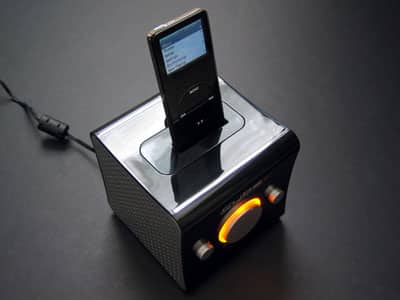
Pros: As a revision to prior iCube, this small (4” cubed) speaker system includes an iPod charging dock and separate drivers for left and right channel audio. Includes bass and treble controls, a glowing power light, and audio cables to connect the cube to external/non-dockable devices. Female Dock Connector port and line-out let you use system as a standard iPod dock for computer synchronization and audio output. Runs off of wall power.


Cons: Sound quality is good overall for the price, though neither volume nor bass is truly powerful.
Review: Boynq iCube II Speaker & Docking Station for iPod

In addition to boasting physical compatibility with the iPod nano and 5G, this sequel to last year’s iCube speaker and docking station for iPod promises superior audio quality and simultaneous iPod charging in the same sized package.

The iCube II also comes in glossy black to compliment popular black iPods, and includes audio cables to ensure its compatibility with older iPod models.

Last November, we reviewed Boynq’s original iCube (iLounge rating: B-), a 4” cube that housed left- and right-channel speakers and an iPod dock. Somewhat sloppy in internal execution despite its clean, simple exterior, the iCube had a few glaring faults that seemed easy enough to address, and now Boynq has done so in iCube II ($69), which isn’t so much a sequel as an enhanced revision. Except as noted below, we’ll point you to our earlier review for all the details.


Review: Boynq iCube II Speaker & Docking Station for iPod

The biggest differences between iCube and iCube II are four in number: first, and most obviously, the iCube II comes in glossy black and metallic silver rather than its predecessor’s white and metallic silver, a change that compliments popular black iPods. Second, though the last model included four dock adapters and audio cables that could be used with any iPod, the new unit includes the cables and six adapters, two specifically for use with the iPod nano and 5G.

Between the various inserts, you’ll have no problem docking any iPod from 3G to 5G, mini or nano; the only conceivable issue here is that the included cables remain white, but then, any old iPods that require these cables will be white, too, so it’s not a huge issue.


Review: Boynq iCube II Speaker & Docking Station for iPod

Review: Boynq iCube II Speaker & Docking Station for iPod

Third, while the iCube was unable to charge a docked iPod – a surprising omission, given that the iCube required a connection to wall power – the new version lets you charge and listen to your iPod at the same time. Boynq has European and U.S.-certified versions of iCube, which ship with different wall power supplies, but are otherwise the same internally, switching between 100-240V. On a related note, no change has been made to the unit’s portability; though it’s small, there’s still no battery compartment for use on the road. Fourth and finally, Boynq has made a couple of small audio tweaks to iCube – now, the left and right speakers aren’t reversed, which is better, and it sounds like there’s been a tiny boost of the iCube II’s midrange, which though barely discernible did not improve the audio from our standpoint.



Latest News
The 14-inch MacBook Pro with M5 Chip 16GB RAM/512GB is $250 Off
1 Min Read
Noise and Static on AirPods Pro 3 Still Unfixed
1 Min Read
New iMac with 24-inch OLED Display May be Brighter With 600 Nits
1 Min Read
The 15-inch M4 MacBook Air 256GB Is $250 Off
1 Min Read
Internal Kernel Debug Kit from Apple Reveals Tests for a MacBook with A15 Chip
1 Min Read
Apple Currently In Talks With Suppliers for Chip Assembly & Packaging of iPhones in India
1 Min Read
Apple Allows Easier Battery Replacement For M5 MacBook Pro with 14-inch Display
1 Min Read
The Apple Watch SE 3 44mm GPS is $50 Off
1 Min Read
20th Anniversary iPhone May Launch in Two Years
1 Min Read
Better Image Generation Capabilities and Apple Music Integration Coming to ChatGPT
1 Min Read
A20 Pro Chip Coming to Next Gen iPad Mini OLED
1 Min Read
Amazon has the AirTag 4 Pack Marked $29 off
1 Min Read

iLounge logo

iLounge is an independent resource for all things iPod, iPhone, iPad, and beyond. iPod, iPhone, iPad, iTunes, Apple TV, and the Apple logo are trademarks of Apple Inc.

This website is not affiliated with Apple Inc.
iLounge © 2001 - 2025. All Rights Reserved.
  • Contact Us
  • Submit News
  • About Us
  • Forums
  • Privacy Policy
  • Terms Of Use
Welcome Back!

Sign in to your account

Lost your password?








