
Released late last year, Blue Microphones’ Spark Digital ($199) is the company’s first studio-quality microphone designed specifically for connecting with iOS devices, alongside USB connectivity for Macs and PCs. Spark Digital expands upon the company’s prior Yeti and Snowball USB microphones, targeting studio users with a larger microphone capsule that promises higher recording fidelity.
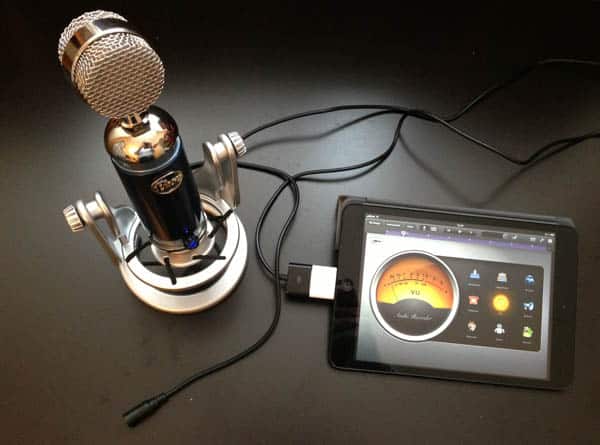
Spark Digital comes bundled with two separate nine-foot cables, one for Dock Connector devices and one with a standard USB connection. Both cables include a mini-USB connector on the microphone end, plus a three-foot female headphone jack cable split off from there. A Lightning cable is not yet available, but as with other accessory manufacturers, Blue is developing one, awaiting Apple certification, and attempting to determine how to affordably distribute it to current customers. When it’s released, the cable will come with future Spark Digital units, but for now, the Apple Lightning to 30-pin Adapter can be used as an alternative. Blue’s package also includes a stand with integrated shock mount, and a soft suede carrying/storage bag that holds everything from the microphone to the stand and cables.

The included stand is unique in two ways: it complements the microphone’s aesthetics, and helps dampen the impacts of external vibrations and low-frequency noise.
While it seems a bit odd for a microphone to bounce around in its mount, the noise isolation isn’t an empty promise. It worked surprisingly well at compensating for external sounds, ranging from a nearby heating unit fan to light vibrations from shuffling items around on the same wooden table. Blue also uses the same threaded mount found on most of its professional mics, including the original analog version of Spark, and a studio shockmount is available from the company as an optional accessory, allowing for connection to a standard threaded microphone mount; a custom pop filter is also sold as another accessory. Of course, Spark Digital can also be used as a handheld mic without any stand, although of course you’ll lose the stand’s noise isolation benefits. While the microphone isn’t as aesthetically well-suited to handheld use as other mics we’ve looked at, if you put the appearance aside, it works and sounds fine.

At the lower front of Spark Digital is a multi-function knob/button that can be used to control the monitored headphone volume, microphone gain, or mic muting. Four status LEDs above the knob provide a visual indicator of the current adjustment level and change color according to the selected mode—blue for headphone adjustment, or orange for gain adjustment. Changing modes requires pressing and holding the control for three seconds until the LEDs change color, which is a slightly fiddly way of handling this feature, but not something that most users will need to do more than once per recording session.

The microphone uses a cardioid condensor capsule that’s similar to most other professional studio microphones, and provides a maximum 32dB gain range with a standard 20Hz – 20kHz frequency response range.
An integrated analog-to-digital converter turns the audio received by the condensor mic directly into a digital signal for the connected iOS device or Mac/PC, with no other analog circuitry in the path to color the signal. Despite the open visual design of the capsule, Spark Digital uses a cardioid pattern—recording audio from only the front side—with a fairly standard 120-degree acceptance angle.
While geared primarily toward both spoken and music vocal use, Spark Digital can also be quite effectively used as an instrument mic, and provides a nice dynamic range across the board for acoustic instruments such as guitar, piano and wind instruments. As with any general-purpose studio mic, you’re not going to get the same results as you would from a professional instrument mic, but Spark Digital’s sound quality for this purpose trumps most general-purpose mics we’ve looked at in its price range.

Spark Digital offers one particularly unique feature dubbed Focus Control. This provides the user with a choice of two different sonic signatures appropriate for different recording applications. Controlled by a switch at the bottom rear of the mic, enabling Focus Control effectively de-emphasizes lower frequencies, bringing out the typical mid- and high-range sounds with greater clarity and detail. Focus Control helps vocals or acoustic guitar to stand apart from a more audibly crowded background mix.











