
Blue Microphones has had a mixed track record with Apple accessories, repeatedly scoring hits with beautifully-designed Mac microphones while stumbling on add-ons for Apple’s smaller devices. Whereas Blue’s computer mics have been gloriously large and retro-styled, its Mikey units for iPods have been expensive and limited in device compatibility, typically arriving in stores just as Apple releases new devices that don’t work with them. Despite utilizing the same bottom-mounting Dock Connector found in most of Apple’s pocket devices, the original 2009 version of Mikey didn’t support the increasingly popular iPod touch, and the sequel Mikey for iPod worked with all iPods besides the then-current iPod touch, only later promising some support for older iPhones. Blue’s latest version is called Mikey Digital ($100), and designed for current iPhones and iPads, though with a familiar caveat: it’s becoming available only weeks before Apple debuts new iPhone and iPad models without the classic 30-Pin Dock Connector. While Mikey Digital does indeed work with a number of current-for-now Apple devices, you’ll have to decide whether to invest so much in a soon-to-be-discontinued accessory standard.
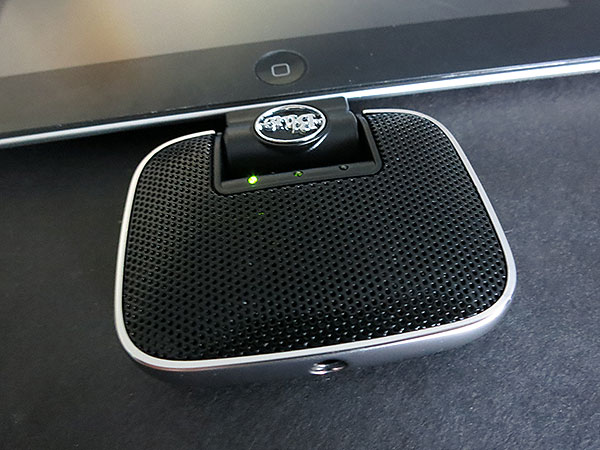
As was the case with the two prior Mikeys, the pitch with Mikey Digital is that you can add a semi-flexible external microphone to the bottom of your device, enabling you to capture higher-quality, stereo audio on the go than might be possible with the monaural mics found inside current iPhones and iPads. The design is virtually identical to Mikey for iPod’s, which is to say that it’s a black and silver attachment roughly 2.4” tall, 2.4” wide, and 0.5” thick at its largest points, though tapered significantly in each dimension.

Mikey Digital’s Dock Connector plug is surrounded by a rectangular brick of plastic that reduces the accessory’s compatibility with some iPhone and iPad cases; it should have been tapered for superior connectivity. A hinge between the Dock Connector and perforated black plastic grille housing enables the microphone unit to ratchet through more than 200 degrees, including straight upward or downward 90-degree angles, possibly useful if your device is being hand-held or left on a table. A thin silver switch on the back moves through three positions corresponding to tiny lights on the unit’s front, indicating low, medium/automatic, or high gain.
You can leave Mikey Digital on automatic most of the time, switching it to quiet or loud modes when dealing with really quiet or loud audio sources.
Inside Mikey Digital are twin condenser microphones, a 3.5mm line-in port, and a processor with pre-amplification, gain control, and analog-to-digital conversion capabilities. In addition to recording directly with its mics or the 3.5mm input, an included 1/8” adapter lets you connect instruments and other audio sources for direct recording. Mikey Digital also includes a soft-lined black canvas carrying bag with a simple flap at the top, capable of holding both the accessor and adapter, though not securely. The packaging doesn’t indicate it, but Blue’s web site also promises support for the fourth-generation iPod touch.

Surprisingly, Blue Microphones doesn’t make any attempt to push users towards its previously-released iPhone- and iPod-formatted Blue FiRe recording application, either on Mikey Digital’s packaging or when the accessory itself is connected. Instead, the packaging touts Mikey Digital as compatible with “most popular recording apps,” and there’s no prompt to automatically download anything when it’s plugged in. Instead, you’re left to find and download an app of your choice, including the free Blue FiRe or Apple’s $5 GarageBand, connect Mikey Digital, and watch as one of the three front lights briefly flashes yellow to indicate the current gain level. A yellow light stays on only when a recording application is being used, and all three lights flash red if audio levels are too high; otherwise, the lights are off, conserving device power. Like other bottom-mounted microphone accessories, Mikey Digital doesn’t work or even light up when you load the iPhone’s Phone app or FaceTime for the iPad or iPhone, but it does work with the video recording side of Camera on each device.
The critical question facing prospective customers is whether there’s a $100 difference in sound quality between what an iPad or iPhone can do with its own integrated microphones and what Mikey Digital offers.
There are a few situations in which the answer might be yes, namely when some manual gain control is desired, when limited-distance stereo recording is necessary, or when increased audio fidelity is important. Set up properly, Mikey Digital can record audio at higher decibel levels than Apple’s integrated mics, with the ability to adjust gain to handle nearby, midrange, or distant audio sources, and with stereo rather than monaural recordings—the latter either with the built-in microphones separated by less than an inch, or via line input.

Unlike Apple’s built-in mics, which are locked into default automatic settings that produce “good enough” results under most circumstances, Mikey Digital’s results vary depending on how skilled you are with using the gain settings and different apps. Use Apple’s free Voice Memos app on the iPhone 4S to record with both Mikey Digital and the phone’s integrated mics, and when played back through the iPhone, you’ll notice that Mikey’s loudest and middle/auto gain settings produce softer-volume recordings than the iPhone’s, with the quietest gain setting creating all but inaudible results—unless you’re dealing with a very high-decibel audio source. If you’re merely planning to record near-field audio and listen to it through your iOS device’s integrated speakers, Mikey Digital probably isn’t necessary; the sonic quality is very similar.
However, when the same recordings are played through a computer’s speaker or through your iOS device’s headphone port—the places where high-quality recordings are most likely to be edited, and appreciated for what they are—the story’s completely different. Beyond its monaural limitations, the iPhone’s mic is revealed to have comparatively flatter sound that’s almost like listening to audio through a tube, while Mikey Digital’s built-in mikes are decidedly crisper and fuller-bodied. If Mikey Digital is judged solely as a stereo microphone accessory, without consideration of its price or value, it’s definitely better than what Apple includes in its own devices.

Unfortunately, there are other situations where Mikey Digital doesn’t add a lot of value. We didn’t get good results when trying to record line-in audio through Mikey Digital’s bottom port—in fact, music we played through an iPhone’s headphone port came out seriously garbled on a recording third-generation iPad or iPhone 4S no matter what gain setting we chose, using either GarageBand or Voice Memos.











