
iLoungeiLounge
  • News
    • Apple
      • AirPods Pro
      • AirPlay
      • Apps
        • Apple Music
      • iCloud
      • iTunes
      • HealthKit
      • HomeKit
      • HomePod
      • iOS 13
      • Apple Pay
      • Apple TV
      • Siri
    • Rumors
    • Humor
    • Technology
      • CES
    • Daily Deals
    • Articles
    • Web Stories
  • iPhone
    • iPhone Accessories
  • iPad
  • iPod
    • iPod Accessories
  • Apple Watch
    • Apple Watch Accessories
  • Mac
    • MacBook Air
    • MacBook Pro
  • Reviews
    • App Reviews
  • How-to
    • Ask iLounge
Font ResizerAa
iLoungeiLounge
Font ResizerAa
Search
  • News
    • Apple
    • Rumors
    • Humor
    • Technology
    • Daily Deals
    • Articles
    • Web Stories
  • iPhone
    • iPhone Accessories
  • iPad
  • iPod
    • iPod Accessories
  • Apple Watch
    • Apple Watch Accessories
  • Mac
    • MacBook Air
    • MacBook Pro
  • Reviews
    • App Reviews
  • How-to
    • Ask iLounge
Follow US

Reviews

Reviews

Review: Blackmagic Design Video Recorder with H.264 Encoding

Last updated: May 15, 2021 10:44 am UTC
By Jeremy Horwitz
Review: Blackmagic Design Video Recorder with H.264 Encoding

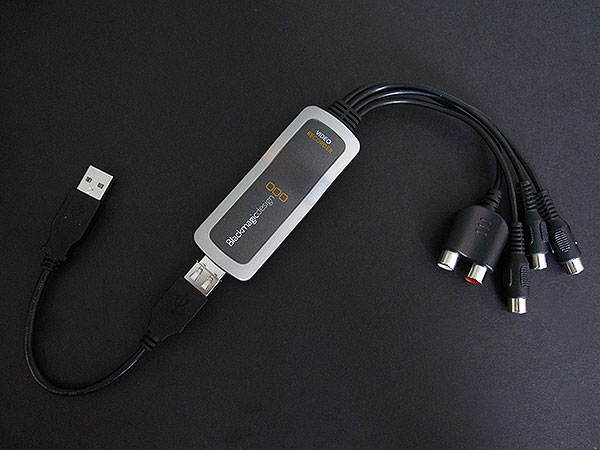
First things first: for those of us with certain video devices that output component video, Blackmagic Design’s Video Recorder ($149) for Mac users can be a godsend. It’s a tiny USB dongle with five female RCA-style inputs permanently wired in, two for audio, and either one or three for video. Connect a standard yellow composite video plug to the green port to record from most video sources, or hook up the red, green, and blue video connectors to component video sources. Support for the fading S-Video format is also possible via an optional adapter. A USB extension cable is included in the package.

Review: Blackmagic Design Video Recorder with H.264 Encoding

Recording from all of these sources is handled through a CD with included software, developed by Blackmagic, which transforms your output into iTunes-ready H.264 files.

The software is cleanly laid out, fairly easy to use, and can run in the background while you’re doing other things. It supports 720×480 resolution—enough for DVD transfers—and brightness, color, and contrast adjustments, as well as stereo audio input. You can set it for specific Apple devices, such as iPods, iPhones, or Apple TV, select varying bitrates, do timed recordings, minute- or Megabyte-chunked recordings, and export directly into iTunes.


Review: Blackmagic Design Video Recorder with H.264 Encoding

To be clear, one of Video Recorder’s cool features is its ability to make backups of whatever video content you may have on a 480i or lower-resolution analog video source. Connect most camcorders, iPods or iPhones, for instance, and you can create a duplicate of whatever they’re playing back.

As soon as the recording has finished, the H.264 file is sitting there ready for you to play on an iPod or iPhone without additional transcoding.


Review: Blackmagic Design Video Recorder with H.264 Encoding

Review: Blackmagic Design Video Recorder with H.264 Encoding

The software does have some issues, however. Rather than offering its own adjustments for aspect ratios, it relies on the video source to feed it a 4:3 picture, and lets you use cropping bars to trim off whatever part of the image—letterboxes—you don’t want. In the case of an Apple TV outputting a video to the Video Recorder, the aspect ratio was off and apparently uncorrectable, so the video was stretched to incorrect proportions. On a related note, when the Apple TV attempted to output to the device in any resolution save for 480i, the Video Recorder couldn’t recognize its video properly; even 480p signals didn’t work. Consequently, we couldn’t get the now 480p-capable iPhone 3GS to put out a compatible video signal, and high-definition-only devices will be non-starters given the 480i cap.



Latest News
The AirPods Pro 3 is $20 Off
1 Min Read
Exynos 2600 Chip 2nm Process Revealed by Samsung
1 Min Read
New Celebrity Ad Campaign Featuring Travis Scott Released by Beats
1 Min Read
Australia Getting Hypertension Notification Feature
1 Min Read
The 14-inch MacBook Pro with M5 Chip 16GB RAM/512GB is $250 Off
1 Min Read
Noise and Static on AirPods Pro 3 Still Unfixed
1 Min Read
New iMac with 24-inch OLED Display May be Brighter With 600 Nits
1 Min Read
The 15-inch M4 MacBook Air 256GB Is $250 Off
1 Min Read
Internal Kernel Debug Kit from Apple Reveals Tests for a MacBook with A15 Chip
1 Min Read
Apple Currently In Talks With Suppliers for Chip Assembly & Packaging of iPhones in India
1 Min Read
Apple Allows Easier Battery Replacement For M5 MacBook Pro with 14-inch Display
1 Min Read
The Apple Watch SE 3 44mm GPS is $50 Off
1 Min Read

iLounge logo

iLounge is an independent resource for all things iPod, iPhone, iPad, and beyond. iPod, iPhone, iPad, iTunes, Apple TV, and the Apple logo are trademarks of Apple Inc.

This website is not affiliated with Apple Inc.
iLounge © 2001 - 2025. All Rights Reserved.
  • Contact Us
  • Submit News
  • About Us
  • Forums
  • Privacy Policy
  • Terms Of Use
Welcome Back!

Sign in to your account

Lost your password?








