
Pros: A free, highly simplified Mac program capable of one-click transfer and conversion of TiVo videos into iPod- and iTunes-ready files. Finds your TiVo on a home network, and can create 640×480 videos in MPEG-4 format that transfer properly to the iPod, preserving greater visual detail than in TiVo’s authorized solution, Toast 8 Titanium. Also creates MPEG-2 files.
Cons: Not authorized by TiVo. No H.264 encoding, or helpful presets to create different types of video files. Videos will require some iTunes retagging. Though computer- and network-dependent, speed of iPod format conversion remains far below realtime, and resulting files are unnecessarily large relative to their Apple Store- created alternatives.
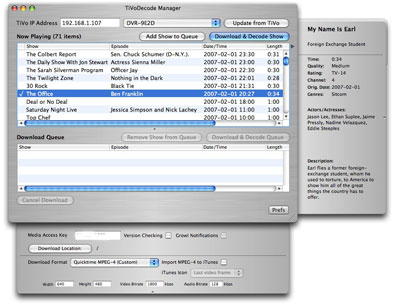
There’s a lot to like about David Benesch’s TiVoDecode Manager 2.1 – it’s a free, generally simple alternative to Roxio’s Toast 8 Titanium for Mac users who want to transfer TiVo Series 2 content to their iPods or iTunes libraries. In fact, it’s so good as a free application that there’s no reason to delay giving it a try, but as with all of the Mac TiVo software we’ve seen thus far, a bit of extra polishing could make it even better.
Unlike Toast 8, Benesch’s software, which we’ll call TDM going forward, has three major advantages besides its obviously low price: it can do one-click transfers of TiVo videos into iTunes, handling that process without four different windows to juggle, and creating files in iPod-ready MPEG-4 at 640×480 resolution. Each of these three items is a major step in the right direction for TiVo fans.

Let’s start with the one-click transfer process.
TDM’s main window rapidly finds your TiVo’s address on your local network, creates a list of all of its stored content, and gives you a single “do it all” button to press once you’ve picked a show: Download & Decode Show. Alternately, if you want to grab a number of TiVo videos at once, you can select multiple shows, hit the Add Shows to Queue button, and then Download & Decode Queue. Unless you’re a hard-core user, you can skip any other steps – your videos will wind up in iPod- and iTunes-ready MPEG-4 format on your desktop. Done. Unlike Toast 8, you don’t need to open a second application, find files in a media manager, or anything of the sort.

If you want to pick a different destination directory or make tweaks to the video files, the process gets only a little more complex. A Prefs button at the bottom right opens a pane to let you pick your download location, automatically import all videos into iTunes, and change the format of your files. You’ll want to turn the iTunes import feature on, and leave it there. TDM can create unfiltered MPEG-2-format videos, iPod- and Apple TV-ready 640×480 videos, smaller ones, or even larger ones if you desire, using your choice of audio and resolution settings.
The only problem: Series 2 TiVos record TV programs at unusual resolutions (352×480, 480×480) that don’t take full advantage of TDM’s 640×480 output mode. You’ll need to set your TiVo to High or Best quality to make files that benefit most dramatically from TDM’s default iPod setting.


Top to Bottom: iTunes, TDM, Toast 8


For that reason, under the best circumstances, your videos will look better than videos created with Toast 8, but they’ll likely fall a little short of the ones you can download through the iTunes Store or create with Elgato’s EyeTV software. Here, you can see several examples of how a video recorded at 352×480 looks when converted by TDM into a 640×480 MPEG-4 file: it’s noticeably superior in detail to the Toast 8 video, at least on a larger-than-iPod screen, but not up to the iTunes download standard. Both the Toast 8 and TDM files have one line of flickering data at the top of each frame which could really stand to be cropped off; neither program includes this sort of editing tool or a commercial removal tool. As such, and because the files are in MPEG-4 format, they can take up much more space than similar resolution iTunes Store files – one TDM Office episode required 450 megs to the Store’s 320.


TDM’s tagging is also a little quirkier than we’d prefer. On a positive note, the right-side panel provides all sorts of details about the currently selected show, which hopefully would wind up as embedded metadata ready for iTunes. Unfortunately, the data mightn’t always be right – here, our episode of The Office was displaying its data properly in the main window, but the right-side pane contains metadata from the preceding show, My Name is Earl. If you tell TDM to send to iTunes, it only partially populates iTunes with data, properly picking TV Show, but not filling the Description field, and using an unusually long episode name.











