
Though a number of companies have previously released iOS-compatible home automation accessories, high prices have limited their mainstream appeal: between custom in-wall wiring, recessed iPad docks, software, and other components, complete home automation installations can cost hundreds or thousands of dollars, and sometimes require professional installation. Belkin’s new “family” of WeMo products tackles home automation from the opposite direction, deliberately limiting itself to comparatively inexpensive parts that literally anyone can install and use, though it’s consequently far less ambitious than earlier rivals. Right now, WeMo poses a single serious question — is it worth $50 per wall outlet to be able to turn switches on and off from afar — but if Belkin grows the “family” beyond its current two products, it could have a big hit on its hands.
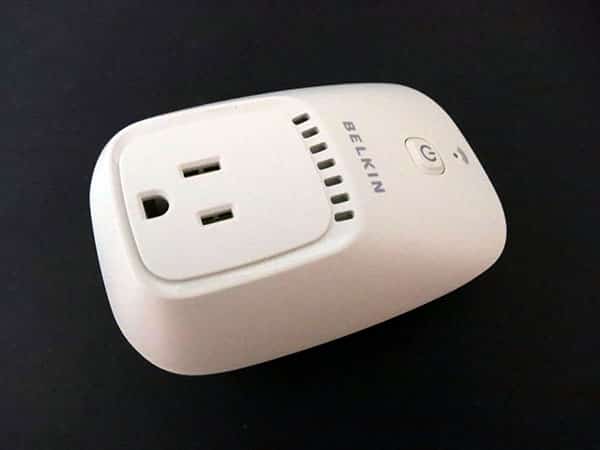
WeMo currently comes in two different versions: WeMo Switch ($50) and WeMo Switch + Motion ($100), both containing the same base part—an off-white, Wi-Fi-enabled wall power adapter called Switch that can be used for the simple task of turning on or off a connected device. Measuring 4.25” tall by 3” wide by a little over 2” deep at its thickest point, Switch has a footprint that’s almost as large as a full wall plate, though the three-prong power outlet is very close to its bottom edge, so you can fit another plug below it. A blue light near its top indicates Wi-Fi status, and a power button below the light can be used to manually toggle the switch on and off regardless of a Wi-Fi connection.

Should you purchase nothing more than a WeMo Switch or two, Belkin’s free and nicely developed WeMo app will allow you to do several things. First, the app enables you to flip each Switch on and off with a single button press, organizing all of your switches with custom names and even custom images—a child’s photo, for example, for a specific child’s bedroom lamp. Second, you can set one or more timers to automate on/off status, including “turn on” or “turn off,” as well as “turn on then off,” each change separately timed, with each timer limited to specific days of the week.
Third, the app integrates with a web-based service called IFTTT (If This Then That) that lets you create more complex controls that are activated over the Internet.

The WeMo app can be controlled from two places—at home over your Wi-Fi network, and optionally when you’re away from home on a cellular or separate Wi-Fi connection; this is enabled by default, and just works. It’s also incredibly easy to set up. We had only a brief, one-time hiccup when setting up the first of two Switches during testing, which resolved itself after an iPhone restart. Otherwise, the Switches were easy to add to our home network, and quickly rejoined every time we disconnected and reconnected them. Every on-off flip happened immediately, and critically, the timed activations occur even if the app isn’t active; rules are stored on the Internet, rather than solely within the app. The overall user experience with the app is great, considering what it does.

Belkin’s second WeMo component is Motion, a part that’s only included—for now—inside the $100 Switch + Motion package. Motion looks identical to Switch, except that there’s no power port on the face, and a six-foot cable dangles from its bottom, with a lipstick top-shaped motion sensor at the other end.
This sensor has a frosted white circular motion detecting surface at the top, plus a blue light that turns on and stays on whenever it’s sensing motion. Since the cable’s so long, and not physically connected to Switch, you can place Motion wherever you want so long as you’re willing to give it a wall outlet of its own, and even conceivably place the rubber-bottomed sensor in a dry, temperate spot outside of a door to activate an interior light whenever someone approaches it.

The fact that it can trigger a Switch from anywhere else within Wi-Fi reach is a big part of Motion’s appeal—moreover, one Motion can be used to trigger multiple switches at once, should you want to set up a rule within the app to do so. Motion can be set to four levels of sensitivity, ranging from requiring 0 to 30 seconds of perceived motion before activating, and on 0 (“very high”), it’s on a hair trigger. WeMo detects movement from feet away, and if anything is more capable than we’d imagined it would be.

There are only two problems with Motion, one more serious than the other. If you’re planning to set up a home automation scheme with multiple motion sensors, you’ll need to buy multiple Switch + Motion sets; Belkin currently does not sell Motion units separately. Second, Belkin has regrettably reused most of Switch’s chassis for Motion, despite the fact that Motion doesn’t have its own pass-through port port.











