
Belkin’s release of the original WeMo Switch in mid-2012 was a tantalizing first step for the company into the dauntingly complicated home automation accessory market — a wall outlet-powered, Wi-Fi/iOS-compatible switch that could turn power on or off to a single connected device. For $50, we didn’t think the WeMo Switch was either cheap or universally appealing, but technologists assume that people will eventually expect remote-controlled lights and appliances all throughout their homes, and with the right combination of pricing and simplicity, we’d agree. To that end, Belkin has continued to experiment with WeMo accessories such as the Light Switch, and recently debuted the WeMo Insight Switch ($60), an enhanced sequel to its first product.
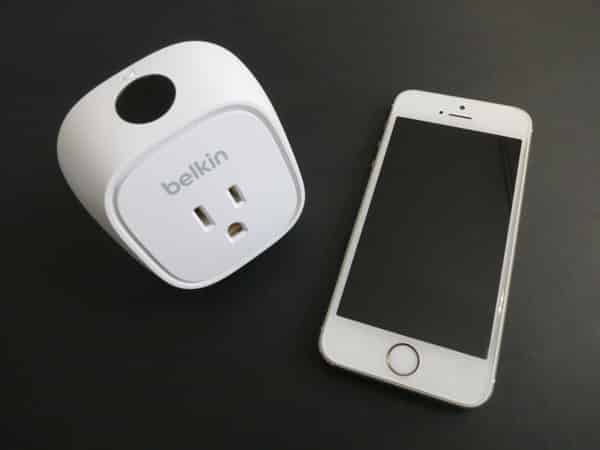
Even though the basic concept behind the Insight Switch is very similar to the original Switch, there are two noteworthy differences this time out. First, the Insight Switch has been physically redesigned, and all for the better. It’s a lot smaller than the original Switch, which may ease installation for some users — it still requires the top of two outlets, but leaves more space above, and enough for something to be connected underneath it. Additionally, the top power button has been replaced with a touch sensor that uses glowing light indicators. These changes aren’t earth-shattering, but Insight Switch looks and feels better than its predecessor.
Once again, it doesn’t ship with anything else in the package, and you’ll need to download Belkin’s free and very straightforward WeMo app to use it.


Second and more critically, Insight Switch adds a power usage meter to the original on/off Switch, plus software to take advantage of the features. Thanks to a Wi-Fi connection and the WeMo app, you can use Insight Switch to turn the connected device on and off from anywhere. IFTTT integration within the app continues to enable WeMo users to create Internet-based “if this then that” rules for Insight Switch, including traditional time-based automatic on/off control of the device, as well as triggers should power be sensed on the switch. You could receive a notification on your iPhone whenever the power goes on, goes off, or if the power is on for a length of time; you can also prevent too many notifications from coming in, and limit the days of the week they’re sent. Family power-limiting and lightweight security come to mind as possible applications of these features.

Insight Switch’s power meter is capable of measuring the strength of power use, the duration of power use, and the duration of standby/idle time — handy features that arguably don’t go far enough on the hardware side. Insight Switch does provide you with the average amount of power (in watts) a connected device draws when on, as well as the current power drain, enabling you to understand the active and idle states of a big-screen TV, for example. It also knows when the device was last on and how long it was on, as well as how long it’s been off or in standby mode.

The information is used to provide an estimate of the monthly cost of operating a connected device, notably varying quite dramatically by the minute when the device is first connected, and stabilizing somewhat weeks later. A TV set that was estimated to cost $15 per month to operate at first was later estimated at 41 cents per month, but it’s unclear how the WeMo app calculates the numbers — no previous day’s data or aggregate chart of usage can be viewed with the software. While this suggests that the hardware doesn’t really have the ability to track monthly data in a granular way, a feature hidden within the app’s Edit menu claims to export up to 45 days worth of data to an e-mail, a not particularly useful way to analyze the information.

One of our issues with this is the modest value of the “Insight” that’s actually being gained from using Insight Switch. Although the WeMo app is otherwise nicely designed, there’s no obvious way to set the cost estimates to a specific power grid, no way to view or verify daily usage, and no visibility into how estimates are being generated. It was only when we discovered the aforementioned “Edit” menu—notably not the Settings screen—that we found a setting to adjust the Cost per kWh, which requires you to reference your electricity bill. The most useful information we retrieved from the WeMo app was just a broad sense of the average and idle power drain, numbers that aren’t particularly meaningful without further quantification. It’s unclear at this point whether Belkin will be able to add deeper tracking and automatic local price estimation into the WeMo app, but we’d hope to see Insight Switch do more in the future.


Our other issue is the conceptual value of adding a power meter — typically a standalone portable device that can be moved from outlet to outlet as needed for brief testing of different devices — into a switch that’s supposed to be left in one place to control one device.











