
iLoungeiLounge
  • News
    • Apple
      • AirPods Pro
      • AirPlay
      • Apps
        • Apple Music
      • iCloud
      • iTunes
      • HealthKit
      • HomeKit
      • HomePod
      • iOS 13
      • Apple Pay
      • Apple TV
      • Siri
    • Rumors
    • Humor
    • Technology
      • CES
    • Daily Deals
    • Articles
    • Web Stories
  • iPhone
    • iPhone Accessories
  • iPad
  • iPod
    • iPod Accessories
  • Apple Watch
    • Apple Watch Accessories
  • Mac
    • MacBook Air
    • MacBook Pro
  • Reviews
    • App Reviews
  • How-to
    • Ask iLounge
Font ResizerAa
iLoungeiLounge
Font ResizerAa
Search
  • News
    • Apple
    • Rumors
    • Humor
    • Technology
    • Daily Deals
    • Articles
    • Web Stories
  • iPhone
    • iPhone Accessories
  • iPad
  • iPod
    • iPod Accessories
  • Apple Watch
    • Apple Watch Accessories
  • Mac
    • MacBook Air
    • MacBook Pro
  • Reviews
    • App Reviews
  • How-to
    • Ask iLounge
Follow US

Reviews

Reviews

Review: Belkin Ultimate Keyboard Case for iPad 2, iPad (3rd/4th-Gen)

Last updated: May 16, 2021 8:28 pm UTC
By Nick Guy
Review: Belkin Ultimate Keyboard Case for iPad 2, iPad (3rd/4th-Gen)

There’s plenty of hyperbole in the consumer electronics space, so we frequently hear that devices or accessories are the “thinnest,” “best,” or another superlative; the prevalence of the terms makes them easy to brush off. Belkin’s Ultimate Keyboard Case ($100-$130) relies on one such word for its moniker, but here, it’s not just marketing spin: “ultimate” mightn’t be exactly right, but this accessory is definitely one of the best Bluetooth keyboard cases for the iPad. It starts with a lid that’s very similar to Logitech’s Ultrathin Keyboard Cover and adds proper body protection, addressing our biggest concern with the earlier design.


Review: Belkin Ultimate Keyboard Case for iPad 2, iPad (3rd/4th-Gen)

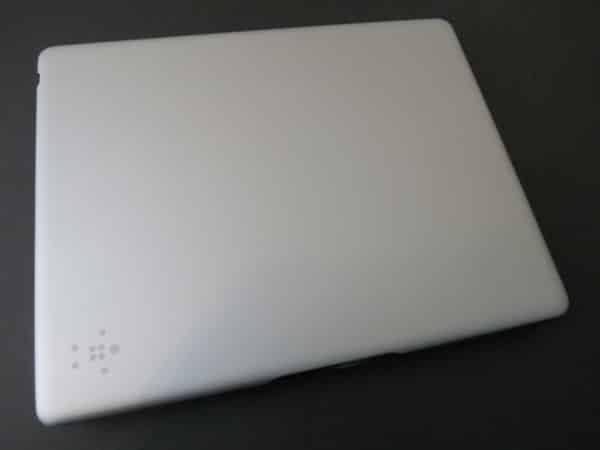
The Ultimate Keyboard Case’s rear frame itself isn’t fancy, but it’s good. A hard plastic shell, it almost completely covers the the iPad’s metal body, and the border is just a little bit thicker around the right edge. The only openings are properly-sized holes for the headphone port, microphone, Sleep/Wake button, iSight camera, side switch and volume rocker, and Dock Connector or Lightning port. Rather than simply remaining exposed, the speaker is rerouted towards you with what the company calls “SoundFlow design.” All that’s missing relative to our favorite hard shells is button protection, which would’ve been a nice addition. The case is attached to the keyboard cover with a 7.5” tall strip of faux leather; you lift one edge of the case away from the leather and into a recess above the keyboard when you reposition Ultimate Keyboard Case in typing mode.


Review: Belkin Ultimate Keyboard Case for iPad 2, iPad (3rd/4th-Gen)

Review: Belkin Ultimate Keyboard Case for iPad 2, iPad (3rd/4th-Gen)

Magnets in the shell’s bezel and the cover create a strong hold, meaning the case won’t come open unless you want it to. Belkin’s auto-locking magnets unlock second-, third-, and fourth-generation iPads. On the outside, the lid is a single piece of silver metal, which makes it looks a lot like Logitech’s design—quite nice on the eyes, with a substantial feel. Inside, the lid is glossy black plastic with a keyboard. Belkin incorporated a really cool feature we’ve never seen used before: the keyboard automatically wakes up and re-pairs when a magnetic nub along the iPad’s left edge is placed in any of the three recesses above the keyboard, allowing for multiple viewing angles and power saving. The battery is rated for 160 hours of constant use, and six months of standby time. It’s recharged with the included Micro-USB cable.


Review: Belkin Ultimate Keyboard Case for iPad 2, iPad (3rd/4th-Gen)

Review: Belkin Ultimate Keyboard Case for iPad 2, iPad (3rd/4th-Gen)

Review: Belkin Ultimate Keyboard Case for iPad 2, iPad (3rd/4th-Gen)

The most important factor of any keyboard case is the keyboard. if you can’t type easily without making errors, the accessory doesn’t have much value. Thankfully, Belkin got that part of the solution right too: Ultimate Keyboard Case’s typing surface is really quite good. Each of the main keys are about a half inch square, made from hard plastic, with a scissor-style mechanism and enough space to keep small and medium-sized hands from feeling cramped. Important keys, such as the apostrophe and delete, are right where they’re supposed to be, allowing touch typists to write without looking. There are also dedicated keys for switching the language of your keyboard, the @ symbol, and Siri. Instead of a dedicated row of iOS function keys, though, Belkin decided to add them as secondary functions to the number keys.



Latest News
The Apple Watch Series 11 42mm GPS is $100 Off
1 Min Read
Apple Launching A New Education Hub In India Teaching Robotics and Swift Programming
1 Min Read
Women’s and Men’s Golf Added to Apple Sports
1 Min Read
Apple Adding Civilization VII and Other Games To Apple Arcade
1 Min Read
AirPods 4 ANC Is $59 Off
1 Min Read
Apple Using 2NM Process For Their M6 and A20 Chip
1 Min Read
iPhone 18 Models Will Not Have a Big Redesign
1 Min Read
Launch of MacBook Pro M5 Pro and M5 Max Models is Approaching
1 Min Read
Get the iPad Mini 7 256GB Wi-Fi at $99 Off
1 Min Read
Mozilla Now Allows Turning AI Features Off
1 Min Read
Barcelona Passeig de Gràcia Apple Store Temporarily Closing
1 Min Read
Apple’s Plans to Enter the Smart Glasses Market is Changing the Industry
1 Min Read

iLounge logo

iLounge is an independent resource for all things iPod, iPhone, iPad, and beyond. iPod, iPhone, iPad, iTunes, Apple TV, and the Apple logo are trademarks of Apple Inc.

This website is not affiliated with Apple Inc.
iLounge © 2001 - 2025. All Rights Reserved.
  • Contact Us
  • Submit News
  • About Us
  • Forums
  • Privacy Policy
  • Terms Of Use
Welcome Back!

Sign in to your account

Lost your password?








