
Going forward, there should be a simple standard for whether an iPhone and iPod accessory needs its own downloadable application: if the app adds something that’s not only substantial, but substantial enough to fully justify the price premium over an identical accessory without the extra software, then it’ll be worthwhile. Thus far, app-assisted FM transmitters have gone zero for two, starting with Griffin’s iTrip with iTrip Controller App, and now continuing with Belkin’s new TuneCast Auto Live ($80), which similarly takes a prior-generation FM transmitter accessory and adds an application that essentially duplicates the hardware’s built-in buttons; the only “benefits” are that neither of these accessories costs more or works worse than the app-free version it replaces.
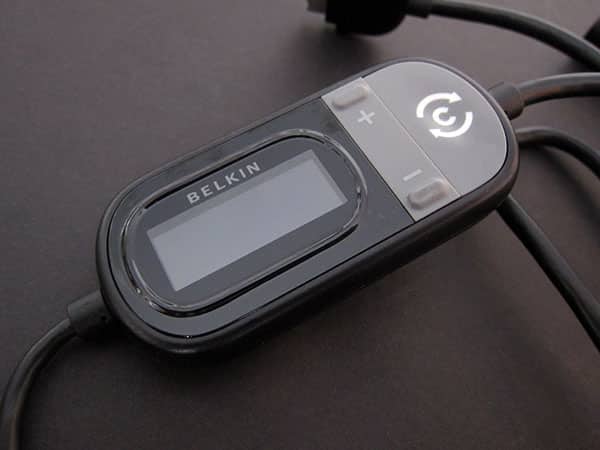
TuneCast Auto Live is an almost identical update to Belkin’s 2008 release TuneCast Auto, a black and gray combination of FM transmitter and car charger with a Dock Connector at one end and a thin car charging bulb at the other. The bulb has a small yellow light to indicate that it’s receiving power, and the Dock Connector is tailored to accommodate the often small holes in the bottoms of iPod and iPhone cases; Belkin’s transmitter housing has + and – buttons for tuning, M1 and M2 buttons for station memorization, a Pro button to toggle between three sound optimization modes, and a C button for ClearScan.

ClearScan is designed to take the hard work out of manually scanning the FM radio dial for a station that’s empty enough to receive your iPod’s or iPhone’s audio without static. Press the button and TuneCast Auto Live scans your local airwaves, looking for empty channels, then automatically tunes itself to one of them; hit it again and it’ll look elsewhere. As we noted in our prior review, the feature doesn’t work wonderfully—it seems to be 50/50 on picking good stations, as often hitting one with significant existing broadcasting as not—but after a couple of presses, you’re likely to get a channel that works.

Belkin has made a few relatively small physical changes to Auto Live.
The screen is now amber rather than bright white on black, a core in the middle of the charging cable has been removed, and the inking on the +, -, and C buttons has changed a little. No one will care much about these tweaks, though we preferred the white screen of the prior TuneCast Auto to this one. Apart from original iPhone EDGE-based TDMA interference, which has been reduced in this version, FM transmission quality has stayed essentially the same—on “good” stations, with the most aggressive monaural Pro setting turned on, there are only small but fairly persistent traces of static in the audio, but on stations with any pre-existing broadcasting taking place, TuneCast Auto Live’s signal drops out entirely. Virtually every FM transmitter on the market has suffered since an FCC crackdown on overpowered transmissions, so this model’s not substantially different from others made by major manufacturers.

Since it largely duplicates the functionality of the FM transmitter bulb, there’s relatively little to say about Belkin’s ClearScan Live application except that we’d prefer that it did more. It’s a free download, automatically triggered by connecting the plugged-in accessory to an iPhone or iPod touch; touch users will obviously want to be near a Wi-Fi network or grab the application on their own before heading out to a car.
Once it’s downloaded to an iPhone 3G or 3GS, the app requests access to your current location, ostensibly changing the ClearScan feature to use GPS and a local radio database to find the best clear stations near you. Oddly, we didn’t see much improvement when the feature was “working,” and a supposed Settings menu option to turn location assistance on and off was missing when we hunted for it. We’re not sure if these issues were due to a bug or something else, but we weren’t impressed by the results.

Apart from that feature, the application adds little. The screen shows you the two M1/M2 preset stations, offers the big C button for ClearScan, and places a tuning dial around the edges of the ClearScan button so you can change stations—a position that more than once had us accidentally changing the station we’d previously dialed in. Perhaps the single most useful changes wrought by the app are full explanations of the three Pro audio settings, and the fact that you can see which stations have been saved as presets, but these are truly trivial additions to the prior-generation hardware.











