
iLoungeiLounge
  • News
    • Apple
      • AirPods Pro
      • AirPlay
      • Apps
        • Apple Music
      • iCloud
      • iTunes
      • HealthKit
      • HomeKit
      • HomePod
      • iOS 13
      • Apple Pay
      • Apple TV
      • Siri
    • Rumors
    • Humor
    • Technology
      • CES
    • Daily Deals
    • Articles
    • Web Stories
  • iPhone
    • iPhone Accessories
  • iPad
  • iPod
    • iPod Accessories
  • Apple Watch
    • Apple Watch Accessories
  • Mac
    • MacBook Air
    • MacBook Pro
  • Reviews
    • App Reviews
  • How-to
    • Ask iLounge
Font ResizerAa
iLoungeiLounge
Font ResizerAa
Search
  • News
    • Apple
    • Rumors
    • Humor
    • Technology
    • Daily Deals
    • Articles
    • Web Stories
  • iPhone
    • iPhone Accessories
  • iPad
  • iPod
    • iPod Accessories
  • Apple Watch
    • Apple Watch Accessories
  • Mac
    • MacBook Air
    • MacBook Pro
  • Reviews
    • App Reviews
  • How-to
    • Ask iLounge
Follow US

Reviews

Reviews

Review: Belkin Secure Wired Keyboard for iPad with Lightning Connector

Last updated: May 16, 2021 7:56 pm UTC
By Nick Guy
Review: Belkin Secure Wired Keyboard for iPad with Lightning Connector

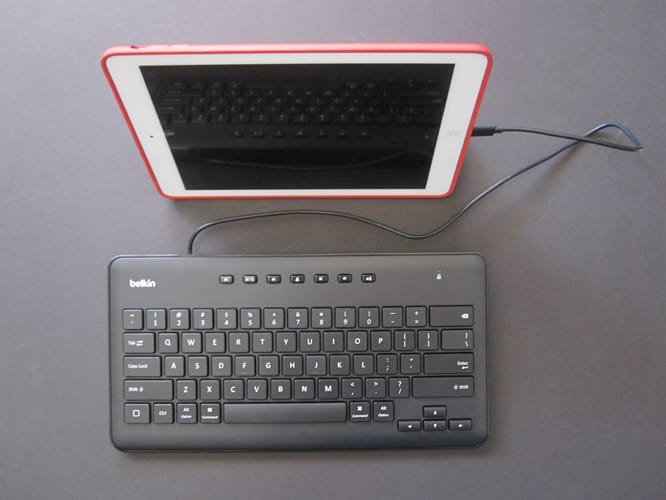
Belkin’s newest keyboard is in an arena with very few competitors. Secure Wired Keyboard for iPad with Lightning Connector ($60) — the name kind of says it all. This full-sized plastic keyboard connects to any Lightning-equipped iPad using a cable, rather than requiring a Bluetooth connection. In addition to a fully QWERTY layout, it features music tracking, volume, and lock screen buttons at the top. Available to the public, it’s aimed at institutions where Bluetooth may not be allowed, or battery life may be an issue. Even though they’re not listed on the official specs page, the keyboard works with iPhones and iPod touches as well.


Review: Belkin Secure Wired Keyboard for iPad with Lightning Connector

Likely because it’s designed to be more stationary than travel-friendly, the keyboard is chunkier than those built into cases.

Measuring just over a foot across, and about 6.6” deep, it ranges from 0.75” at its thickest, the back end, to about 0.5” at the front. Made of mostly matte black plastic—there’s a ring of glossy material around the exterior—it feels sturdy, but not as dense as one might expect. The 23.5” cable comes out of the left side of the rear edge, with the iPad instantly recognizing the keyboard as soon as it’s plugged in.


Review: Belkin Secure Wired Keyboard for iPad with Lightning Connector

One of the benefits of a physically larger keyboard is physically larger keys. Here, they’re 0.63” square, which is just a tad larger than those on Apple’s keyboards, and they’re almost a full 0.1” tall. The scissor-style keys are pretty great to type on. Not only are they large enough to prevent cramped hands, but the layout doesn’t move things around.

All of the punctuation keys are where they’re supposed to be, as are control, option, and command. It’s a small thing, but the keys sound a bit more “clacky” than “clicky” to us; if the Apple keyboard sounds metallic, this one sounds more like plastic. Somewhat surprisingly, there are only a few iPad function keys built-in. Down in the bottom left corner is a Home button, and there are small, chiclet-style tracking, lock, and volume buttons along the top.


Review: Belkin Secure Wired Keyboard for iPad with Lightning Connector

Review: Belkin Secure Wired Keyboard for iPad with Lightning Connector

The build quality is nice and the typing experience is great, meaning Belkin got the two most important qualities of its keyboard right. If there’s anything missing, it’s a stand.



Latest News
The Apple Watch Series 11 46mm GPS Is $100 Off
1 Min Read
Clamshell Style iPhone Being Looked Into By Apple
1 Min Read
Foldable iPhones May Have the Largest Battery Ever
1 Min Read
Apple and TSMC’s 10-Year Collaboration May Be Ending
1 Min Read
The 13-inch M5 iPad Pro 256GB Wi-Fi Is $149 Off
1 Min Read
M5 Pro and M5 Max Chips for the MacBook Pro could Roll Out with macOS 26.3
1 Min Read
Mac Ordering Process Revamped
1 Min Read
Check Signed By Steve Wozniak and Steve Jobs Sold For $2.4 Million
1 Min Read
The Anker 140W 4-Port GaN USB-C Charger is $35 Off
1 Min Read
No iPhone Air 2 This Year, according to Latest Report
1 Min Read
New Report Corroborates Split iPhone Release Dates
1 Min Read
Apple Losing More Researchers As They Plan To Release 2 Siri Versions
1 Min Read

iLounge logo

iLounge is an independent resource for all things iPod, iPhone, iPad, and beyond. iPod, iPhone, iPad, iTunes, Apple TV, and the Apple logo are trademarks of Apple Inc.

This website is not affiliated with Apple Inc.
iLounge © 2001 - 2025. All Rights Reserved.
  • Contact Us
  • Submit News
  • About Us
  • Forums
  • Privacy Policy
  • Terms Of Use
Welcome Back!

Sign in to your account

Lost your password?








