
The latest addition to Belkin’s series of keyboard cases for the iPad Air is Qode Thin Type Keyboard Case ($100), coming about five months after the release of the company’s first two iPad Air keyboard cases. Clearly inspired by the design of Logitech’s Ultrathin Keyboard Cover and its variants, Thin Type is more of a lid with a keyboard inside than an actual case. It magnetically attaches to the iPad’s edge like a Smart Cover when not in use, protecting the screen. Inside, there’s a ridge that holds the tablet, with a full keyboard below; it connects using Bluetooth. The accessory is available in white and gray, and it ships with a Micro-USB charging cable. Its battery is said to last up to six months.
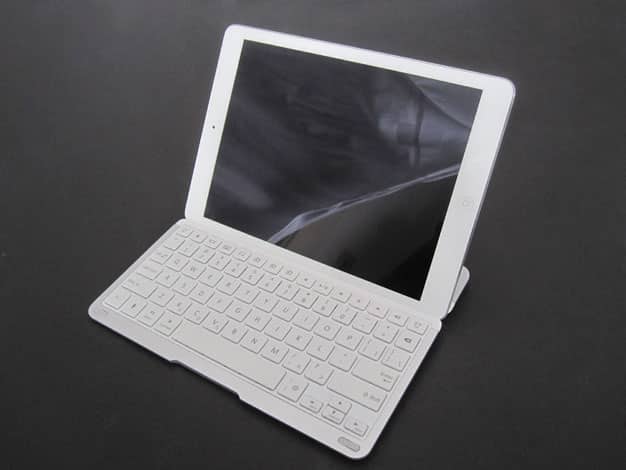
Unlike Logitech’s Ultrathin covers, which are flat on the outside, Qode Thin Type has a more distinctive shape. Towards the left edge, where the metallic spine connects to the iPad’s body, there’s a raised plastic block that holds the battery. Belkin says it’s rated for 79 hours of active use, and 3,100 hours—about 129 days—of standby time.
This is where you’ll find the Micro-USB charging port. There’s also a raised metal ridge, corresponding to where the tablet rests when in typing mode. The final 4.3” or so are flat, with the exception of small rubber nubs at either corner. Although the cover is 0.4” at its thickest point, the aluminum is only 0.17”.


The keyboard cover uses a number of techniques to help save its own battery life, and the iPad Air’s battery life, as well. Embedded magnets lock the tablet when Qode Thin Type is being used as a lid — a standard but appreciated feature. When you switch to typing mode, the iPad gets inserted into the ridge, and can be positioned in either landscape or portrait orientation. A small button gets depressed when you do so, signaling the keyboard to wake from sleep and reconnect, and turning on the iPad’s screen, if it’s off.
Pull the tablet away, and the keyboard goes into a resting mode. We found the system to work consistently well.

As for the keys themselves, they’re very close to great, with a small layout issue being the only real negative factor. Although the letter keys are somewhat small at 0.52” tall by 0.56” wide—others are shorter and narrower—we found them to be very comfortable to type on. There’s a slightly textured finish that feels pleasant to the touch, and the keys have a tactility similar to that of Apple’s keyboards. They travel further than the thickness of the keyboard would have you think, and click pleasantly. Across the top there are iOS function keys, including three specific to iTunes Radio: they replicate the “Play More Like This,” “Never Play This Song,” and “Add to iTunes Wish List” features. Somewhat odd, but not a bad thing.











