
iLoungeiLounge
  • News
    • Apple
      • AirPods Pro
      • AirPlay
      • Apps
        • Apple Music
      • iCloud
      • iTunes
      • HealthKit
      • HomeKit
      • HomePod
      • iOS 13
      • Apple Pay
      • Apple TV
      • Siri
    • Rumors
    • Humor
    • Technology
      • CES
    • Daily Deals
    • Articles
    • Web Stories
  • iPhone
    • iPhone Accessories
  • iPad
  • iPod
    • iPod Accessories
  • Apple Watch
    • Apple Watch Accessories
  • Mac
    • MacBook Air
    • MacBook Pro
  • Reviews
    • App Reviews
  • How-to
    • Ask iLounge
Font ResizerAa
iLoungeiLounge
Font ResizerAa
Search
  • News
    • Apple
    • Rumors
    • Humor
    • Technology
    • Daily Deals
    • Articles
    • Web Stories
  • iPhone
    • iPhone Accessories
  • iPad
  • iPod
    • iPod Accessories
  • Apple Watch
    • Apple Watch Accessories
  • Mac
    • MacBook Air
    • MacBook Pro
  • Reviews
    • App Reviews
  • How-to
    • Ask iLounge
Follow US

Reviews

Reviews

Review: Belkin Power Dock

Last updated: May 15, 2021 6:48 pm UTC
By Jeremy Horwitz
Review: Belkin Power Dock

Over the past week, Belkin has released four iPod accessories that surprised us a little — not for their innovation, but for their simplicity. Two of the accessories are simple iPod chargers: Belkin’s Power Adapter ($25) and Charging Kit for iPod ($35). The other two are iPod docks, the Power Dock ($35) and the Power Dock AV ($50).

Review: Belkin Power Dock

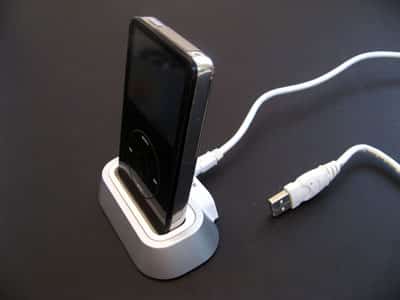
Power Dock is a silver and white plastic alternative to Apple’s iPod Universal Dock, packaged with a USB cable for connection to your PC or Mac, and Dock Adapters for the 5G iPod and both versions of the iPod nano. Power Dock AV has those parts, plus a composite audio/video cable, and a wall charger in the box.

Both versions of the Power Dock are the same, and have rubberized bottoms for anti-scuff stability on a flat surface; the only differences are the pack-ins. The standard Power Dock is ready to sync your iPod, while AV’s components let you sync, wall-charge, and output both audio and video from it.


Review: Belkin Power Dock

Though Belkin’s relatively late to market with each of these options, the ideas here are fairly obvious: go after low-priced product categories that have been dominated by Apple or Griffin, offering slightly lower prices and/or more limited features. Consequently, Belkin’s dock portion of the Power Dock and Power Dock AV packages is more interesting for its cosmetics than its features. Though its silver portion isn’t made from aluminum, like the bodies of Apple’s Cinema Displays or Griffin’s competing, more expensive AirDock, it’s hard to tell the difference. Consequently, the Power Docks are the least expensive docks we’ve seen that visually match Apple’s Pro series computers and silver home AV systems.


The standard Power Dock’s packed-in USB cable is interesting in that Apple doesn’t include a cable with its own iPod Universal Dock; you’re supposed to use the one that comes with the iPod.

But most competing low-end iPod docks include a USB cable for the same reason Belkin has: Power Dock’s integrated mini USB connector doesn’t electronically interface with either side of Apple’s cable.


Review: Belkin Power Dock

They’re not quite the rivals of Apple’s or Griffin’s docks electronically, though. Neither Power Dock nor Power Dock AV includes a remote control or remote control sensor, so if you decide in the future that you want to control your iPod from a distance while it’s inside the dock, that’s not an option here. Belkin also doesn’t include an S-Video port on either unit’s rear: the ports are solely for composite AV and USB. AirDock has a similar limitation, but includes a good RF remote control in the box, which is missing here.


Review: Belkin Power Dock

Performance-wise, all of Belkin’s accessories do what they’re supposed to do. The car and home chargers charged our iPods just as they were supposed to, and the docks worked properly with both computers and TV/wall outlet combinations.



Latest News
The AirPods Pro 3 is $20 Off
1 Min Read
Exynos 2600 Chip 2nm Process Revealed by Samsung
1 Min Read
New Celebrity Ad Campaign Featuring Travis Scott Released by Beats
1 Min Read
Australia Getting Hypertension Notification Feature
1 Min Read
The 14-inch MacBook Pro with M5 Chip 16GB RAM/512GB is $250 Off
1 Min Read
Noise and Static on AirPods Pro 3 Still Unfixed
1 Min Read
New iMac with 24-inch OLED Display May be Brighter With 600 Nits
1 Min Read
The 15-inch M4 MacBook Air 256GB Is $250 Off
1 Min Read
Internal Kernel Debug Kit from Apple Reveals Tests for a MacBook with A15 Chip
1 Min Read
Apple Currently In Talks With Suppliers for Chip Assembly & Packaging of iPhones in India
1 Min Read
Apple Allows Easier Battery Replacement For M5 MacBook Pro with 14-inch Display
1 Min Read
The Apple Watch SE 3 44mm GPS is $50 Off
1 Min Read

iLounge logo

iLounge is an independent resource for all things iPod, iPhone, iPad, and beyond. iPod, iPhone, iPad, iTunes, Apple TV, and the Apple logo are trademarks of Apple Inc.

This website is not affiliated with Apple Inc.
iLounge © 2001 - 2025. All Rights Reserved.
  • Contact Us
  • Submit News
  • About Us
  • Forums
  • Privacy Policy
  • Terms Of Use
Welcome Back!

Sign in to your account

Lost your password?








