
Unlike rivals who rushed to release keyboard cases for the first-generation iPad, Belkin took its sweet time in developing the Keyboard Folio for iPad 2 ($100), trying to come out with something unique. And while this accessory makes some trade-offs of its own in the name of achieving a proper balance of size and keyboard performance, it does pull off an impressive feat: it has a legitimately great keyboard, an improved hard plastic design that replaces the lower-quality rubber alternatives that were so common in the past. If Keyboard Folio’s case was better, it would have been even higher rated.

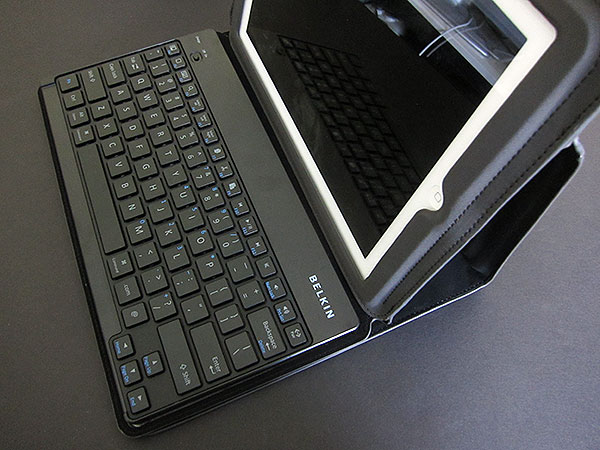
Keyboard Folio is almost identical to the company’s earlier Slim Folio Stand, with the obvious addition of the keyboard that makes it incredibly long when unfolded—about 27.5” total—and thicker. There are a few other small differences, though: the blue lining has been switched to black, there’s no place to tuck the front cover into on the back, and the little indent on the right edge of the front cover is gone. All of the holes and openings are the same as before, although those on the top and bottom edge are more deeply recessed because of the additional material; Keyboard Folio is about an inch taller than Slim Folio Stand, evenly distributed on either side. This extra space allows for a larger keyboard. While these little design changes conspire to make the case overly large and unusual in its thickness, they do collectively provide substantial protection for the iPad 2 inside.


We are truly impressed with the quality of the keyboard that Belkin has used: the keys feel similar to those of our previous favorite, Targus’ Versavu Keyboard and Case, and are about the same size.
Because Keyboard Folio is longer, though, there’s more room for a standard key arrangement and larger auxiliary keys. Specifically, the brackets, colon, and question mark keys are all where they’re supposed to be, and full-sized. This sentiment recurs with almost every new keyboard case that arrives—and thus should be understood as part of a chronological progression of improvement—but Keyboard Folio is currently one of the best keyboards for the iPad we’ve used. It rivals Apple’s Wireless Keyboard in performance, feeling great and registering all of our input accurately. There’s virtually no learning curve to move from a full-sized keyboard to this one. We would have no qualms about using this regularly, and the 60-hour active/2,000-hour standby rechargeable battery is solid, too; a long micro-USB charging cable is included for refueling.

In addition to the standard Home, keyboard pop-up, Spotlight, cut, copy, paste, track, and volume control buttons, there are some uncommon keys: Select All, Select Left, Select Right, a pair button, dedicated .com and @ keys, plus a device switcher. That last button allows you to quickly move between two synced Bluetooth devices, such as an iPad and an iPhone, but there’s no documentation that says as much.
We were also impressed to see the inclusion of a number pad as a secondary function of the letter keys, accessible when the “Fn” key on the bottom left of the keyboard is held down. As an aside, though no company has integrated a key to call up the app switcher, and this may very well be a limitation on Apple’s end, it would be nice to see in the future.


Actually positioning and using the keyboard isn’t nearly as clean and neat as it could be. When unfurled, Keyboard Folio is deeper than most of the best-designed cases we have seen, and feels a little less sturdy. To stand it up, the two far segments—the keyboard and the front flap—must sit flush against one another. In our testing, the keyboard had to be positioned at least at the edge, although it could be pulled out further for a more shallow viewing angle. Push it back, though, and the iPad 2 falls right over. It’s not the best design we’ve seen, though it needs to be said that when it’s used as shown in Belkin’s product images, it’s more than stable enough for regular typing.

We do have to mention one small issue that we had with our original test unit of Keyboard Folio.











