
iLoungeiLounge
  • News
    • Apple
      • AirPods Pro
      • AirPlay
      • Apps
        • Apple Music
      • iCloud
      • iTunes
      • HealthKit
      • HomeKit
      • HomePod
      • iOS 13
      • Apple Pay
      • Apple TV
      • Siri
    • Rumors
    • Humor
    • Technology
      • CES
    • Daily Deals
    • Articles
    • Web Stories
  • iPhone
    • iPhone Accessories
  • iPad
  • iPod
    • iPod Accessories
  • Apple Watch
    • Apple Watch Accessories
  • Mac
    • MacBook Air
    • MacBook Pro
  • Reviews
    • App Reviews
  • How-to
    • Ask iLounge
Font ResizerAa
iLoungeiLounge
Font ResizerAa
Search
  • News
    • Apple
    • Rumors
    • Humor
    • Technology
    • Daily Deals
    • Articles
    • Web Stories
  • iPhone
    • iPhone Accessories
  • iPad
  • iPod
    • iPod Accessories
  • Apple Watch
    • Apple Watch Accessories
  • Mac
    • MacBook Air
    • MacBook Pro
  • Reviews
    • App Reviews
  • How-to
    • Ask iLounge
Follow US

Reviews

Reviews

Review: Belkin FlipBlade Adjust

Last updated: May 14, 2021 7:09 pm UTC
By Jeremy Horwitz
Review: Belkin FlipBlade Adjust

Though it’s been relatively quiet on the electronic accessory front in recent months — particularly so for Apple’s iPads — Belkin has mastered one type of tablet add-on: the stand. While competitors have targeted $50 price points for more than occasionally oversized or over-engineered alternatives, Belkin has scored direct hits with two inexpensive options that look great, feel great, and work well. The first was FlipBlade, a blue and silver iPad holder with a unique spring release mechanism, and now it has trumped that design with FlipBlade Adjust ($30), which offers even greater versatility at the same price.

Review: Belkin FlipBlade Adjust

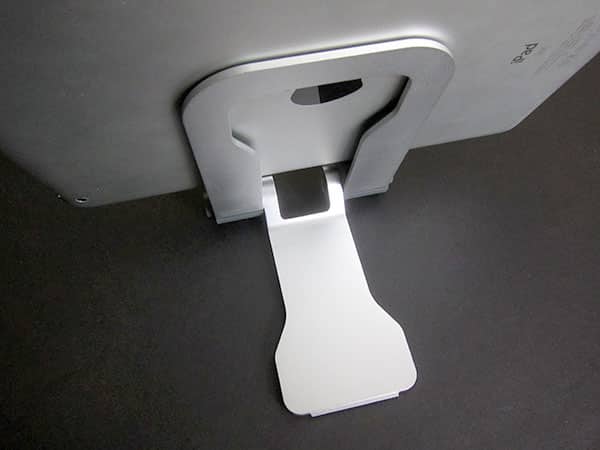
Many of the iPad stands we’ve reviewed use metal sparingly if at all, but like FlipBlade, aluminum is a critical component in FlipBlade Adjust. Sculpted metal is used for both the frame and a new flip-out leg, with blue-gray plastic connectors and rubber pads in all the right places.

Your bare iPad or iPad 2 is protected against scratches at every point where it might make contact with the scoop-shaped holder, which now has a hole in its bottom for a Dock Connector cable; another pad on the bottom of the leg keeps it from scuffing or getting scuffed on a table. Encased iPads and iPad 2s also work in Adjust, as do iPhones and iPod touches, even though Belkin doesn’t pitch it as designed for anything save tablets.


Review: Belkin FlipBlade Adjust

What’s fascinating here is that Belkin has strategically reduced the quantity and thickness of materials used in FlipBlade Adjust while maintaining stability and increasing functionality—a balance achieved by using wider, taller metal rather than thicker plastic. The spring-loaded opening mechanism was nice in the first model, but has disappeared here in favor of a set of two spring-based locking buttons on Adjust’s sides. Press them both together and this stand can be shifted from a closed position into one of four different “open” angles, or converted from open to closed.


Review: Belkin FlipBlade Adjust

Review: Belkin FlipBlade Adjust

Folded down, FlipBlade Adjust measures only barely over 4” wide at its button points, and 3.75” wide elsewhere; it’s a little under 5.75” tall and 1” thick at its tallest and thickest points, with only 1/8” at its thinnest. (The original FlipBlade was nearly 3” wide, 5” tall, and 1” thick at its thickest, or 0.25” at its thinnest.) As a modest trade-off, less of the metal is covered this time than before, which means that FlipBlade Adjust will be a little more susceptible to scratches and dings, assuming that you make no effort to keep it in a soft, padded portion of a bag.


Review: Belkin FlipBlade Adjust

The only really important thing that was missing from FlipBlade was multiple viewing angle support, and even then, that model’s price and build quality were enough to compensate for the omission.

With FlipBlade Adjust, there’s no compromise: you get it all. At its deepest reclining angle, FlipBlade Adjust holds the iPad or iPad 2 almost as flat as a traditional keyboard, while the maximum upright position mimics the gentle recline of Apple’s own docks. Using the side buttons, you can ratchet the stand into two interim angles that compromise between typing and viewing, or viewing with a greater recline. All of the angles are firm; only the deepest typing recline provides a tiny, inoffensive bit of give when it’s pressed upon.


Review: Belkin FlipBlade Adjust

FlipBlade set new standards for its price point when it was released, and FlipBlade Adjust does the same.



Latest News
The 14-inch MacBook Pro with M5 Chip 16GB RAM/512GB is $250 Off
1 Min Read
Noise and Static on AirPods Pro 3 Still Unfixed
1 Min Read
New iMac with 24-inch OLED Display May be Brighter With 600 Nits
1 Min Read
The 15-inch M4 MacBook Air 256GB Is $250 Off
1 Min Read
Internal Kernel Debug Kit from Apple Reveals Tests for a MacBook with A15 Chip
1 Min Read
Apple Currently In Talks With Suppliers for Chip Assembly & Packaging of iPhones in India
1 Min Read
Apple Allows Easier Battery Replacement For M5 MacBook Pro with 14-inch Display
1 Min Read
The Apple Watch SE 3 44mm GPS is $50 Off
1 Min Read
20th Anniversary iPhone May Launch in Two Years
1 Min Read
Better Image Generation Capabilities and Apple Music Integration Coming to ChatGPT
1 Min Read
A20 Pro Chip Coming to Next Gen iPad Mini OLED
1 Min Read
Amazon has the AirTag 4 Pack Marked $29 off
1 Min Read

iLounge logo

iLounge is an independent resource for all things iPod, iPhone, iPad, and beyond. iPod, iPhone, iPad, iTunes, Apple TV, and the Apple logo are trademarks of Apple Inc.

This website is not affiliated with Apple Inc.
iLounge © 2001 - 2025. All Rights Reserved.
  • Contact Us
  • Submit News
  • About Us
  • Forums
  • Privacy Policy
  • Terms Of Use
Welcome Back!

Sign in to your account

Lost your password?








