
iLoungeiLounge
  • News
    • Apple
      • AirPods Pro
      • AirPlay
      • Apps
        • Apple Music
      • iCloud
      • iTunes
      • HealthKit
      • HomeKit
      • HomePod
      • iOS 13
      • Apple Pay
      • Apple TV
      • Siri
    • Rumors
    • Humor
    • Technology
      • CES
    • Daily Deals
    • Articles
    • Web Stories
  • iPhone
    • iPhone Accessories
  • iPad
  • iPod
    • iPod Accessories
  • Apple Watch
    • Apple Watch Accessories
  • Mac
    • MacBook Air
    • MacBook Pro
  • Reviews
    • App Reviews
  • How-to
    • Ask iLounge
Font ResizerAa
iLoungeiLounge
Font ResizerAa
Search
  • News
    • Apple
    • Rumors
    • Humor
    • Technology
    • Daily Deals
    • Articles
    • Web Stories
  • iPhone
    • iPhone Accessories
  • iPad
  • iPod
    • iPod Accessories
  • Apple Watch
    • Apple Watch Accessories
  • Mac
    • MacBook Air
    • MacBook Pro
  • Reviews
    • App Reviews
  • How-to
    • Ask iLounge
Follow US

Reviews

Reviews

Review: Belkin Express Dock for iPad

Last updated: May 16, 2021 7:58 pm UTC
By Nick Guy
Review: Belkin Express Dock for iPad

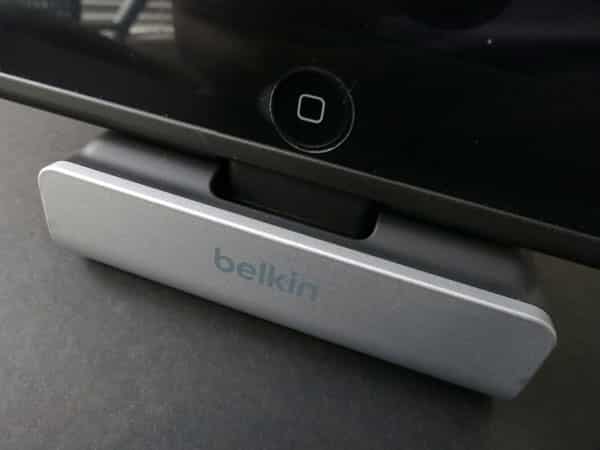
One year after the Lightning connector standard debuted in new Apple devices, case compatibility remains the single biggest issue with Lightning-based docks. Belkin’s new Express Dock for iPad ($60) attempts to solve that problem with a unique, adjustable Lightning plug. Although it still has a wide, Dock Connector-sized base around it, the plug raises and lowers as you turn a dial on the back of the dock. Because most fourth-generation iPad cases are also designed to fit prior Dock Connector models, the openings should be large enough for this device to work when encased or bare; however, encased iPad mini, iPhone 5/5s/5c, and iPod touch 5G compatibility will be more limited. The integrated USB cable is four feet long, and supports both syncing and charging.


Review: Belkin Express Dock for iPad

The design of this dock is based heavily on that of Belkin’s earlier Charge + Sync Dock for iPhone 5. As with that option, the simplest way to sum up the Express Dock for iPad is as a fairly long Lightning to USB Cable with a basic stand permanently attached.

A black-jacketed USB plug and cable run into a silver metallic plastic and matte black rubber stand with a flexible Lightning plug in the center. Around and behind the Lightning plug, there’s a rubber coating that helps prevent scratches to the iPad’s casing. Similar material is found on the underside, adding some grip. Express Dock is notably physically larger than the iPhone version, measuring about 3” tall, 3.25” deep, and 3.25” wide; it makes sense that an accessory designed to support a larger device would be larger.


Review: Belkin Express Dock for iPad

Review: Belkin Express Dock for iPad

Express Dock for iPad’s key feature is the dial, located behind the tablet support. It’s used to raise and lower the Lightning plug so as to better accommodate cases.

At its lowest, the base around the plug sits flush with the material on either side of it. Spin the dial all the way, and the plug will raise about an eighth of an inch. Following Apple’s odd design dictates, Belkin has the Dock Connector-sized base move up with the Lightning plug, so cases with tight Lightning plug-sized openings won’t be able to make a physical connection. This system can help with full-sized iPads when the case material is too thick to otherwise support docking, but it’s not a perfect solution, particularly for encased iPad minis.


Review: Belkin Express Dock for iPad

Review: Belkin Express Dock for iPad

We appreciate that Belkin is trying to do what it can to increase case compatibility while dealing with Apple’s design mandates. Unfortunately, Express Dock for iPad doesn’t go far enough in solving the issue.



Latest News
The 14-inch MacBook Pro with M5 Chip 16GB RAM/512GB is $250 Off
1 Min Read
Noise and Static on AirPods Pro 3 Still Unfixed
1 Min Read
New iMac with 24-inch OLED Display May be Brighter With 600 Nits
1 Min Read
The 15-inch M4 MacBook Air 256GB Is $250 Off
1 Min Read
Internal Kernel Debug Kit from Apple Reveals Tests for a MacBook with A15 Chip
1 Min Read
Apple Currently In Talks With Suppliers for Chip Assembly & Packaging of iPhones in India
1 Min Read
Apple Allows Easier Battery Replacement For M5 MacBook Pro with 14-inch Display
1 Min Read
The Apple Watch SE 3 44mm GPS is $50 Off
1 Min Read
20th Anniversary iPhone May Launch in Two Years
1 Min Read
Better Image Generation Capabilities and Apple Music Integration Coming to ChatGPT
1 Min Read
A20 Pro Chip Coming to Next Gen iPad Mini OLED
1 Min Read
Amazon has the AirTag 4 Pack Marked $29 off
1 Min Read

iLounge logo

iLounge is an independent resource for all things iPod, iPhone, iPad, and beyond. iPod, iPhone, iPad, iTunes, Apple TV, and the Apple logo are trademarks of Apple Inc.

This website is not affiliated with Apple Inc.
iLounge © 2001 - 2025. All Rights Reserved.
  • Contact Us
  • Submit News
  • About Us
  • Forums
  • Privacy Policy
  • Terms Of Use
Welcome Back!

Sign in to your account

Lost your password?








