
iLoungeiLounge
  • News
    • Apple
      • AirPods Pro
      • AirPlay
      • Apps
        • Apple Music
      • iCloud
      • iTunes
      • HealthKit
      • HomeKit
      • HomePod
      • iOS 13
      • Apple Pay
      • Apple TV
      • Siri
    • Rumors
    • Humor
    • Technology
      • CES
    • Daily Deals
    • Articles
    • Web Stories
  • iPhone
    • iPhone Accessories
  • iPad
  • iPod
    • iPod Accessories
  • Apple Watch
    • Apple Watch Accessories
  • Mac
    • MacBook Air
    • MacBook Pro
  • Reviews
    • App Reviews
  • How-to
    • Ask iLounge
Font ResizerAa
iLoungeiLounge
Font ResizerAa
Search
  • News
    • Apple
    • Rumors
    • Humor
    • Technology
    • Daily Deals
    • Articles
    • Web Stories
  • iPhone
    • iPhone Accessories
  • iPad
  • iPod
    • iPod Accessories
  • Apple Watch
    • Apple Watch Accessories
  • Mac
    • MacBook Air
    • MacBook Pro
  • Reviews
    • App Reviews
  • How-to
    • Ask iLounge
Follow US

Reviews

Reviews

Review: Belkin Chef Stand + Stylus for iPad + iPad 2

Last updated: May 17, 2021 12:00 pm UTC
By Nick Guy
Review: Belkin Chef Stand + Stylus for iPad + iPad 2

We have to give Belkin credit for recognizing and acting on the growing use of iPads in the kitchen. Since the tablet’s introduction, it has quickly become a cooking mainstay, used for everything from displaying recipes to simply playing back content while cooking. To capitalize on this, the company has introduced three new products in the “Kitchen Accessories” category: Chef Stand + Stylus ($40), Kitchen Cabinet Mount ($50), and Fridge Mount for iPad 2 ($40). Each serves the same general purpose — hold the tablet so you don’t have to — but goes about the task in a different way.

Review: Belkin Chef Stand + Stylus for iPad + iPad 2

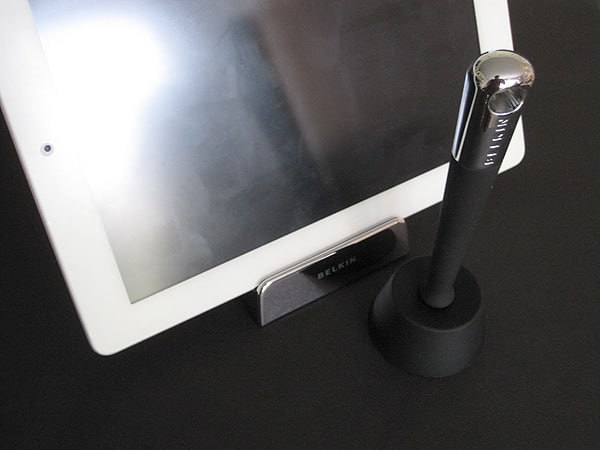
Chef Stand + Stylus is a simple solution, but very wisely thought out. This set is composed of three components, each a nice-looking combination of black rubber and chrome-colored plastic or metal: there’s an iPad/iPad 2 stand, a stylus, and a stylus holder. The stand has a large, round base to weigh it down, plus a simple lip that allows either of Apple’s tablets to be held safely in landscape or portrait orientation.

Belkin’s design also allows for the use of iPads in cases, a feature that is very much appreciated. However, there is only one viewing angle, which is somewhat of a limitation.


Review: Belkin Chef Stand + Stylus for iPad + iPad 2

Review: Belkin Chef Stand + Stylus for iPad + iPad 2

Belkin’s stylus feels substantial, and has a few nice features that make it especially helpful in the kitchen. Both the shaft and tip are are covered in rubber, with the metallic end providing some heft. Like most capacitive styli, this one works just fine with the iPad’s multi-touch display. Beyond its ability to tap, swipe, and scroll on the screen, it has an extra trick: there’s a magnet in the tip that can be used to wake an iPad 2 when it is asleep. Simply swiping over the right side of the bezel triggers the magnetic sensor and turns the device on, which nicely enables you to avoid touching your iPad’s buttons with dirty fingers.


The stylus doesn’t turn the iPad 2’s screen off, though, as that requires a constant magnetic connection.


Review: Belkin Chef Stand + Stylus for iPad + iPad 2

The stylus holder is the simplest piece of the set. It’s a truncated cone, made of one piece of rubber, with a hole in the center that goes all the way through. The stylus’s tip fits right in, and the pen stands upright. Press photos show it hovering above the base like something you might find in a science museum gift shop, but unfortunately, those images only demonstrate that the matching stylus and base are actually separate pieces. The stand can fit inside the stand’s round base to keep the solution compact.


Review: Belkin Chef Stand + Stylus for iPad + iPad 2

Importantly, all of the components can be hand-washed with warm, soapy water, which helps the Chef Stand and Stylus feel even more kitchen-safe than otherwise similar alternatives.



Latest News
The 14-inch MacBook Pro with M5 Chip 16GB RAM/512GB is $250 Off
1 Min Read
Noise and Static on AirPods Pro 3 Still Unfixed
1 Min Read
New iMac with 24-inch OLED Display May be Brighter With 600 Nits
1 Min Read
The 15-inch M4 MacBook Air 256GB Is $250 Off
1 Min Read
Internal Kernel Debug Kit from Apple Reveals Tests for a MacBook with A15 Chip
1 Min Read
Apple Currently In Talks With Suppliers for Chip Assembly & Packaging of iPhones in India
1 Min Read
Apple Allows Easier Battery Replacement For M5 MacBook Pro with 14-inch Display
1 Min Read
The Apple Watch SE 3 44mm GPS is $50 Off
1 Min Read
20th Anniversary iPhone May Launch in Two Years
1 Min Read
Better Image Generation Capabilities and Apple Music Integration Coming to ChatGPT
1 Min Read
A20 Pro Chip Coming to Next Gen iPad Mini OLED
1 Min Read
Amazon has the AirTag 4 Pack Marked $29 off
1 Min Read

iLounge logo

iLounge is an independent resource for all things iPod, iPhone, iPad, and beyond. iPod, iPhone, iPad, iTunes, Apple TV, and the Apple logo are trademarks of Apple Inc.

This website is not affiliated with Apple Inc.
iLounge © 2001 - 2025. All Rights Reserved.
  • Contact Us
  • Submit News
  • About Us
  • Forums
  • Privacy Policy
  • Terms Of Use
Welcome Back!

Sign in to your account

Lost your password?








