
iLoungeiLounge
  • News
    • Apple
      • AirPods Pro
      • AirPlay
      • Apps
        • Apple Music
      • iCloud
      • iTunes
      • HealthKit
      • HomeKit
      • HomePod
      • iOS 13
      • Apple Pay
      • Apple TV
      • Siri
    • Rumors
    • Humor
    • Technology
      • CES
    • Daily Deals
    • Articles
    • Web Stories
  • iPhone
    • iPhone Accessories
  • iPad
  • iPod
    • iPod Accessories
  • Apple Watch
    • Apple Watch Accessories
  • Mac
    • MacBook Air
    • MacBook Pro
  • Reviews
    • App Reviews
  • How-to
    • Ask iLounge
Font ResizerAa
iLoungeiLounge
Font ResizerAa
Search
  • News
    • Apple
    • Rumors
    • Humor
    • Technology
    • Daily Deals
    • Articles
    • Web Stories
  • iPhone
    • iPhone Accessories
  • iPad
  • iPod
    • iPod Accessories
  • Apple Watch
    • Apple Watch Accessories
  • Mac
    • MacBook Air
    • MacBook Pro
  • Reviews
    • App Reviews
  • How-to
    • Ask iLounge
Follow US

Reviews

Reviews

Review: Belkin TuneCast Auto Live with Lightning Connector

Last updated: May 16, 2021 7:56 pm UTC
By Nick Guy
Review: Belkin TuneCast Auto Live with Lightning Connector

FM transmitters, once some of the more common iPod accessories around, have almost totally fallen by the wayside thanks to the proliferation of Bluetooth connections and aux inputs in cars and speakers. There are still vehicles that don’t have these more advanced inputs though, and iPhone users who want to listen to their music through the FM radio. That’s what Belkin’s TuneCast Auto Live with Lightning Connector ($70) is for. A small update to the 2010 30-pin based system of the same name — itself a revised edition of a 2008 version — the transmitter doesn’t offer a lot of surprises, but it gets the job done.

Review: Belkin TuneCast Auto Live with Lightning Connector

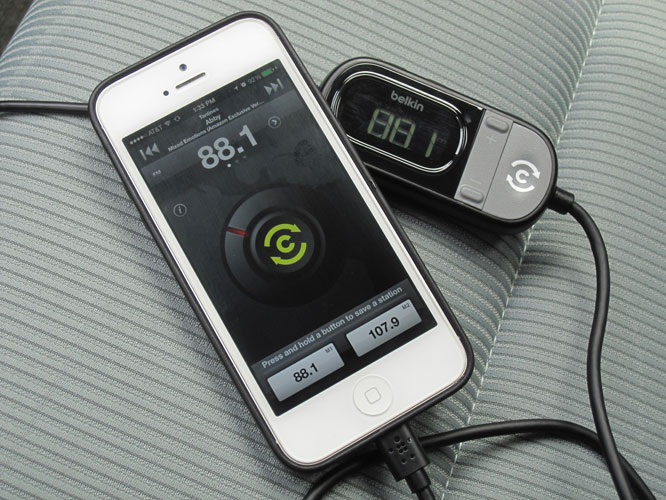
With a Lightning plug on one side, a car charging plug on the other, and a tuning module in-between, TuneCast Auto Live works in conjunction with Belkin’s free app to find the clearest station for broadcasting. The controller in the middle is essentially the same as the one found on the last edition of the product.

In addition to a small LCD display showing the currently-tuned station, there are two memory preset buttons, station toggle buttons, a “ClearScan” button that’ll help find the best station, and a “PRO” button “that optimizes audio and boosts volume.” Instead of red/orange characters, the numbers on this one glow a pale green. The app isn’t actually necessarily, as it simply replicates the functionality of the module. Although there have been some small changes to the app, it looks basically the same as it did in 2010.


Review: Belkin TuneCast Auto Live with Lightning Connector

Review: Belkin TuneCast Auto Live with Lightning Connector

Depending on how TuneCast Auto Live is used to find a radio station, results will vary in terms of transmission quality. When we hit the ClearScan button, it actually took us to a fully functioning commercial radio station.

Needless to say, the power of that station drowned out what we were trying to broadcast. Playing around with the dial a bit though, we were able to find a clearer station, and were very impressed with the audio quality. Except for a few minor hisses and hiccups, it sounded quite good, especially for an over-the-air connection.


Review: Belkin TuneCast Auto Live with Lightning Connector

Belkin is essentially selling the same product it was six years ago. It’s swapped out the 30-pin connector for a Lightning plug and dropped the price by $10, but functionally and aesthetically, it’s the same thing.



Latest News
The Apple Watch Series 11 46mm GPS Is $100 Off
1 Min Read
Clamshell Style iPhone Being Looked Into By Apple
1 Min Read
Foldable iPhones May Have the Largest Battery Ever
1 Min Read
Apple and TSMC’s 10-Year Collaboration May Be Ending
1 Min Read
The 13-inch M5 iPad Pro 256GB Wi-Fi Is $149 Off
1 Min Read
M5 Pro and M5 Max Chips for the MacBook Pro could Roll Out with macOS 26.3
1 Min Read
Mac Ordering Process Revamped
1 Min Read
Check Signed By Steve Wozniak and Steve Jobs Sold For $2.4 Million
1 Min Read
The Anker 140W 4-Port GaN USB-C Charger is $35 Off
1 Min Read
No iPhone Air 2 This Year, according to Latest Report
1 Min Read
New Report Corroborates Split iPhone Release Dates
1 Min Read
Apple Losing More Researchers As They Plan To Release 2 Siri Versions
1 Min Read

iLounge logo

iLounge is an independent resource for all things iPod, iPhone, iPad, and beyond. iPod, iPhone, iPad, iTunes, Apple TV, and the Apple logo are trademarks of Apple Inc.

This website is not affiliated with Apple Inc.
iLounge © 2001 - 2025. All Rights Reserved.
  • Contact Us
  • Submit News
  • About Us
  • Forums
  • Privacy Policy
  • Terms Of Use
Welcome Back!

Sign in to your account

Lost your password?








