
Originally released in late 2005 and subsequently updated in 2007, Apple’s subsequently revised its Universal Dock ($59) kit again in late 2010 to bring the set in line with iPod, iPhone, and accessory tweaks that have taken place over the past two years. While the core ingredients — a glossy white dock, Infrared remote control, and five Universal Dock Adapters — are similar to parts we’ve seen before, the specifics have changed a little.
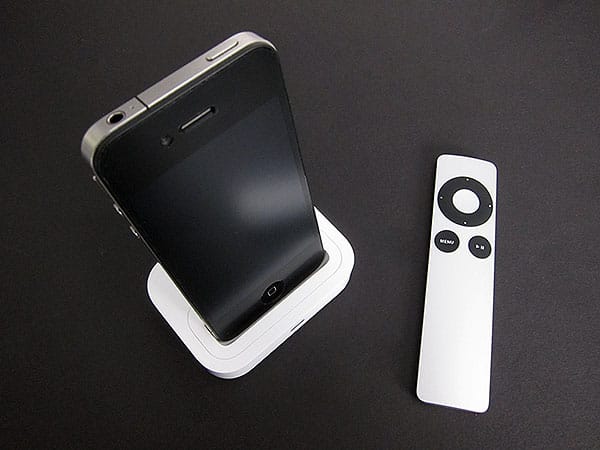
Start with the Universal Dock, which looks almost identical to the version introduced in 2007. Made from glossy white plastic with a “well” in the top center that can fit any Dock Connector-equipped iPod, the Dock has received only the most modest external changes: the “iPod” name is gone from its gray rubber bottom, and a new A1371 part number differentiates it from the A1256 prior model. Since the well hasn’t been redesigned, the touchscreen of the sixth-generation iPod nano starts just a little below the Dock’s top surface—not enough to radically impact use of the display, but a change could have been made to accommodate Apple’s newer, ever-smaller devices. On the other hand, Apple’s device-specific, “non-Universal” Docks are generally made only to work with one specific model of iPod or iPhone, and this one does a good job with virtually all of them.
Even iPhone 4 speakerphone functionality works properly, and unlike the dedicated iPhone 4 Dock, this one works with most iPhone 4 cases.

Other external features of the new Universal Dock are more or less the same. There’s a pill-shaped Infrared sensor on the front, and two ports on the back for 3.5mm audio output and Dock Connector I/O. As with all of Apple’s past Docks, this one has no issue whatsoever connecting to a computer for synchronization and charging, or a stereo system to provide attenuated line-level output. Other types of accessories may or may not work when daisy-chained through the Dock’s rear port to an iPod or iPhone placed on top. Due to chip changes inside the new Universal Dock, error messages now pop up to let you know that the accessories can’t be linked together: “This accessory only works when directly connected to iPhone.” Some accessories, including Apple’s AV Cables, will work without complaint, but may take a split-second or second longer to do so than with the last-generation Universal Dock.

Additional changes are more positive. The included Apple Remote is the 2009 edition, made from aluminum and black plastic, now possessing seven buttons rather than the six found on the earlier 2005-vintage Apple Remote design.
It looks, feels, and works great, though the Infrared technology it relies upon to communicate with the Universal Dock works primarily when you point the remote directly at the dock. Radio-based RF remotes are better, but the Apple Remote is as slick as Infrared versions come.

Due to the passage of time, Apple’s old Universal Dock Adapters have been swapped in this package for versions compatible with the iPhone 4, iPod touch 4G, iPhone 3G/3GS, iPod touch 2G/3G, and fifth-generation iPod nano—neither the iPod classic nor the current iPod nano has an Adapter in the package. New to the package are an iPod/iPhone-ready 1-Amp wall power adapter and a USB cable, neither included with the prior Universal Docks. These items previously were sold separately for $29 total, so their inclusion in the 2010 Universal Dock set is welcome.

Overall, the latest Universal Dock package represents a fairly significant set of improvements over the prior version, albeit with two caveats. First, the Universal Dock has increased again in price, reaching a new high of $59, which is a fair chunk of change to spend if all you’re looking for is a device-agnostic syncing or charging solution. Second, the Universal Dock’s just a hint slower and more error message-prone than the prior version, albeit not in critically important ways.

On the other hand, the improved Remote and newly included power and cable accessories really increase the actual value you’re getting from the set if you’re willing to take the plunge, so despite the premium you’re paying for Apple branding, you’re also getting a lot of good stuff in the box.











