
Pros: A charging, synchronization, and audio/video dock designed for late 2007 and earlier iPods, including adapters for late 2007 models. Now includes simple Infrared Apple Remote, which can be used to wirelessly control audio and video playback on a direct line of sight. Works with 2007 iPhone.
Cons: Higher price and fewer features than prior Universal Dock. Can’t be used for video out of the box, and lacks affordable S-Video and composite video outputs; now requires use of considerably more expensive video cables. No guarantee of future iPod or iPhone compatibility.
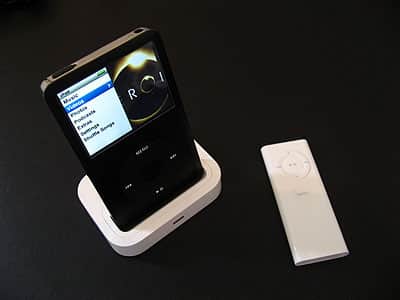
The 2007 version of Apple’s Universal Dock ($49) steps forwards and backwards from its late 2005 same-named predecessor. Physically almost identical to the prior model, the new Universal Dock still has the ability to work with Apple’s Universal Dock Adapters, which resize the dock well for each iPod and iPhone out there, but now comes with a total of five adapters that are specific to the iPod classic/5G, iPhone, iPod touch, and third-generation iPod nano. It also retains the front Infrared sensor found on the 2005 Universal Dock, but slims it down from a circle to an oval slit; the rear Line Out and Dock Connector ports are retained. Apple now includes an Apple Remote in the package to take advantage of the Infrared sensor. Gone is the prior dock’s S-Video output, replaced by the ability to output authenticated video from the Dock Connector port when connected to one of Apple’s $49 Composite or Component AV Cables.
Having designed the iPod and released its reference-standard video docks and cables for years, Apple is in a unique position to positively or negatively influence the future course of such accessories’ development. Last month, the company debuted three new video-ready iPods, and this month, it released three seemingly innocuous new video accessories, the Universal Dock ($49), Composite AV Cable, and Component AV Cable. The first two of these products are updates to 2004-2005 Apple accessories that sold for lower prices.
Like the new iPods, these three add-ons look nice on the outside, but they’re hiding a secret inside: Apple is using lock-out chips to control third-party video accessory development and effectively preventing older, less expensive accessories from competing against Apple products. By including one of these chips in each of these new, expensive accessories, and requiring that the new iPods communicate with the chips in order to play back video, Apple has effectively created a hidden “video-out tax” on both iPod accessory consumers and third-party manufacturers—you literally must buy new chip-inclusive items if you want to see your new iPod’s video on a separate display.
For that reason, and though we recognize that iPod and iPhone owners may not be able to find less expensive alternatives to these three accessories, we cannot in good conscience recommend that you purchase them. We explain further in the review below, and in the separate reviews of the Component AV Cable and Composite AV Cable.
The 2005 Universal Dock, iPod AV Cable, and Apple Remote
Two years ago, Apple released the original $39 Universal Dock, a glossy white rounded rectangular dish designed to hold any iPod in a reclining upright position, and serve one or more of several purposes. First, you can charge and synchronize the iPod through a Dock Connector pass-through port. Second, you can output audio through a minijack port on the back. Third, you can output video through an S-Video port on its back, or through the same minijack port used for audio. S-Video cables sold for well under $10 at most stores, while iPod-compatible composite AV cables sold for between $10-20; Apple offered its own pricey but nicely designed iPod AV Cable for $19.

Around the same time, Apple introduced Dock Adapters, matching white plastic inserts for the Universal Dock, guaranteeing that future iPods would be able to work inside. The company recommended that third-party developers use the Universal Dock design in their own products, and packaged Universal Dock Adapters with all new iPods to encourage people to use Universal Dock-equipped accessories. Apple also released a separate $29 Apple Remote, a wireless remote control that could talk to an Infrared sensor on Universal Dock’s front, changing your iPod’s tracks and volume from up to 30 feet away on a direct line of sight.
If this all sounds smart and reasonable, that’s because it was. Apple’s individual parts weren’t cheap, but you could buy only the ones you needed, or use third-party alternatives, and save money. The $19 cable that worked on one iPod worked on another, and the same dock could work with every iPod. In past Apple fashion, everything “just worked.” We gladly recommended all of Apple’s aforementioned parts to our readers.

Last month, that all changed without warning or explanation. Buyers of new iPods started to discover that their previously-purchased Universal Docks and iPod AV Cables were not working properly any more: the iPods weren’t outputting video, and there wasn’t any explanation as to why. Even Apple Store employees didn’t appear to understand what was going on; up until the day when replacement Apple-branded accessories started to arrive, salespeople were still recommending that new iPod owners buy the old ones, and expressing confusion when they didn’t work.
Apple had clearly done something to the new iPods, but it hadn’t clued anyone in as to what.

The “what” turned out to be a quiet change to each iPod’s software. Apple’s new firmware told the iPods that they should not output video unless they found a specific lock-out chip inside of a bottom-connected, Apple-authorized accessory. This meant that top-connecting video accessories no longer worked. It also meant that bottom-connecting video accessories without the specific lock-out chip didn’t work, either. The company had silently killed an entire, exciting category of video-specific accessories—and also stopped virtually every past speaker or dock “with video as a bonus” from working properly. A simple firmware change could fix this, but Apple’s not making that fix; instead, it’s trying to sell the chips to developers so they can re-release their past accessories and have people buy them again.
The 2007 Universal Dock, with Apple Remote
Even if it’s $10 more expensive than the prior model, the 2007 version of the Universal Dock initially appears to offer a better value than before: Apple now bundles the Universal Dock and Apple Remote together in a single package, and on first blush, you don’t seem to lose anything. While preserving the size and shape of the 2005 dock, it has reduced the size of the previously conspicuous black Infrared sensor, narrowing it to an oval-shaped slit on the front. And it now includes Dock Adapters that work with all of today’s iPod models—the iPod classic, iPhone, iPod touch, and third-generation iPod nano—replacing the larger but older set of Adapters found in the earlier box.

As before, the Universal Dock enables you to prop your iPod up on a reclining angle for charging and synchronization with your computer, using the Dock Connector-to-USB cable that comes in each screened iPod’s box. With the included plastic adapter, this model also does the same thing with the iPhone without triggering that device’s “nag screen,” though just like the iPhone’s included Dock you’ll still hear strong interference in your computer’s speakers when it’s in standard mobile phone mode. The new Universal Dock also continues to output stereo audio, just as all iPod docks save the shuffle’s have done since 2003.

Regrettably, that’s where the list of positive features ends. Look on the new Universal Dock’s back and you’ll notice that Apple has removed the S-Video port previously found there. Check the variable/attenuated Line Out port and you’ll discover that it doesn’t output video, so it can’t be used with Apple’s prior iPod AV Cable. Those who have followed Apple’s Dock pricing policies will note that these two changes make the Universal Dock nearly as stripped-down as Apple’s now-discontinued $29 iPod nano docks, so the presence of a $29 Apple Remote isn’t really a deal—it’s just a way to justify the Universal Dock’s newly higher $49 price.

What these two changes mean for the new Universal Dock’s customers is more ominous: since there aren’t S-Video or minijack-style video outputs, there’s no way to get any type of video out of this accessory unless you use the pass-through Dock Connector port that remains.











