
When we reviewed Apple’s original iPad Dock Connector to VGA Adapter back in June 2010, we noted that the video accessory’s performance wasn’t terrible, just disappointing. Designed to enable the iPad to share video and photo content with older VGA monitors and video projectors, the $29 Adapter was unexpectedly incapable of performing some movie content through a connected screen — an omission that led an upset customer to publicly confront Apple’s then-CEO Steve Jobs on camera at a conference, where he threw up his hands and effectively blamed Hollywood studios for the limitation. Two and a half years later, Apple has released a sequel for new Lightning connector-based devices called the Lightning to VGA Adapter ($49), and a few things have changed: Apple’s iOS software has been improved, the Adapter’s connector is obviously different, and the accessory’s functionality has changed a little. However, the new version has jumped considerably in price, and the Hollywood video limitation is still in place.
Later renamed to the “Apple VGA Adapter” in recognition of its subsequent compatibility with the iPhone 4, iPhone 4S, and fourth-generation iPod touch, then renamed again to “Apple 30-pin to VGA Adapter” following the release of Lightning devices, the original Adapter was a simple accessory. Made from white glossy plastic with gray cabling and accents, it consisted of little more than a male 30-pin Dock Connector plug, a female VGA port, a surprisingly long flexible cable, and the modest components necessary to convert the video signal to classic VGA output. Ten inches long from end to end, the original VGA Adapter offered no audio output—the iPod, iPhone, or iPad’s speaker continued to perform sound—and had no way to feed power to a connected iOS device. Notably, VGA compatibility wasn’t a priority for Apple’s pocket products in the pre-iPad era, but since the new tablet could double as a computer, sharing some of its screen contents with older computer monitors and video projectors began to make sense, particularly in academic environments.
With the subsequent addition of nearly complete iOS interface Screen Mirroring to certain iOS devices, the value of a connected monitor continued to grow.

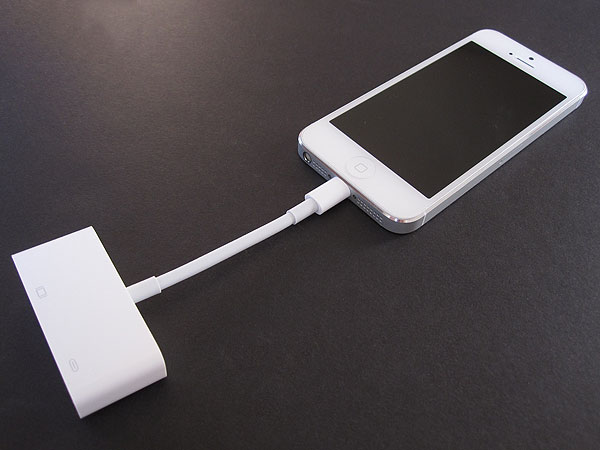
The Lightning to VGA Adapter is less than half the length of its predecessor, measuring 4.5” long from edge to edge; this time, only 2.75” of cabling separates its male Lightning connector from its female VGA port. Although the Lightning plug housing is almost as small as on standard Apple USB cables and thus highly case-compatible, the VGA port housing is considerably wider than before, as well as noticeably shorter and slightly thinner. It retains screw holes to help make a stronger attachment with a male VGA cable, and adds a nondescript female Lightning port, so users can power a connected iPad, iPhone, or iPod touch at the same time as video is being shared through the cable; this remedies one of the prior 30-pin version’s omissions, and works exactly as expected without causing hiccups in the video signal. Regrettably, you still have to supply the Lightning to USB Cable and Power Adapter at your own expense; if you don’t have spares handy, they can be purchased separately for $19 each, which as we’ve previously noted is overly expensive, just like the $49 Lightning to VGA Adapter itself. The total cost for Apple’s combined charging and VGA solution comes out to a crazy total of $87.

What initially appears to be a modest functional improvement in the Lightning to VGA Adapter versus the prior Dock Connector version actually isn’t unique to the newer accessory. When you connect a Lightning device to the Adapter, you’ll notice that Screen Mirroring is automatically activated, a convenience that eliminates your need to manually flip the hidden software switch on within iOS. As it turns out, the auto-Screen Mirroring feature was also added for the Dock Connector version of the VGA Adapter in an iOS software update, so this isn’t unique to the Lightning accessory, but it is welcome all the same.


On a positive note, the Lightning to VGA Adapter does pretty much what you’d expect it to do: almost everything that appears on an iPad, iPhone, or iPod touch screen is mirrored by default, automatically rotating depending on the device’s orientation, and displaying with a clear, very low-latency signal.
At this point, developers must manually disable this default mirroring compatibility from their individual apps—a step few developers take—so almost everything that shows up on your iOS device will show up on the connected VGA monitor.


Some apps, such as Apple’s iOS Photos and Videos apps, as well as certain third-party games, can alternatively use the connected monitor to display one thing while the iOS device’s screen displays something different. So even though the new adapter is extremely similar to the old one—and still lacking in audio-out functionality—the amount of content that it can share today with a monitor or projector is much greater than it was two and a half years ago, thanks to software improvements.


But there are still regrettably hiccups related to Hollywood. A software and hardware copy-restricting solution called high-bandwidth digital content protection (HDCP) is still required by some iTunes Store content providers—this technology effectively tells your iOS device that it cannot display certain video content on anything other than its own screen. Consequently, some purchased videos, particularly but not solely high-definition movies, may or may not play through the Lightning to VGA Adapter, just as they didn’t through its predecessor. By comparison, Apple’s $49 HDTV/HDMI-focused Lightning Digital AV Adapter will work with these videos, and carries an audio signal as well, though it requires you to have a modern TV or monitor with an HDMI input.











