
Officially announced in September 2012, Apple’s Lightning connector is the smaller replacement for the 30-Pin Dock Connector introduced in 2003 — a reliable plug that has been used in thousands of Apple-specific accessories, including everything from chargers to speakers, video projectors, and blood pressure monitors. Roughly six millimeters long by six millimeters wide and 1.5mm thick, the male Lightning plug is around 30% as wide as its predecessor, stiffer-feeling, and apparently a lot more expensive. Thus far, Apple has announced eight different Lightning accessories; two are new, while six are updates to prior Dock Connector versions. Almost all of these accessories are pricier than their Dock Connector predecessors, and newly-released Lightning to 30-Pin Adapters aren’t cheap, either. In some cases, Apple’s prices are so high that you’d be better off skipping these accessories entirely if you don’t really need them; you can decide for yourself whether to spend the cash on them, anyway.
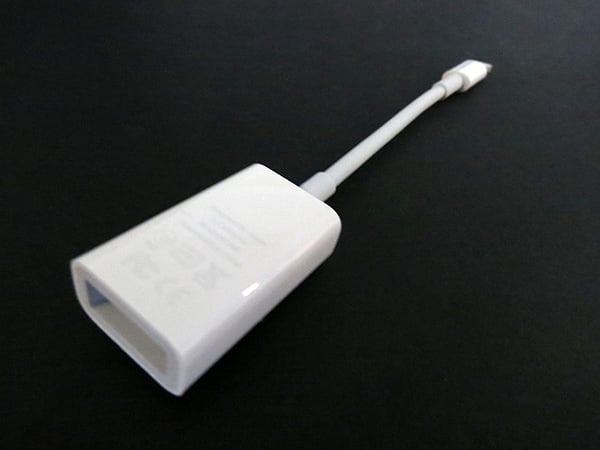
This review looks at two separate accessories, Apple’s Lightning to SD Card Camera Reader ($29) and Lightning to USB Camera Adapter ($29), the Dock Connector versions of which were previously sold together for $29 as the iPad Camera Connection Kit (iLounge Rating: A-). When we reviewed the iPad Camera Connection Kit back in 2010, we called it “a great accessory—the single most worthwhile purchase currently available for iPad users who enjoy photography,” an opinion we’ve continued to hold since then because of the attractive pricing and straightforward design. Only two things have changed the equation this time: the subsequent growth of wireless photo transfer accessories such as Eye-Fi’s SD Cards, and Apple’s decision to effectively double the price of these accessories.

The core functionality of both of these accessories remains entirely unchanged from what we discussed in our comprehensive prior review (read it here), so we won’t repeat the prior discussion beyond to reiterate that Apple has streamlined the process of importing photographs onto your iPad from digital cameras on both the accessory and software ends of the equation. One end of each accessory contains a Lightning plug that’s almost as thin-sheathed as the official Lightning to USB Cable; the other contains either an SD Card reader or a full-sized female USB port.

You plug your SD card or digital camera-plus-USB cable into the respective accessory, and so long as your iPad’s not on the Lock Screen, you’ll see the Photos application pop up automatically. A new Camera tab will quickly show a scrollable 5-by-7 grid of images, with “Import All” or “Delete All” buttons persisting at the bottom of the screen. Press either button and the iPad will do what it says; alternately, if you start tapping on images, checkmarks will indicate specific photos to process, and the buttons will change to “Delete Selected” or “Import,” the latter bringing up “Import All” or “Import Selected” options. Once importing has completed, you’re offered the choice to “keep” or “delete” the photos you’ve processed. Although Apple could have made this process just a little easier, it’s nearly as simple as can be, and every iPad—mini included—handles importing and deleting images in the same way.

It’s worth noting that Apple also allowed certain unsupported devices to connect with the prior Dock Connector-based USB adapter, including musical accessories and some wired keyboards. While this unofficial compatibility has been retained for the Lightning to USB Camera Adapter, Apple very specifically inserted the word “Camera” into this product’s name so that there’s no confusion as to what this accessory is truly intended to be used for. The company says only that the Adapter “is compatible with USB cameras that support Picture Transfer Protocol (PTP) or mass storage class devices;” in plain English, this includes virtually all digital cameras produced over the past five or seven years, including the ones in iPhones, other iPads, and iPod touches.
All you need to do is supply the USB cable and make sure the camera is turned on, with enough power to keep itself running throughout the transfer process. Apple does not want to share the iPad’s battery with connected accessories, a limitation that partially explains the company’s lack of support for most USB devices.

The good news with both the Lightning to SD Card Camera Reader and USB Camera Adapter is that users of Lightning port-equipped iPads will enjoy photo transfer speeds that are markedly faster than with even the most powerful of Dock Connector-based iPads. A test photo collection of 100 images that took around 1.5 minutes to transfer to the third-generation iPad took around 1 minute with the iPad mini, and roughly half a minute with the fourth-generation iPad. However, as these results suggest, the transfer improvements are attributable to the device, not the accessory: we saw virtually identical speeds—actually a hint faster—when transferring the same images using the old iPad Camera Connection Kit with a Lightning to 30-Pin Adapter. Regardless, these accessories don’t appear to be any worse than the ones they replace, apart from their expense, and the added speed the new iPads enjoy for photo ingesting will be addictive for frequent photographers.

Our favorite feature of both of these new accessories is the cabled plug, which enables each camera accessory to connect to iPads regardless of the case you’ve chosen. While Apple’s decision to add roughly 2.8” gray cables to the otherwise glossy white plastic housings has made both accessories significantly larger than before, they’re also that much more difficult to accidentally misplace, and the considerably improved case compatibility is truly welcome.

There are two issues here, one familiar, and one new. First, while these accessories work with Lightning-equipped iPads and iPad minis, they do not work with Lightning-ready iPhones or iPods, bringing up “unsupported accessory” errors—the same was notably true with the prior iPad Camera Connection Kit, and not really a surprise here.











