
Officially announced in September 2012, Apple’s Lightning connector is the smaller replacement for the 30-Pin Dock Connector introduced in 2003 — a reliable plug that has been used in thousands of Apple-specific accessories, including everything from chargers to speakers, video projectors, and blood pressure monitors. Roughly six millimeters long by six millimeters wide and 1.5mm thick, the male Lightning plug is around 30% as wide as its predecessor, stiffer-feeling, and apparently a lot more expensive. Thus far, Apple has announced eight different Lightning accessories; two are new, while six are updates to prior Dock Connector versions. Almost all of these accessories are pricier than their Dock Connector predecessors, and newly-released Lightning to 30-Pin Adapters aren’t cheap, either. In some cases, Apple’s prices are so high that you’d be better off skipping these accessories entirely if you don’t really need them; you can decide for yourself whether to spend the cash on them, anyway.
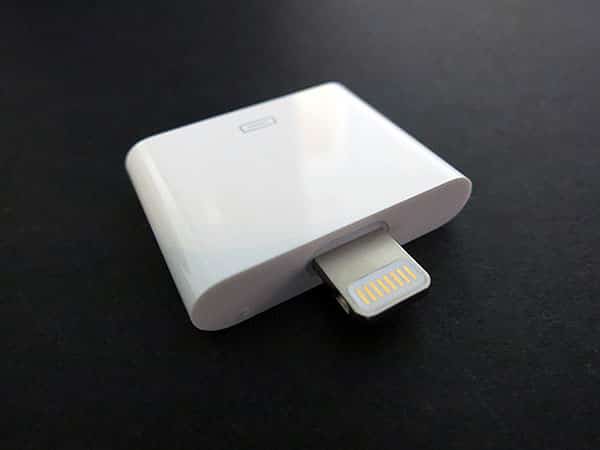
This review looks at two separate but very similar accessories: Apple’s compact $29 Lightning to 30-Pin Adapter, and the larger $39 Lightning to 30-Pin Adapter (0.2m). Conceptually, these Adapters are nearly identical to one another, as they’re both designed to enable certain prior 30-Pin Dock Connector accessories to work with Lightning-equipped iPhones, iPods, and iPads. Yet they’re priced differently, and so substantially different in execution that it’s hard to recommend one as either “ideal” or universally better than the other. They wind up leaving space for an Apple or third-party solution to combine the best assets of both accessories into a single $29 option.

Made substantially from glossy white plastic, the $29 Lightning to 30-Pin Adapter is much smaller than might have been guessed from Apple’s official photographs—roughly 1” wide by 1” tall by 0.2” thick at its largest points. That’s only a little larger than two recent Apple Dock Connector plugs stacked atop each other, plus the 0.25” by 0.25” male Lightning plug on top.
A female Dock Connector port is on the bottom, labelled with a Dock Connector icon on the front, and certification markings are on the back.

Since this Adapter is identical in thickness to the Dock Connector plugs on Apple’s recent cables, connecting it to one of them effectively just adds an extra inch of length and a Lightning plug; consequently, any third-generation iPad case that could accommodate a standard Apple Dock Connector cable will work with the fourth-generation iPad and this Adapter. Moreover, due to the Lightning plug’s reversible design, this Adapter enables Lightning-equipped iPads, iPhones, and iPods to be docked with either their fronts or backs facing forward, though the practicality of doing so is limited. Apple specifically designed this Adapter to be used in speakers and upright docking accessories, physically elevating the iPad, iPhone, or iPod above the prior dock well. This Adapter is thankfully sturdy enough to accommodate the weight of the new iPhone, iPod, and iPad models in old docks, though dependent on a proper surface for larger devices to recline upon, which isn’t always there; the Adapter also tends to unplug itself when you remove the larger device from the dock, rather than staying in place.

By comparison, the $39 Lightning to 30-Pin Adapter (0.2 m) looks like a small cable, and was designed primarily to extend permanently attached 30-pin Dock Connector cables and other accessories where a flexible Lightning connection would be preferable to a stiff one. It could also be used to connect a device incapable of resting atop an old dock, allowing the iPad, iPhone, or iPod to rest on an adjacent flat surface without straightforward screen visibility. Measuring roughly 9” long, the $39 Adapter consists of a male Lightning plug, around 7.5” of gray cable, and a female 30-Pin Dock Connector port that’s both wider and thicker than the prior Lightning to 30-Pin Adapter housing. While the male Lightning side of the adapter has a thicker plastic casing than Apple’s Lightning to USB Cable, it still works with most of the Lightning-ready iPad, iPhone, and iPod cases we’ve tested; similarly, the Adapter’s cable is noticeably thicker than on Apple’s Lightning to USB Cable, but still capable of being easily bent.

Electronically, these two Adapters are identical to one another, and did pretty much what they were expected to do, though it should be noted that Apple quietly lowered performance expectations before they hit the streets. Dock Connector audio signals, data, and power are all passed through the Adapters, but video output is not supported, and some seemingly data-driven features—most notably an iPod Out mode supported by a handful of accessories—were similarly disclaimed as incompatible, as well. Our testing confirmed that Lightning devices worked with numerous past speakers for audio and power, as well as successfully transmitting data over cables; we experienced no obvious degradation of audio quality, transmission speeds, or other major issues when sticking to basic sound, charging, and transferring functionality.

While the broad compatibility with audio and charging accessories will make either of these Adapters suitable for most users’ needs, the lack of video, iPod Out, and other miscellaneous data compatibility means that users who spent money on particularly expensive accessories—video monitors or projectors with built-in Dock Connectors, BMW or Mini Cooper car integration kits, and a random assortment of other items such as fitness add-ons—may be disappointed. We were unable to get Lightning devices to perform video using the Adapters with Apple’s past Component AV Cables, or through docking video accessories such as Epson’s formerly iPod/iPhone-compatible protectors; similarly, reports of incompatible blood pressure monitors and other accessories have been appearing online. In some cases, Apple may have other workaround solutions, such as the $49 Lightning Digital AV Adapter, or the new iPod nano’s on-screen reminder that the Nike + iPod Sport Kit Receiver is not needed because “[t]his iPod has a built in receiver,” but in other cases, users will be out of luck with prior Dock Connector accessories, and justifiably disappointed.

From our perspective, the biggest issues with both adapters are their pricing and physical compatibility with various devices and accessories. Despite early claims that Apple planned to release Lightning Adapters for as little as $10 each, the $29 and $39 asking prices for such simple accessories are high enough to cause winces—more expensive than Apple’s already pricey $19 Lightning to USB Cables and Lightning to Micro USB Adapters. If you didn’t feel that Apple was gouging you on past accessory purchases, every tiny, expensive Adapter you consider buying will likely reinforce that point in your mind. That said, the need for such Adapters is unquestioned, and Apple knows this, hence the price gouging.
We understand why Apple opted to release two different adapters instead of a compromise option in the middle, but the consequences are somewhat unfortunate.











