
Officially announced in September 2012, Apple’s Lightning connector is the smaller replacement for the 30-Pin Dock Connector introduced in 2003 — a reliable plug that has been used in thousands of Apple-specific accessories, including everything from chargers to speakers, video projectors, and blood pressure monitors. Roughly six millimeters long by six millimeters wide and 1.5mm thick, the male Lightning plug is around 30% as wide as its predecessor, stiffer-feeling, and apparently a lot more expensive. Thus far, Apple has announced eight different Lightning accessories; two are new, while six are updates to prior Dock Connector versions. Almost all of these accessories are pricier than their Dock Connector predecessors, and newly-released Lightning to 30-Pin Adapters aren’t cheap, either. In some cases, Apple’s prices are so high that you’d be better off skipping these accessories entirely if you don’t really need them; you can decide for yourself whether to spend the cash on them, anyway.
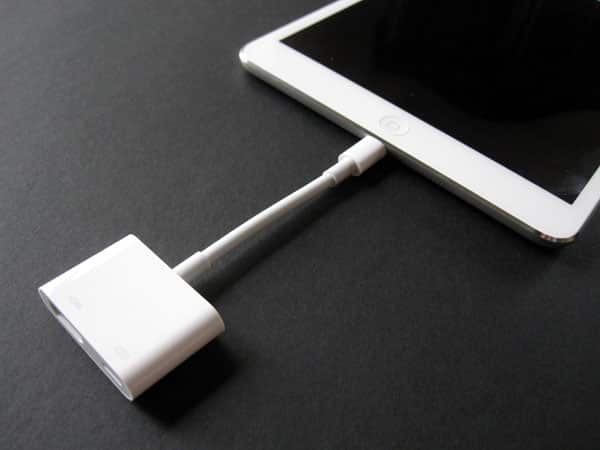
This review looks at Apple’s Lightning Digital AV Adapter ($49), which sells at a $10 premium over the prior version, the Apple Digital AV Adapter (iLounge Rating: B+)—a March 2011 accessory that was modestly tweaked in a same-named update one year later. Conceptually, all three Digital AV Adapters are exactly the same: one side sports a male connector for your iPad, iPhone, or iPod, while the other side has two ports: a female HDMI output for video mirroring, and a female Apple connector for simultaneous charging. The two sides are connected by a semi-stiff gray cable that enables the ports to flex relative to each other rather than stay stiff.

Not surprisingly, there are some obvious differences between the Lightning Digital AV Adapter and its predecessors, generally all consequences of improved technology and lessons learned from the prior iterations.
The extruded pill-shaped box containing the female HDMI and Lightning ports is considerably narrower but a little deeper than the Dock Connector versions, and now uses a gray plastic front rather than white, a design decision that reduces the visual imperfections of previously white-on-white seams. Additionally, though the sheath around the new Lightning connector plug is a little thicker than on Apple’s standard Lightning to USB Cable, most users will find the plug easy to use with iPad, iPhone, and iPod cases; Apple has made real strides in reducing the plastic connector housing’s thickness since the original Digital AV Adapter’s release in March 2011.

From a performance standpoint, the Lightning Digital AV Adapter worked almost exactly as we expected. Just like its predecessor, it enables certain iPads, iPhones, and iPods to output digital video and audio to any HDMI port-equipped TV, supporting full frame rate HD (720p and 1080p) output. The quality of the wired output was at least as good as with AirPlay, Apple’s wireless streaming standard, and we noticed that games that stuttered significantly when streamed to an Apple TV ran as smooth through the Digital AV Adapter as on the devices’ own screens, a major improvement over current AirPlay streaming from Lightning-equipped devices. Movie and TV show streaming notably does not suffer from these issues; games and apps are the most significantly impacted. That having been said, recent frame rate issues we’ve noticed with AirPlay appear to be related to issues with Apple TV software, not iOS device hardware, so the wired to wireless gap may not be as pronounced after a proper Apple TV update.

Most of the time, the Lightning Digital AV Adapter automatically initiates screen mirroring on a connected device, enabling it to share whatever’s on its Home Screens or otherwise intended to be on the display with an HDTV.
We noticed a brief hiccup or three when connecting the fifth-generation iPod touch to the Adapter for the first time, but it went away and didn’t return; similarly, we occasionally noted that the fourth-generation iPad would display a “Not Charging” indication before quickly switching over to a battery charge meter, assuming that a charging cable and wall adapter were connected. The seventh-generation iPod nano notably put up an incompatible accessory notice when connected to the Lightning Digital AV Adapter and wouldn’t output content to the TV.


As was the case with its predecessor, the biggest issue with the Lightning Digital AV Adapter is the total cost of the accessory and the other parts it connects with: Apple not only raised the already expensive Adapter’s price by $10, but also stopped selling a combined charging cable and wall adapter package for $29. Consequently, in addition to the $49 Adapter, you’ll now find that a spare Lightning to USB Cable is $19, and sold separately from Apple’s $19 wall adapters. That brings the total cost of just these Apple components to $87 before you even get to the required HDMI cable, which can cost anywhere from $5 to $20 (or more) depending on the brand you buy. You can obviously save money if you don’t want to charge your device while it’s connected, or already have cables and chargers of your own, but there’s no avoiding the reality that this accessory is just too expensive for what you’re actually getting.

It’s almost as if Apple is trying to push consumers towards the $99 Apple TV, which does so much more and works wirelessly with iOS devices, wherever they may be. Even if you don’t see the $99 wireless and $87 wired AV plus charging solutions as purely comparable, the price of just the $49 Adapter and an HDMI cable will push most users to consider the Apple TV instead.











