
iLoungeiLounge
  • News
    • Apple
      • AirPods Pro
      • AirPlay
      • Apps
        • Apple Music
      • iCloud
      • iTunes
      • HealthKit
      • HomeKit
      • HomePod
      • iOS 13
      • Apple Pay
      • Apple TV
      • Siri
    • Rumors
    • Humor
    • Technology
      • CES
    • Daily Deals
    • Articles
    • Web Stories
  • iPhone
    • iPhone Accessories
  • iPad
  • iPod
    • iPod Accessories
  • Apple Watch
    • Apple Watch Accessories
  • Mac
    • MacBook Air
    • MacBook Pro
  • Reviews
    • App Reviews
  • How-to
    • Ask iLounge
Font ResizerAa
iLoungeiLounge
Font ResizerAa
Search
  • News
    • Apple
    • Rumors
    • Humor
    • Technology
    • Daily Deals
    • Articles
    • Web Stories
  • iPhone
    • iPhone Accessories
  • iPad
  • iPod
    • iPod Accessories
  • Apple Watch
    • Apple Watch Accessories
  • Mac
    • MacBook Air
    • MacBook Pro
  • Reviews
    • App Reviews
  • How-to
    • Ask iLounge
Follow US

Reviews

Reviews

Review: Apple iPod shuffle Armband

Last updated: May 16, 2021 9:27 am UTC
By Jeremy Horwitz
Review: Apple iPod shuffle Armband

Pros: Quality iPod shuffle-matching armband that holds the shuffle and your arm securely; though simplistic, the design has proven better aesthetically in one previous generation (iPod mini) than most competitors.


Cons: No protection for the iPod shuffle when mounted, a bit pricey for such simple components.
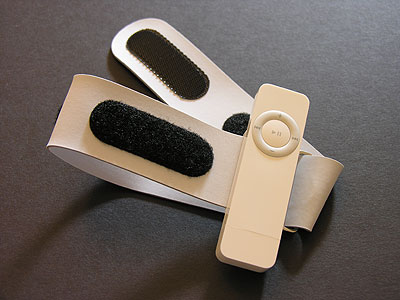
Review: Apple iPod shuffle Armband

Released third in Apple Computer’s series of first-party iPod shuffle accessories is the one most prominently advertised: the iPod shuffle Armband ($29) is a light gray version of Apple’s black neoprene, Velcro, metal and white glossy plastic iPod mini Armband launched one year ago. Conceptually, the two Armband offerings are identical: you wrap the neoprene band around your arm, using a metal loop to double one of its sides back against the other, and fasten those sides together with strips of Velcro. The iPod is held in place with a plastic clip.


The shuffle Armband differs in three primary ways from the mini Armband: it is thinner, lighter, and uses a different style of plastic iPod clip. For the first two reasons, the new Armband – along with the shuffle that goes inside – is even easier to exercise with than before, and – headphone cord aside – is less noticeable no matter what you’re doing.

Like its lanyard cap, Apple’s new plastic Armband clip takes advantage of the iPod shuffle’s USB 2.0 plug, which snaps into place in the clip’s base. Since Apple’s clips use ball bearings that lock into the USB plug, you can turn the shuffle upside down in the Armband without worrying about anything falling out. Admittedly, there’s less reason to do this with the screenless shuffle than there was with the iPod mini, but if you want the headphone port to be upside down, it can be. The clip’s hard plastic backing plate runs across the shuffle’s back up to its power switch, which can be toggled through all three positions even when fully mounted.


pic

pic

In addition to its small size, light weight, and easy shuffle mounting, the new Armband is arguably even more stylish than its predecessor, looking almost like a fashion accessory rather than an exercise aid.

This is partially due to the simplicity of the iPod shuffle and the sophistication of Apple’s choice of complementary gray neoprene rather than contrasting black. But it’s also a statement about most of the competing armband accessories other companies have released for iPods: Apple’s don’t look anywhere near as bulky or goofy as the worst of them, and work almost as well as the best of them.

We use the word “almost” for only one reason. Companies such as Speck have released almost identical armbands that accommodate encased iPods, which Apple’s shuffle and mini Armbands do not. Other companies have released neoprene iPod armband sacks, as well.



Latest News
The 14-inch MacBook Pro with M5 Chip 16GB RAM/512GB is $250 Off
1 Min Read
Noise and Static on AirPods Pro 3 Still Unfixed
1 Min Read
New iMac with 24-inch OLED Display May be Brighter With 600 Nits
1 Min Read
The 15-inch M4 MacBook Air 256GB Is $250 Off
1 Min Read
Internal Kernel Debug Kit from Apple Reveals Tests for a MacBook with A15 Chip
1 Min Read
Apple Currently In Talks With Suppliers for Chip Assembly & Packaging of iPhones in India
1 Min Read
Apple Allows Easier Battery Replacement For M5 MacBook Pro with 14-inch Display
1 Min Read
The Apple Watch SE 3 44mm GPS is $50 Off
1 Min Read
20th Anniversary iPhone May Launch in Two Years
1 Min Read
Better Image Generation Capabilities and Apple Music Integration Coming to ChatGPT
1 Min Read
A20 Pro Chip Coming to Next Gen iPad Mini OLED
1 Min Read
Amazon has the AirTag 4 Pack Marked $29 off
1 Min Read

iLounge logo

iLounge is an independent resource for all things iPod, iPhone, iPad, and beyond. iPod, iPhone, iPad, iTunes, Apple TV, and the Apple logo are trademarks of Apple Inc.

This website is not affiliated with Apple Inc.
iLounge © 2001 - 2025. All Rights Reserved.
  • Contact Us
  • Submit News
  • About Us
  • Forums
  • Privacy Policy
  • Terms Of Use
Welcome Back!

Sign in to your account

Lost your password?








