
Apple’s first iPod Dock appeared in 2003, packed in with the third-generation iPod — the first model to include the company’s 30-pin Dock Connector on the bottom — and since then, there have been dozens of alternatives, most of them better than the original. The single most influential innovation was the 2005 Universal Dock, which introduced a wider, deeper docking well that could be resized with plastic Dock Adapters or left alone for use with thicker cases, a design that continued with a very similar 2007 re-release that also worked with the iPhone. Unfortunately, Apple’s iPad Dock ($29) steps backwards in time to the first 2003 iPod design, and though it will be entirely fine for some users, anyone who needs a case will either have to pass or wait for cases that are compatible with Apple’s unnecessarily tight mount.
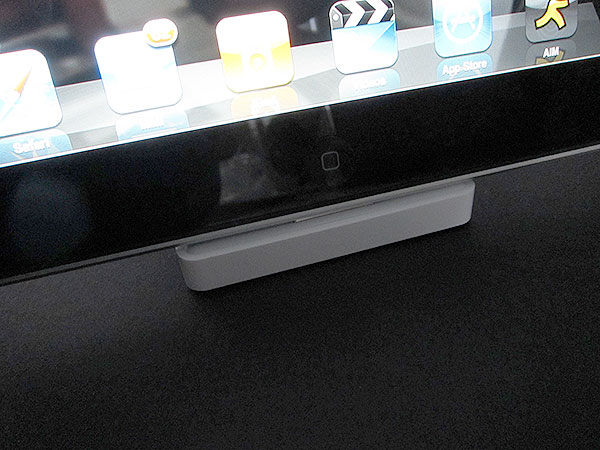
On the surface, there’s absolutely nothing controversial about the iPad Dock: it’s roughly 2.75” deep and 2.75” wide, with a slanted 1.25” tall lip that stands considerably above its 0.38” tall base. Like virtually all of the iPod Docks and iPhone Docks that have preceded it, there’s a gray rubber base on the bottom and both 3.5-millimeter audio-out and 30-pin Dock Connector ports on the back. It is typically Apple in its elegance and purpose: the slanted lip defines the angle that the iPad will rest on when docked, while it and the base provide just enough of a footprint and support to enable the aluminum device to recline vertically without any fear of tipping over. The top of the iPad forms an invisible line straight down to the back of the base—clean, precise, and attractive.


Once it’s docked, the iPad can be charged, synchronized, and used for line-level audio out, assuming that you’re willing to provide the cables and charger yourself, as they’re not included in this box. Audio sounded strong and problem-free through the line-out port, which always outputs sound at the iPad’s peak volume for subsequent attenuation by your connected audio receiver and speakers; the iPad disables its own volume controls when it’s connected to the Dock. When the line-out port isn’t in use, the iPad performs sound through its bottom speakers, which stand enough above the surface of a table to be heard without an issue.

Synchronization similarly worked fine with Apple’s Dock Connector to USB cable, and charging wasn’t a problem with the iPad’s 10W USB Power Adapter; the iPad Dock essentially just passes through whatever power and data it receives from a connected cable. Similarly, Apple’s separately-sold composite, component, and VGA video accessories can be connected to the iPad Dock, and since the iPad has integrated Bluetooth capabilities, it can be used with wireless keyboards, speakers, and headphones while in the Dock, as well.

If you need a hardwired keyboard for the iPad, and don’t mind the fact that it wont be able to sit on the typical slide-out keyboard tray of a desk, Apple’s iPad Keyboard Dock is another, more expensive option with a very nice keyboard that looks like it was physically grafted onto the front of this accessory; the screen recline angle is actually a little more pronounced on the Keyboard Dock.
The result is a 7 1/8”-deep alternative that some people will find convenient and others will deem unusable. Pairing the iPad with the standard iPad Dock and a $69 Apple Wireless Keyboard is yet more expensive, but will work on any desk.


There’s one and only one reason that we wouldn’t rush to recommend the all-Apple solution, and that’s the iPad Dock’s slanted lip. It is, like the original iPod Dock, precision fit to a specific maximum depth of a specific unencased Apple product. If you want to use the iPad Dock with an unencased iPad, it works without a problem; Apple has actually designed the dock with a little rubber pad around its male Dock Connector, and the iPad with a tilting female Dock Connector port, enabling users to tilt the iPad forward while removing it without breaking either the iPad Dock or the iPad itself. But because the hard white plastic lip doesn’t have any give, the docking system doesn’t work when you try to use it with an iPad case. Even the thinnest of the dozens of cases we’ve received for testing doesn’t fit properly.











