
Unlike its cases, which seem to annually redefine how little can be put into boxes and sold at high prices, Apple’s iPod, iPhone, and iPad docks have generally been good values over the past seven years. Always made from glossy white plastic and based on rounded rectangular shapes, these docks most commonly have sold for $29 and featured two rear ports — an audio output and a Dock Connector input/output port. So it’s no great shock that the iPad 2 Dock ($29) roughly follows this template, but a couple of changes in this year’s version make it less appealing than its same-priced predecessor.

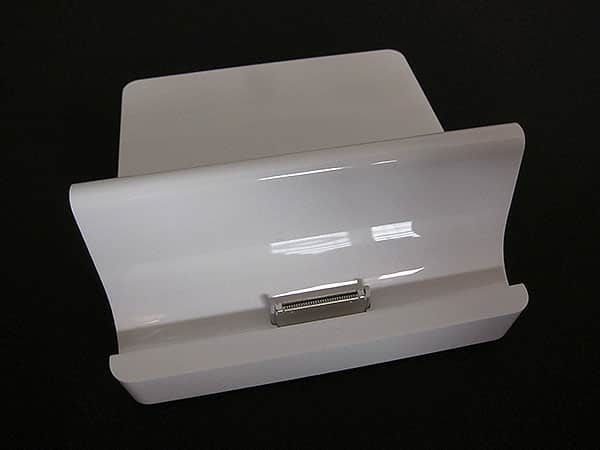
Like the original iPad Dock (iLounge Rating: B), the iPad 2 Dock is designed to do several things: first, it holds Apple’s latest tablet upright and on a gentle recline, using an angled piece of plastic to provide partial back support. Second, it lets data and/or power pass through from most of the devices you might connect to its rear Dock Connector port, enabling the iPad 2 to charge, synchronize, display video, and use the iPad Camera Connector when it’s standing upright. And third, it performs line-level audio—the clearest and best analog sound the iPad 2 can produce—directly from the Dock Connector through a 3.5mm port, so you can connect the iPad 2 to a stereo. As with almost all of Apple’s docks, the iPad 2’s 3.5mm port delivers true, unattenuated line output at an optimized peak volume level, which means that you’ll need to adjust your external speakers rather than using the iPad 2’s volume controls; they’re disabled when using the iPad 2 Dock.
Notably, you’ll need to supply the cables yourself for each of these purposes; like almost all Apple docks, this one ships in a box with nothing more than paper manuals and a clear plastic wrapper.


All of the features above are completely uncontroversial and work pretty much exactly as expected. Audio from the iPad 2 Dock is as clean as the original iPad Dock, accessories pass through the Dock Connector port in the same way, and the reclines of an original iPad in the first Dock and the iPad 2 in the new Dock are basically identical. During initial testing, it seemed as if screen mirroring started a little faster with the iPad 2 Dock than with the iPad Dock, but after restarting the iPad 2 and doing further tests, the differences evaporated. Electronically, the Docks seem to be more or less identical, and the new one is certainly no worse in any way than its predecessor.


That having been said, there are a couple of physical changes to the iPad 2 Dock that could make it less appealing than its predecessor for certain users. Uncharacteristically, Apple has considerably increased the new Dock’s size relative to its predecessor. As discussed in this article, it is now roughly 3.3” wide, 1.5” tall, and 3.6” deep, larger in every dimension than before, with nearly an inch of additional depth.


The changes were so significant that we
disassembled both iPad Docks to see whether something new inside was responsible, but the answer was no: Apple seemingly made the new Dock larger to increase its stability on a flat surface. Both versions have large metal plates inside and are exceedingly well made, but contain only tiny circuit boards, cabling, and connectors that occupy very little of their total volume. A expansion of the circuit board, shown in our teardown, was trivial in size and seemingly importance. The company could have chosen a smaller or much different shape had it wanted to do so.


While the additional size doesn’t really matter in any way to us, the iPad 2 Dock’s redesigned Dock Connector well creates some serious case incompatibility issues. Unlike the original iPad Dock, which had an entirely open front with an obviously flexible Dock Connector plug sticking out, the iPad 2 Dock has a large plastic lip in front that’s almost the same height as the Dock Connector. During testing, it became obvious that the purpose of this lip was to help align the iPad 2 for easy electronic connection, and it works, but at the cost of case and iPad compatibility.











