
Apple’s release of iBooks 1.0 alongside the iPad in April was big news, but only the prelude to what happened with today’s debut of iBooks 1.1 — a “point release” that includes some major new features. The single biggest feature is the addition of compatibility for any device capable of running iOS 4, including all 2008-2010 iPhones and iPod touches, a non-trivial addition to iBooks’ prior capabilities. But even iPad users familiar with versions 1.0 and 1.01 of iBooks will be impressed with several other new additions discussed below.
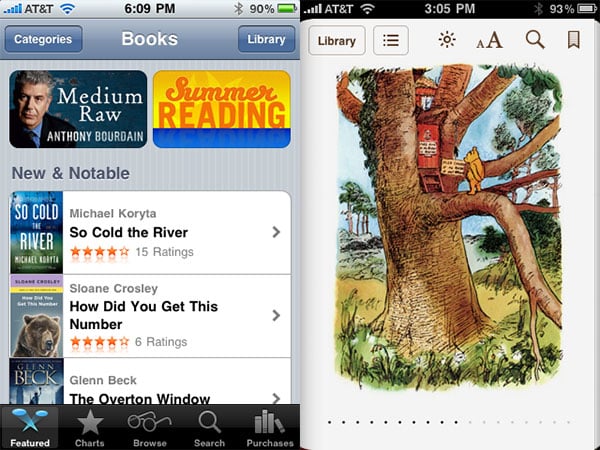
iPhone and iPod touch Support. iBooks 1.1 is compatible with the iPhone 3G, iPhone 3GS, iPhone 4, iPod touch 2G, and iPod touch 3G, featuring a largely familiar design. On these devices, the familiar “Library” bookshelf becomes a 3×3 grid in portrait orientation or a 4×2 grid in landscape, transforming into either a tall or wide book reader based on how you hold your iPhone or iPod touch. Unlike the iPad, which uses the corners of the screen to simulate the look of an actual printed book, and divides the wide screen into two pages when you choose landscape orientation, the iPhone and iPod touch employ the former effect solely in portrait mode, and provide a wide single page in landscape—no surprise given the lower resolution and physical footprint of the iPod and iPhone screens.

The iPhone and iPod touch version of iBooks provides options just like the iPad’s: an on-screen brightness control, ten* different font sizes, six fonts—Georgia has been added to the five in iBooks 1.0 and 1.01—a sepia control, a one-touch text search feature, and enhanced bookmarking and note-taking capabilities, the latter a new addition discussed further below. For ePub-format books, page turning can still be accomplished with side-of-screen taps, a page curling animation, or a scroll bar found at the bottom of the screen, and the iBookstore has been reformatted to use the same look and narrow interface of iTunes and the App Store for iPod touch and iPhone.


iBooks is still missing the ability to zoom into pictures within ePub books, a feature included in Amazon’s competing Kindle application, and its iBookstore is still smaller than Amazon’s. But it’s clear that Apple is still working on improving iBooks, as evidenced by…


PDF Support. For iPad users, and perhaps others, the addition of PDF support to iBooks is huge news.
Though Apple has enabled iOS devices to display PDF documents for years now, the capability has always been limited to whatever PDFs one could e-mail or find on the web—odd given that iTunes has included a PDF storage feature since before Apple’s touchscreen devices existed. So the good news is that iBooks’ PDF support now enables users to drop PDFs directly into iTunes, choose which PDFs to synchronize to the device through the same Books tab used for ePub books, and then browse those PDFs in their own Library bookshelves.


E-mailed or web-acquired PDF documents can automatically be added to the iBooks Library using an “Open in iBooks” button that appears in Apple’s in-app PDF viewer, a really nifty feature that removes the need to synchronize back with iTunes every time you want to add new PDFs to the library.


The bad news: Apple’s PDF viewer is far from the best we’ve seen on the iPad, iPhone, or iPod touch, at least in speed. Unlike the ePub part of the reader, which feels a little faster than before, opening large PDF documents feels decidedly slower with iBooks than with GoodReader, ReaddleDocs, and other programs we’ve tested—less than fully optimized for the faster iPad, iPhone 3GS, and iPod touch 3G, say nothing of the older iPhone 3G and iPod touch 2G. Similarly, the dynamic thumbnailing process iBooks uses to create the page-selecting bar it places at the bottom of the screen lags a little, even on the iPad and iPhone 3GS.


Not surprisingly, note-taking and highlighting are missing from the PDF portion of iBooks, though bookmarking, search, and screen brightness tools are there, along with a 3-by-3 or 4-by-2 grid view of pages. Zoom isn’t as responsive as we’ve seen in some third-party apps, but it works, and pages look good when they’re expanded to full size. In short, we’d call the PDF viewer a good start and welcome addition for iBooks, but it would really benefit from additional optimization to get its performance up to the standards of even inexpensive third-party apps.


Bookmarking and Note Taking. On iBooks 1.0 and 1.01, bookmarking required you to hold down on a word, creating highlighted text that was added to a list of bookmarks.
iBooks 1.1 adds a dedicated bookmarking icon to the top right of the screen, marking the whole page rather than requiring you to select specific words. If you hold down on and select words now, the word that comes up is “highlight,” duplicating the same functionality as before.


Alongside it is an option for “Note,” which brings up a post-it note and keyboard, enabling you to type out margin notes for whatever text you want to annotate. On the iPad, these notes appear as little boxes with date stamps; on the iPhone and iPod touch, they’re just little blank pieces of paper in the margin. Noted text is highlighted in your choice of five colors, yellow, green, blue, pink, or purple. The addition of the note feature is going to be huge for textbook users in the future, though having the ability to use a stylus for notes would dramatically improve the note-taking process for many people.

New Font + Sepia Choices. iBooks 1.1 adds a sixth font, Georgia, to the prior list of Baskerville, Cochin, Palatino, Times New Roman, and Verdana choices for ePub reading. Georgia is on the surface just another font with serifs, but it’s capable of fitting just a little more text on the screen than any of the other serifed fonts, though less than the sans-serif Verdana. It may be a little easier on the eyes than Verdana for those who are looking for higher word density. So too is the addition of a sepia option, familiar to fans of Amazon’s Kindle, which turns the black and white page into a softer brown, instead.











