
Although third-party music creation apps have been available for iOS devices in various forms since the App Store debuted in 2008, one that had been conspicuously absent from the platform was Apple’s GarageBand. Made popular on the Mac as part of the iLife suite, the desktop version of GarageBand evolved over the years from a simple multitrack MIDI and audio recording app into a full-featured music creation and education application designed for experienced and amateur musicians alike. GarageBand has seemed like a fairly natural fit for the iPad since the device made its debut last year, and it was only a matter of time before Apple brought its venerable music creation app to the mobile platform.
Announced during last week’s iPad 2 media event in San Francisco, GarageBand for the iPad brings a very thorough and impressive redesign with an app that takes full advantage of the iPad multitouch interface and feels right at home on the portable device. Like its desktop counterpart, GarageBand for the iPad is designed to allow users to create, play and record music and effects using multitrack recording and a variety of different sounds and instruments. The iPad takes this a step further, however, with the implementation of “Touch Instruments,” built in keyboards, drum sets, guitars and synths that can be used to create music and accompaniment tracks.


GarageBand for iPad includes basic keyboard and drum kit instruments as well as an audio recorder, sampler and guitar amp complete with a variety of stompbox effects. The iPad version also delivers four additional “Smart Instruments”—drums, bass, keyboard and guitar designed to allow even novice musicians to easily create great sounding rhythms and melodies.

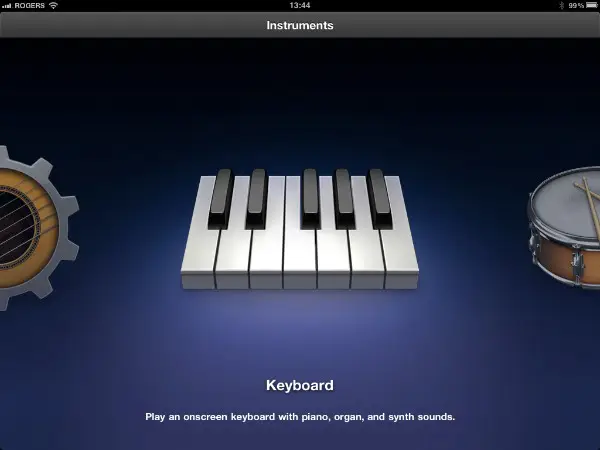
Starting up the app for the first time provides a simple Cover Flow style view allowing you to choose which instrument you want to work with. After selecting an instrument, you can freely play and jam with that instrument or begin laying down a track with it as part of a multitrack recording.

GarageBand on the iPad supports up to eight tracks which can be any combination of instruments and effects. Once you begin recording your first track, an additional control appears at the top of the screen to switch between the Instrument view and Tracks view. From the Tracks view you can add, rearrange and delete tracks, add loop tracks, adjust track volume and even copy and paste segments between tracks.

The Tracks view provides an impressive set of very intuitive touchscreen controls for rearranging and organizing track information.
Tracks can be adjusted in length, moved around, or reordered simply by dragging them around on the screen. Track controls such as volume, solo and mute can be shown by dragging the left sidebar to the right or hidden again by dragging back to the left, and pinch gestures can be used in main track display to zoom in or out on the timeline.

A Loop button in the top-right corner of the Tracks view allows the user to select from over 250 professionally-recorded loops that can be browsed by instrument, genre or descriptor tags such as Cheerful, Intense and Acoustic. Loops can be previewed from here or added as a new track simply by dragging them from the popup to the track view—again an impressive and intuitive way of handling this.

The multitouch support for playing instruments is similarly impressive, with the ability to easily play full chords on the keyboard instrument or strum multiple strings on the guitar. GarageBand also uses the accelerometer to provide velocity sensitivity for keyboards, drums and guitars. Keyboard and guitar instruments also include a scales filter which automatically provides a keyboard or guitar including only the notes from the selected scale making it extremely easy to improvise and jam—the notes will sound good together as they’re all part of the same major, minor or pentatonic scale—a fantastic feature for both the amateur and experienced musician alike. An “Arpeggiator” can also be enabled to automatically play arpeggios (chord notes in a sequence) when holding down a key, including the ability to set the note order of the arpeggiated notes as either fixed up or down or to follow the play order.


As an additional bonus for the armchair musician, GarageBand’s Smart Instruments provide predefined chords, chord progressions and rhythms. Bringing up the Smart Keyboard, for instance, provides a view of eight common chords instead of traditional piano keys, with three bass notes at the bottom and five inversions at the top. Tapping a space plays an appropriate chord or bass note in the displayed key, with three minor, four major and a diminished chord to choose from. Just about anybody can create great sounding mixes from here, and to make things even more interesting, an Autoplay knob allows the selection of four pre-defined comping patterns that will be played in the selected keys—great for building your own custom background loops.


The Smart Drum machine works along a similar concept, providing predefined drum sets and rhythms that the user simply adjusts by placing them onto a 8×8 grid to determine relative complexity and volume of each drum effect.
Six different drum sets are available ranging from Hip Hop and House Drum Machines to Classic and Vinage Studio kits.

Users who prefer to do their own drumming can choose the standard Drums instrument which provides either an on-screen drum kit view or a drum machine depending on the instrument selected. Multitouch is again fully supported here providing the ability to play complex drum rhythms, although we’d recommend avoiding the temptation to use drum sticks on the glass iPad screen.


A Guitar Amp is also included allowing you to connect an electric or bass guitar directly into the iPad headphone jack and record a track with simulated amps and effects. Nine amps are included which can be manually mixed and matched with up to four stompboxes from a collection of ten or you can choose from 32 predefined classic guitar rig configurations. The Guitar amp screen also includes a built-in tuner and a noise gate to clean up the input of a guitar connected directly to the iPad’s line-in/headphone jack. GarageBand does an impressive job of working with direct guitar input to try and eliminate the need for third-party accessories, however serious guitar players will still likely want to consider a third-party guitar adapter such as the Amplitube iRig.


An audio recorder and sampler round out the selection of instruments allowing either direct audio recording for vocals or sampling of external sounds which can be played back as a melody on the keyboard, complete with pitch-bend and modulation wheels. A set of five samples is included in the app and you can record additional samples for either the current song or add them to the sample library to be used in any song. Samples can also be edited after recording to adjust shape, tune, length and amplitude. The same features and controls are available on the sampler keyboard as in the main piano keyboard, allowing samples to be played only on a certain scale or played with the Arpeggiator.


All of the instruments in GarageBand are beautifully rendered with impressive photorealistic designs appropriate to the instrument, with every knob, slider, control wheel, button and switch directly adjustable from the touchscreen interface. GarageBand for iPad includes an impressive variety of instruments with eight keyboards ranging from a Grand Piano to a Classic Rock organ, 64 synth keyboards, eight FX keyboards, three drum kits, three drum machines, eight guitar amp cabinets, ten stompboxes, four guitars and four bass guitars.


GarageBand also includes a detailed interactive help system, accessed from a button in the top-right corner of each screen. Pressing the button toggles a set of on-screen tips for the various controls with links to bring up a more detailed help window for the current screen.











