
Pros: A small, attractively designed white glossy plastic dock for the iPod nano that lets you charge and sync through your computer when connected to Apple’s included USB 2.0-to-iPod cable, or listen to high-quality stereo audio. Reasonable price.
Cons: Because of nano’s design, there’s no way to use a remote control with this Dock when nano’s inside. Best suited for use with a computer, no long-distance track forward/backward/play/pause control when connected to a stereo. Only available in white.
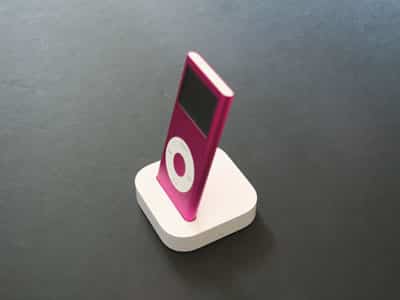
This modestly enhanced version of Apple’s earlier iPod nano Dock is now physically compatible with the aluminum-bodied second-generation iPod nano. As before, its smaller-than-standard-iPod-Dock casing includes only a line-out audio port and a Dock Connector port for data transfers, and does not include a video port (unused by the nanos), an IR remote sensor, or any ability to work with other iPods. Even the prior iPod nano doesn’t fit inside.
The $29 price is, however, Apple’s lowest for an official iPod nano-ready dock.
Last week’s introduction of the second-generation, aluminum-bodied iPod nano led Apple Computer to introduce several refreshed accessories that fit the new model’s slightly changed body size and shape. Of the three accessories, the least changed is Apple’s updated iPod nano Dock ($29), which makes two almost invisible tweaks – a reshaped dock well at its top with a slightly moved Dock Connector plug inside – to its same-named predecessor (iLounge rating: B), in the process becoming fully compatible with the new iPod nano, and incompatible with the prior one.
Since the release of the third-generation iPod, there have always been easy and advanced ways to connect Dock Connector port-equipped iPods to computers or stereo systems: you can use the headphone port for audio and Apple’s included cable for data, or buy a white glossy plastic Apple Dock for $39 to mount your iPod and provide higher quality audio-out. With the release of video-ready iPods, Apple created newer, better Universal Docks (iLounge rating: B+) for the same $39 price, adding video-out ports, Infrared remote control sensors, and the ability to physically fit any iPod model.

Like the version released for first-generation iPods, Apple’s new iPod nano Dock sells for $10 less than the Universal Dock, and offers only computer syncing and line-quality audio output ports, as the nano doesn’t support video output for any purpose. And like the iPod nano itself, it’s physically smaller than Apple’s full-sized iPod docks, with the same rounded curves in a smaller square size that doesn’t visually overpower the nano inside. As with the first-generation iPod nano Dock, Apple shifts the iPod Dock Connector plug up top off to the left, so that the nano sits properly in the Dock’s center, rather than off to one of its sides, and reduces the Dock’s height by around 1/8 of an inch.
It still comes with no cables, but interfaces with any stereo minijack cable, Dock Connector-to-USB or FireWire cable, and/or any Apple Power Adapter if you want to connect them.

Apple’s Docks have never wanted for quality; in more than three years of using them, we have yet to see one fail to work perfectly for data or stereo system synchronization. As before, the new iPod nano Dock we’ve tested worked perfectly for both audio and data. Unlike the Universal Dock, the nano Dock’s volume comes out of the unit’s true line-out port at a constant, maximum level, and you can only adjust it with a separate amplifier, not the iPod’s own volume control. Audio purists may rejoice, while others may feel disappointed – unlike the iPod mini or earlier full-sized iPods, the nano lacks a top-mounting accessory port, so there’s no other place to connect a remote control to the iPod nano while it’s inside the nano Dock.

Put more simply, if you buy this Dock, you can’t use a remote control with your iPod, and must handle both track and volume adjustments separately. That’s why Apple’s newest product is more limiting than its iPod and mini predecessors, an offset that cripples what otherwise would have been a higher rating given this Dock’s lower price. If you want to use a remote control to change both tracks and volume on the nano, you’ll need to look elsewhere to products such as Kensington’s Stereo Dock (iLounge rating: A-) or Apple’s aforementioned Universal Dock, neither of which looks ideal with the nano inside; similar options such as SwitchEasy’s Kurodock (iLounge rating: B+) offer superior looks at the same price, but suffer from the same remoteless design limitation.

Given the historic uses of iPod Docks for both audio output and computer docking purposes, Apple’s latest nano Dock is still a useful and good product for the price – worthy of our general-level recommendation.











