
Pros: A quality iPod nano armband that holds the nano comfortably on your arm; perforated neoprene traps less heat and moisture than earlier iPod armbands. More protection than earlier Apple armbands, including thin plastic Click Wheel guard.
Cons: Significant parts of iPod nano are left exposed, including top third and bottom sides. Not the best design for people who want to view nano’s screen upside down. Simple headphone port hole is on small side. Color options don’t include neutral black, and skew bright.
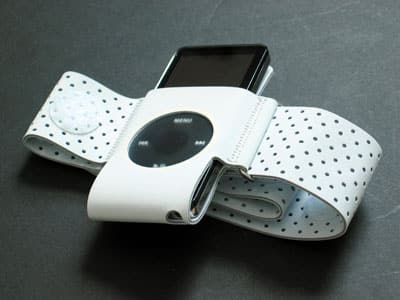
In the past, Apple Computer’s minimalistic iPod mini and shuffle armbands have been less than ideal: they were each light on protectivity, and pricey. But they benefitted from being first to market, widely distributed, and fashion-neutral. Now the company’s iPod nano Armband ($29.00) – the first accessory available for the iPod nano – offers a little more protection and makes a bolder fashion statement.
For that reason, and unlike its predecessors, it immediately raises one question: do you like how it looks?
Those who say “no” will point to the Armband’s most glaring characteristic: a vulcanized neoprene and Velcro band, which like Incase’s earlier Neoprene Wristband for iPod shuffle uses a perforated design that traps less moisture and heat than would full neoprene. As we noted during Apple’s Special Event to debut the nano and its accessories, the Armband looks like a giant bandage on your arm, save for the conspicuous presence of the iPod in its center. But looks aside, it’s very comfortable and breathable, and is built large enough to fit all but a heavyweight’s arms.

Thinner than earlier Apple armbands, the neoprene doubles over itself with an equally thin metal O-ring found immediately to the right of the nano, and is held in place by a “male” oval of Velcro and one or two of nine total “female” Velcro circles on the band. We had no problems getting the Velcro to hold in place, and found the Armband’s fit and finish to be up to Apple’s typically high accessory standards, another reason we feel comfortable recommending it. Like both the mini and shuffle bands, the iPod name is subtly embossed at the visible edge of the armband, its classiest touch.

Unlike the original iPod mini Armband, which shipped in neutral black and later became available in grey, yellow, orange, pink, and blue, the nano Armband isn’t available in black – instead, it’s in light grey, with bright red, green, blue and pink alternatives. The colors appear to be mostly aimed at female customers, as they look more than a little odd on men’s arms – grey is the safest bet of the bunch for guys. We would have preferred to see some more masculine options in the bunch.

The other surprise of the new design is its approach to iPod protectivity.
Prior Apple bands had essentially none: the mini Armband served as a clip, albeit a sturdy one, for the iPod mini’s sides and back, while the shuffle Armband used a USB cap and plastic back plate, but nothing more. For the nano Armband, Apple still isn’t showing any serious commitment to protectivity – instead of a plastic plate on the back, there’s just an unreinforced neoprene pad that wraps around the nano’s back, bottom and front, interrupted only by a hole for the device’s Click Wheel controls. A painted reflective ring around the hole serves as a visual highlight on each Armband, more conspicuous on the non-grey cases.
Presumably to protect against moisture touching the Click Wheel, Apple covers the Wheel with an integrated frosted plastic surface that’s thin enough to keep nano easy to use. It worked well even when moistened, which is more than we can say for some of the plastic iPod control protectors we’ve seen.

But what doesn’t make any sense to us is that Apple continues to leave the rest of the iPod exposed – almost as if it doesn’t believe people care. They do. Other than its back, the nano’s entire top third (including its Hold switch) is exposed, and its bottom sides are open, as well. While stitching makes the neoprene tight enough to let you wear the Armband upside down to see the nano’s screen from the right direction while you’re exercising, sweat will run down your nano’s face in the process.

Similarly, there’s a hole cut in the neoprene that’s large enough for Apple’s earphone plugs (original or nano-sized), and though it’s not physically large enough for oversized headphones to fit inside, they still make proper physical connections with nano because of the thinness of the neoprene.











