
Pros: 20GB capacity for music and data. Simple to use, trackpad scroll wheel, and FireWire port cover. The remote is convenient and easy to use.
Cons: Pricey and some may find the trackpad scroll wheel awkward.
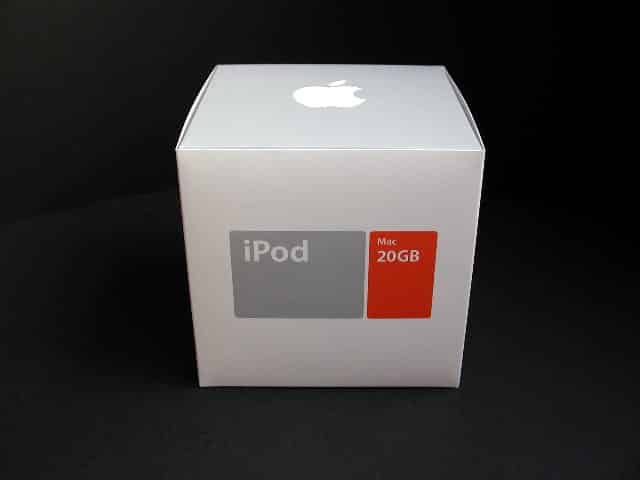
iLounge, after much anticipation, has acquired a new iPod 20GB to review. I’ll be taking a look at the 20GB and all it’s new accessories including the new remote and iPod case. Some of what I’m about to say was mentioned in my earlier report, “First Look: iPod 20GB”.
New Packaging

As you can see from the photos, Apple redesigned the iPod packaging. I like to think Apple was inspired by the iLounge grey color scheme and round corner shapes as we borrowed the orange from the iPod package. If you notice, Apple managed to fit the new accessories into the packaging without changing the original box dimensions.

The iPod 20GB
The iPod 20GB is thicker, heavier and there is now a trackpad scroll wheel. The iPod 20GB is about 10% thicker than the iPod 5GB (previous and new models). In our photos, you’ll notice the size difference is not easily noticed. The 20GB is slightly heavier, but not by much. The reason for the thicker dimensions and heavier weight is due to the Toshiba 20GB hard drive inside.

No doubt case makers will be updating their designs to fit the thicker iPod 20GB and some may also be changing their existing case designs to accommodate the thinner 10GB model. I performed a quick fit test on the following cases:
Neoprene:
MARWARE: SportSuit Basic (tight, but fits ok)
MARWARE: SportSuit Sleeve (fits)
MARWARE: SportSuit Convertible (tight, but fits ok)
OP/TECH iPod pouch (fits)
The Pouch (fits)
The iPod Store Neoprene case (tight, but fits ok)
Leather:
XtremeMac Deluxe case: (tight, but fits)
e-pac case: (fit is too tight)
Vaja case: (does not fit)
Xigma case: (does not fit)
Krusell Classic Leather case (tight, but fits ok)
Krusell Handit case (does not fit)
Other
Groove Jacket (tight, but fits ok)
Waterfield Designs Sooper Dooper case (tight, but fits ok)
Willow Design BiFold case (fit is too tight)
The majority of cases now available do not fit or are too tight and don’t fit properly. We’ll have to wait for the case makers to release new models.
As I had mentioned in First Look: iPod 20GB, I didn’t care for the new trackpad scroll wheel. I believe with time that could change.
It’s the old “it’s new and I have to get used to it” cliche. Many iLoungers have expressed they like the new trackpad scroll wheel and describe the finish as being “soft” and “smooth” when navigating the user interface.

At to the top of the iPod 20GB you’ll find that Apple has designed the chromed metal to surround the FireWire port, audio port and “Hold” switch. Previous model iPods had white plastic.
The FireWire port has a white plastic port cover with a grey rubber gasket on its underside. The gasket extends to form an “L” shaped hinge for the cover. In the included iPod Users Guide, it states, “The FireWire port cover (available with some models of iPod) is designed to be removable. If it comes off, you can reinsert it.” I removed it and reinserted it without any problems.

There has been a slight modification to the “Hold” switch. It’s now longer, and the finger grip has moved from the end of the left side (previous models) to the middle.
The iPod 20GB shipped with Software Updater 1.2 installed, but we won’t be able to take advantage of iCalendars until Mac OS X 10.2 Jaguar is released. Included on the 20GB hard drive are Contacts and Calendars folders, iTunes 2.0.4 for Mac OS 9 and iTunes 3 for Mac OS X installers.
Along with the hours of music you can pack onto the 20GB hard drive, look at all the storage space you have to transport data. A battery powered, 20GB hard drive with everything you need in your pocket. iLounger Jeremy said it best, “Battery-powered FireWire hard drives are cool unto themselves.” We have to agree.
The Remote
It’s about time Apple released a remote for the iPod. Good things come to those who wait and in usual Apple fashion, it’s beautiful and simple to use. The front panel is made from the same polished, chrome metal casing as found on the iPod (but thicker), and the back is white plastic and features a spring clip.

The on/off switch is a tiny, white elongated piece of plastic on the left side. The on and off positions are indicated by a tiny green and red dot. The control buttons include volume, reverse, forward, play and pause.
These buttons are also metal, but with a matte finish.
When you want to use the remote, plug it into the audio port on the iPod (make sure to push it in firmly), and then plug your ear/headphones into the audio port on the remote. Turn your iPod on and choose a song to play. Turn your remote to “on” indicated by the green dot. You now have control of your song via the remote. I didn’t have any problems using the remote, and am quite happy with its performance.

The Case
I’ve reviewed many cases and as I sit here with my back to a table full of iPod cases I think I know what a good iPod case is when I see it. The Apple iPod case is both elegant and simple in form. The case is not a fully functional case, because there is no access to the scroll wheel. You’ll have to pull the iPod out each time you want to use it.

The case is constructed from a U-shaped cardboard insert, covered in tightly woven, black nylon. The finish is smooth to the touch, and the stitching is impeccable. One-size-fits-all, because the elastic sides accommodate the difference in thickness between the 5GB, 10GB and 20GB models. On the back panel is a black plastic and metal belt clip. Though the Apple iPod case is nice, I think many of our readers will be searching for a case to better suit their needs, provides full functionality and better protection.
The Earphones
A common complaint among iPod owners was the uncomfortable and oversized original earphones. Apple took notice and redesigned the new earphones to be smaller than previous models. I’ve worn them for several hours without any discomfort.

I always liked the sound reproduction of the original earphones, and the new models are just as good.











