
The increasing popularity of the iPad in recording studios has compelled many pro audio accessory manufacturers to offer digital music accessories for the iOS platform. While it has generally been possible to use any USB microphone with the iPad — a bonus feature of the USB adapter in Apple’s iPad Camera Connection Kit — there are always compatibility questions when using a device not specifically made to work with the iPad. Consequently, pro audio companies have adapted their existing USB microphone designs for the iOS market, specifically testing them with Apple’s devices in addition to standard Macs and PCs. In most cases, you’re essentially getting a USB mic that includes both USB and Dock Connector cables, and is guaranteed to work with prior-generation iPads, iPhones and/or iPod touches; audio companies are predicting availability of Lightning cables in the near future.
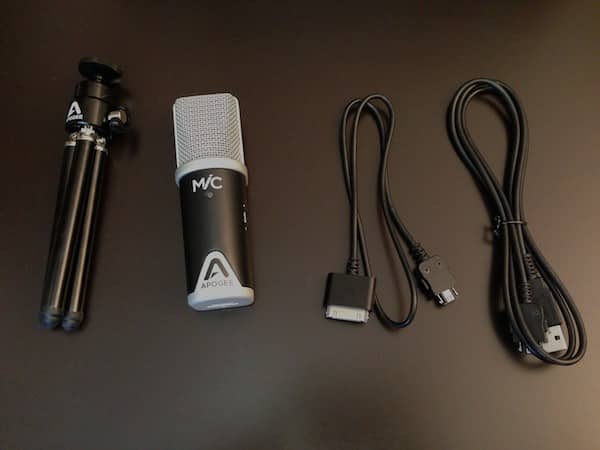
Released last year, Apogee Digital’s MiC ($199) is one of the first professional-quality recording solutions with iOS certification. A portable, studio-quality condenser microphone, MiC allows users to make a direct digital connection to prior-generation iPads, iPhones, or iPod touches using the included 0.5-meter Dock Connector cable—a relatively short distance that will work better for prosumer or solo artist recording purposes than in actual studio environments, while a longer 1-meter USB cable is also included for connecting to a Mac or PC. Notably, a proprietary port found on the bottom of the device is used for connecting either cable; you cannot just use a third-party cable to connect to your iOS device or computer.
The package also includes a small tripod that mounts to the back of the MiC, again useful for near-field recording on a tabletop.
Should you want to use MiC in a more elaborate environment, Apogee sells additional accessories separately. A MiC Stand Adaptor is available for mounting the accessory on a standard microphone stand, and 3-meter versions of either cable can be had for $20 each. A Lightning cable is not yet available, but the company reports that it is working on one and will be making it available for sale to existing owners via its web site, while including it in the package in later MiC versions. For the time being, the Apple Lightning to 30-pin Adapter is fully compatible with Apogee’s Dock Connector cable, though it entails an additional expense for the user.

The MiC unit itself is entirely metal, and while clearly designed to be portable does have a nice solid heft due to the materials; MiC definitely has a quality, premium feel rather than a disposable, lightweight design. In addition to the connector port on the bottom and the obvious microphone capsule at the top, MiC includes a standard input gain control knob on the side and a multi-colored status LED on the front. This latter feature is cleverly done, with the LED displaying one of five colors to provide connection status and audio level information at a glance.
MiC is powered via the USB interface, which has the advantage of not requiring batteries or external power, but may slightly impact the battery life of your connected iOS device; in our own testing we didn’t notice any significant battery drain on a connected iPad after 20-30 minutes of continuous recording, but this may be a consideration for users looking to do longer recording sessions.

MiC includes an integrated preamp with up to 40dB of gain and a 44.1/48 kHz analog-to-digital converter, essentially turning the audio received by the condensor microphone into a high quality digital signal for sending to an iPad, iPhone or iPod touch. Our testing showed the unidirectional cardioid condensor mic to have a relatively wide acceptance angle of around 150 degrees. MiC is designed for a variety of different recording applications including music vocals, acoustic instruments and spoken-word audio.

In our own testing, MiC performed quite well across the board in all of these areas, doing a great job with vocals but lacking a little bit of lower-end dynamic range for certain instrumental recording compared to some of the dedicated instrument mics that we’ve worked with. This was most noticeable when working with wind instruments, while acoustic guitar and piano seemed to fare somewhat better. That said, this shouldn’t be considered a serious deficiency as it does a more than acceptable job for a general-purpose mic, and only users with specifically adverse instrumental studio recording needs will likely consider this to be an issue.











