
This review originally appeared within iLounge’s iOS Gems series within the compilation article, iPhone Gems: 12 Internet Radio Apps for iPhone + iPod touch. Additional details may be found in the original article.
The other major free Internet Radio app currently available for the iPhone and iPod touch is AOL’s AOL Radio (Free), which takes a different—and more conventional—approach to performing music. Here, the idea is that AOL will serve directly to your iPhone or iPod touch a list of hand-selected stations that will play like traditional radio on your device. It provides them from a list of familiar genres, along with a short collection of “recommended” stations that pares down the wide variety into a short list of popular options.
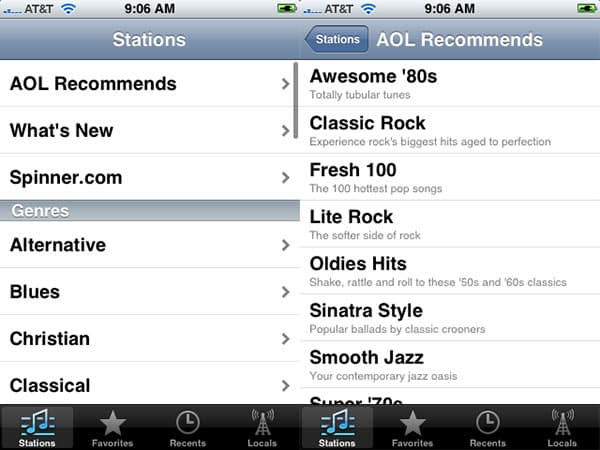

A major difference between AOL Radio and the prior two apps is that it’s not just music. There’s also a section called Comedy, which offers three channels of comedy programming that won’t be found on the Pandora and Last.fm track lists; you can also select from longer lists of News, Sports, and Talk stations that are just like the ones you’d find on local AM or FM radio dials. The content obviously varies a lot from station to station, but the fact that they sound good—and that most of them are available while you’re using the iPhone on EDGE—is a serious reason to keep AOL Radio installed in addition to another Internet Radio application.
There are also a bunch of different stations for any given music genre, each with a specific noted sub-focus, taken from actual FM stations across the United States.

The major issues with AOL Radio are limitations of its interface and functionality. Unlike the other programs, there’s no track skipping, artist selection, or sharing of track information with friends; you’re given a stop button, a volume control, and access to a stream of audio in progress. AOL does save favorites if you want, but there’s no “share with friends” option, and as a mixed positive and negative the application neither ties into AOL’s Radio web site nor adds additional features; it is basically a standalone radio tuner that does only what it appears to do on the surface. Album art is small, and there aren’t many options once you’re playing a station.

That’s not to say that AOL Radio is bad in any way. As with the other apps, you can find a currently playing song for purchase in iTunes, and you can also locate it through AOL’s AOL Music service. A star icon lets you tag a song as a favorite for later lookup with either of those services.

You’ll note that the music stations do contain talk and other interruptions, as well. At that point, you’ll just see the station’s logo and no track information; audio will progress as you listen to the dialogue.

And even though AOL Radio doesn’t permit artist searches per se, some genres do have specific dedicated artist channels, which will actually yield a higher number of songs for these artists than Pandora or Last.fm. We found that the AOL “All B.I.G.” station did a much better job of playing Notorious B.I.G. tracks continuously than any Pandora or Last.fm search we tried, but then, we had no control over the stream other than to adjust the volume or stop listening.

The only other bummer in AOL Radio is its “Locals” feature, which is supposed to find local stations for you, based on your current location. In Western New York, AOL Radio came up with Cleveland—3 hours away—as the closest local station, with only four channels.











