
Pros: The iPod’s third display remote accessory, bundling a color-screened remote control and nice dock that together you browse your iPod’s music library while it’s connected to an iPod-specific or device-agnostic speaker system. Dock neatly integrates iPod and remote chargers with a connector for attachment to existing iPod speaker docks. Lower price than prior color-screened remote; includes rechargeable remote battery, and uses radio waves rather than Infrared for remote control.
Cons: Aside from distance performance, which taps out at roughly 60-75 feet depending on conditions, remote’s performance is inconsistent; play/pause and track controls don’t always work. From screen to fonts to speed, interface isn’t as nice or as easily navigated as on top alternative, lacks iPod video browsing functionality. No power adapter or AV cables in the package.
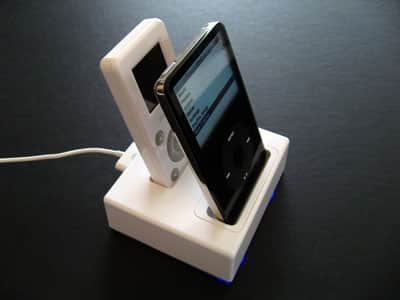
As a direct competitor to Keyspan’s TuneView (iLounge rating: B+), Alive Style’s new PopAlive Remote and Dock ($129) offers similar functionality at a lower price. PopAlive R&D offers a combination of a remote control with an integrated 1.5″ color LCD display and a docking station for both your iPod and the remote, allowing you to navigate the iPod’s audio content from a distance while it’s connected to a high-quality audio source. Like TuneView, the remote pairs wirelessly with the dock via radio waves (RF) rather than Infrared signals, so it’s capable of penetrating walls and being used without pointing directly at a sensor on the dock.
Most of the iPod accessories we test are, to put it mildly, highly similar to one another. So our spirits rise whenever something truly new emerges, or when an underdeveloped product category begins to evolve into something truly great. Alive Style’s new PopAlive Remote and Dock ($129) could have been in the latter category: it’s the iPod’s third “display remote,” providing color-screened wireless access to an iPod connected to your favorite speakers a room or more away. But despite certain major advantages, the PopAlive Remote and Dock lacks the polish of Keyspan’s similar TuneView (iLounge rating: B+), a point we’ll elaborate on further in a moment.
Alive Style’s Remote and Dock bundle – hereafter called R&D – takes a somewhat different tact from Keyspan’s TuneView package. Both companies sell you a color-screened iPod remote control with RF wireless capabilities, and a universal iPod dock with audio and S-Video outputs.
They also include various iPod dock adapters; Keyspan includes 3 to Alive Style’s six. From there, they differ. Keyspan includes a wall power adapter, USB cable, and audio cable, while Alive Style doesn’t include a power adapter, and only includes a somewhat quizzical, short male-to-female iPod Dock Connector cable. This doesn’t initially make sense.

Then you begin to study the PopAlive dock, and realize that it’s more complex than TuneView’s. At the top, there’s a remote control charging bay right behind the iPod well, so everything can sit and charges together. On the back, Alive Style has included a large remote-to-dock pairing button, a switch to toggle betweeen direct line-out audio and amplified, remote-controlled volume output from the dock – both with pretty good audio quality – and a full Dock Connector port. Keyspan has a small but similar button under its dock, no audio switch – but similar volume attenuation – and a USB port instead, designed solely for charging and syncing.

Alive Style’s Dock Connector port does more. The included Dock Connector cable can be connected directly to virtually any iPod-specific speaker system you already own, allowing you to add display remote functionality with a simple single connection. Underneath the PopAlive dock is a recessed area to wind the cable through if you’re adding the unit to a top-loading iPod speaker such as Apple’s iPod Hi-Fi or XtremeMac’s Tango; the dock will just sit neatly on top of the speakers without a dangling cable, charging your iPod and performing its audio. If your speaker system isn’t iPod-specific, you can connect the dock to any iPod wall power adapter and a minijack audio cable you provide yourself, and listen to your iPod’s audio that way. Two blue lights illuminate on PopAlive’s dock when power is on.

Whether you prefer Alive Style’s Dock Connector-focused implementation to Keyspan’s wall power and audio cable package will depend on your existing audio setup. Keyspan makes it easier for you to connect your iPod to a device-agnostic speaker system but offers no special treatment for iPod-specific ones; Alive Style permits both but leaves you to find device-agnostic cables.
Given the $50 price difference between these accessories – and the roughly $30 cost of procuring the parts PopAlive R&D is missing – Alive Style’s dock and bundle approach is, all things considered, the better one.

But it’s offset by significant differences in its other major component: the PopAlive Remote. To its credit, Alive Style has developed a smaller, arguably less intimidating remote control: the PopAlive remote is roughly the same size and thickness as an iPod mini, and has 9 buttons to the 10 on Keyspan’s larger, heavier remote.

Their color LCD screens are almost exactly the same size, and both permit you to synchronize the docked iPod, scroll through its music library with iPod-like menus, and switch between multiple languages: TuneView has English, French, German, and Spanish, while PopAlive R&D has those four plus Chinese and Japanese. All of these points make PopAlive seem the smarter buy at a lower price.

Like TuneView, the PopAlive remote pairs wirelessly with the dock via radio waves (RF) rather than Infrared signals, so it’s capable of penetrating walls and being used without pointing directly at a sensor on the dock. This is a major reason people would consider adding Alive Style’s system to an existing iPod speaker unit, as most are either remote-less or include limited-distance, line-of-sight Infrared remotes. We found that PopAlive’s remote functioned pretty well for iPod navigation in most parts of our two-floor testing environment, losing communication with the dock only when separated by two rooms’ length and a wall: in this regard, it was not as strong a performer as TuneView, which worked fine from such distances, and further.

Unfortunately, this isn’t the only way in which the PopAlive Remote felt like a step down from Keyspan’s. Though both screens are color and between 1.4” to 1.5” in size, Keyspan’s screen is noticeably superior in resolution and contrast: Alive Style fits only six lines of typewriter-like, too-wide text on its screen, while Keyspan fits seven narrower and more detailed lines in the same space. Neither remote’s interface is beautiful, but Keyspan’s uses stronger colors and generally smarter text management schemes to more closely approximate the iPod’s own screens. These differences aren’t enough to sell one device over the other, but they’re noticeable, and all in Keyspan’s favor.

What’s more dramatic is the difference in the actual navigation experience between the two remotes. After an initial caching process, TuneView is faster and generally more reliable than PopAlive R&D, which frequently slows down to update its menu contents and doesn’t have anywhere near the alphabetic scrolling speed or functionality Keyspan has included. You need to press its arrow button once for each entry in your song list, which can be a real navigational pain with larger collections. Additionally, we experienced a number of frustrating failures of the remote to properly pause, resume, and change tracks: it doesn’t happen all the time, but when it does, you’ll find that you can’t stop audio for a phone call without just walking back over to your iPod or speakers.











