
Make no mistake: with the right software, the iPad will eventually become a DJ’s dream — Apple’s iOS 4.2 made the multi-touch tablet even more useful as a tool for blending together multiple audio streams at once, enabling third-party applications to load and mix multiple songs from its iPod music library. Capitalizing on iOS 4.2’s improvements, German developer Algoriddim has just released Djay for iPad ($20), a new application that places you in control of two turntables, a mixing board, and recording capabilities, basic DJ tools that show how potent the iPad can be as a remixing tool in the right hands. At version 1.0, Djay winds up straddling the “novice/professional” fence in interesting ways, offering pro DJs a convenient way to experiment with and practice sets while on the road, while giving amateurs just enough power to feel inadequate for even trying to mimic famous turntablists such as Fatboy Slim, Mark Ronson, and DJ Tiesto.
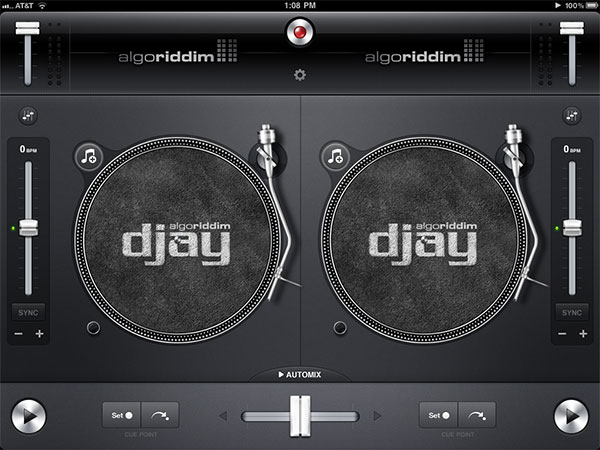
Algoriddim deserves significant credit for getting the basics of its iPad user interface right straight out of the gate. The twin turntables are so obviously labeled with icons and clean text that a first-time deejay can figure out within half an hour how everything works: add a song of your choice using the “musical note +” button and a modal overlay of your iPad’s music library—including music videos—then perform live scratching, skipping, and rewinding on the track as its album artwork spins. When you’re ready for the next challenge, call up a second song on the adjacent turntable, choose how loud or soft you want it to be relative to the first track, and sync the tracks so that they sound great together. You can listen to each track and use your fingers on the turntables to sync them up, as a pro DJ would, or examine a waveform at the top of the screen as it expands and contracts in realtime to let you know where you are within a song, and what’s coming up next.

Djay makes tempo adjustment easy: a slider next to each turntable lets you manually slow down or speed up the beat, auto-analyzing each track’s beats per minute after roughly 20 seconds of playback, while a “sync” button matches the speed of the left turntable as closely as possible to the right one or vice versa.
A set of + and – buttons perform temporary speed-ups and -downs until you release them, while power-off lights on the turntable let the music gradually slow down and fade out rather than abruptly stopping. Volume sliders at the top of the screen let you independently adjust the levels of the two tracks, and the mixing slider at the bottom brings more or less of each song into the combined audio stream. You can also set cue points for each song and return to them with one button press, the closest Djay currently comes to looping, and an EQ icon lets you use a three-band equalizer to bring the lows, mids, and highs up or down independently, and play with the gain to bring down or blow out each audio signal.

The app handles each of these things with hardly a pause, grabbing and starting new songs within a second or two of your tap-based selection, then playing smoothly until and unless you interrupt their flow. Except for a single crash we experienced in our first outing with the app, we found that our own skill in choosing the right songs was far more of an encumbrance to making great mixes than anything in the software. Sonically, dJay does a good job with audio output, gently transitioning between tracks with nice fades, or using more dramatic backspinning, breaking, or reversing out as you prefer. Only skipping around within a track’s waveform adds a little previewing jitter to the signal, which is avoidable if you tilt over to the other turntable or lower the volume level while you’re skipping around. We also noticed that a “low memory” warning infrequently replaced the waveform of one of our tracks, disappearing after it loaded the next track; it happened a handful of times on two iPads, but didn’t stop the flow of the music, just the visualization of the waveforms.
Djay also supports multitasking, running in the background while you’re using other apps, though it effectively turns into a plain music player in the process; effect-laden transitions disappear between songs, and when on automix, the iPad’s multitasking play/pause button doesn’t work.

Algoriddim has been sparing with little frilly touches, apart from a moving, repositionable arm on each turntable, which while not purely cosmetic is far less useful on faux albums, becoming a little more handy if you use settings menus to add a tape marker to the album. The settings also provide access to other features, such as a master volume slider for use with a slightly laggy AirPlay wireless broadcasting feature, an option for split output pre-cueing with an audio adapter accessory—mono pre-cue in one channel for headphones, mono mix in the other channel for output—and added controls over transition effects, speed, and performance of just-loaded songs. Pro DJs will appreciate these settings more than amateurs, though it goes without saying that they could be even better and more numerous. Simplicity was the name of the game in this release rather than depth: recordings can be created with a single button press, and played back with two more, but possibly due to piracy concerns, there’s no way to e-mail out a mix directly from the device. Also missing in action are the ability to queue up separate playlists for live mixing, add more dramatic filters to tracks, auto-loop all or a part of a track, or insert samples of any sort into the playback.

Despite the omissions mentioned above, Djay represents a good first stab at offering real DJ mixing software on the iPad. Novices will find the collection of tools included in version 1.0 to be overwhelming—more than enough to get started with the basics of scratching, mixing, and tempo-shifting songs. After getting past the brief initial learning curve with the interface, even the limited collection of possibilities will begin to feel overwhelming, giving the user a greater appreciation for the seamless blending and catchy transformations of songs achieved by famous spinners.











