
If you’ve been converting your home movies – or, in some countries, DVDs – into iPod-ready video formats, you’ve no doubt discovered a major hiccup in the process: unlike CDs, which can be ripped in minutes, video conversion can take hours. Using the iPod’s newer, better H.264 format, it’s not unusual to see a single video’s transfer process consume 4 or more hours on a PC that hasn’t been upgraded in several years. Updated August 29, 2007: After giving ADS Tech (and a Macintosh-focused counterpart, Elgato Systems) a number of months to remedy issues raised in our initial reviews, this one published March 19, 2007, we are issuing final ratings for the current versions of both products today. An explanatory paragraph appears at the end of this review.
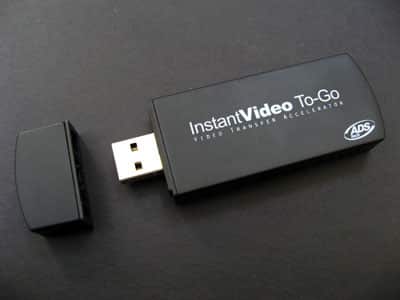
ADS Tech has a solution. As the name suggests, its Instant Video To-Go Video Transfer Accelerator ($80) includes dedicated hardware for video compression – specifically, time-consuming H.264 conversions. And its bundled software is designed to output in one of four quality modes: low-, medium-, or high-quality 320×240, or high-quality 640×480. For the price, you get the Instant Video To-Go unit itself – a USB 2.0 dongle roughly the size and shape of a first-generation iPod shuffle, only in black – plus a USB extension cable, carrying bag, and software CD. You plug the dongle into the cable and then your computer, run the software installer, and you’re ready to go.

To get a sense of the hardware’s baseline performance, we tested Instant Video To-Go on an older 1.83GHz AMD Athlon-based PC running Windows XP – a machine capable of creating what we consider an unacceptably low-quality H.264 320×240, 15 frame per second movie from an original 720×480, 145-minute source in just under two hours with Videora.
ADS Tech’s solution took 59 minutes for a comparable (320×240 Low-Quality 15FPS) test – around half the time of the software-based solution, and only 40% of the video’s original run time.
Predictably, Instant Video To-Go took longer to create higher-quality videos. To create a 320×240 High-Quality 30FPS video – what we’d expect most iPod-only videos to use – from the same 145-minute source, it required 1 hour and 15 minutes on our older machine – about half the video’s run time. Making a 640×480 High-Quality video required 2 hours and 51 minutes, just a hint longer than the original run time. The same task would have required 6 or 7 hours on our test PC.

The good news is that, even on an older PC, Instant Video To-Go unquestionably yields speed dividends. We haven’t yet seen quite the same benefits as advertised on the device’s package – 20 minute hardware encoding of a 100 minute source, versus 5 hours worth of software encoding for the same source – and it’s clear that those numbers use a best-case hardware encoding scenario and a worst-case software encoding scenario. But since most PCs sold over the past several years outstrip the specs of our test machine, it’s highly likely that you’ll see “best-case” conversion times with Instant Video To-Go, and a major step up over your existing software encoding solutions.
There is a bit of bad news, though. ADS Tech bundles the dongle with a software package from ArcSoft called Media Converter 2.0, which appears to be a stripped-down version of the company’s standard Media Converter software designed solely for use with Instant Video To-Go.
It won’t run if the dongle isn’t attached to your computer, and it has been designed to work with very minimal user intervention. On a positive note, it does a fine job with the right source materials: hand it a home movie or an unprotected, single-language VOB file from a DVD and it will perform a speedy, simple conversion, presenting even unusually wide videos in the correct aspect ratio.

But – and this is a common but – the software doesn’t include a DVD ripping application, since doing so is presumptively against the law in countries including the United States. It only converts unprotected content from DVDs and un-DRMed videos, which isn’t unusual at all, but once it gets DVD content, it doesn’t do the right thing with it. If your VOB file comes from a multi-language DVD – say, one with English and French – there’s a very significant possibility that your converted H.264 file will be in French, even where other programs such as Videora would have picked English. Similarly, if you have multiple VOB files, Media Converter won’t join them, leaving you with multiple pieces of every DVD video you try to convert. There don’t appear to be any ways to fix these omissions in Media Converter, so users will need to find and use better DVD ripping programs; even assuming that this is legal in your country of residence, it’s currently most likely beyond the scope of the average user’s expertise.
We’ve opted not to rate Instant Video To-Go quite yet, as we’re hoping to see software updates – and perhaps support for OSes other than Windows XP – in the near future. “Hope” might not be a strong enough word: given the device’s promise and utility, we’d expect to see it or products like it become a big deal for iPod and iTunes users.











