
Back in 2011, Adonit launched a $100 keyboard case called Writer for iPad 2, which it followed up early this year with the same-priced Writer 2 Plus for iPad 2. Since then, Adonit has renamed the latter case “Writer Plus,” released a slightly tweaked version for the third-generation iPad, and markedly lowered the price on all models. The only differences between Writer Plus for iPad 2 ($75-$80) and Writer Plus for the new iPad ($80-$85) are their prices and screen-locking magnet orientations. As such, we’ve updated our prior review to reflect the name change, the new iPad version, and the pricing, while keeping most of the other details intact from the prior text.
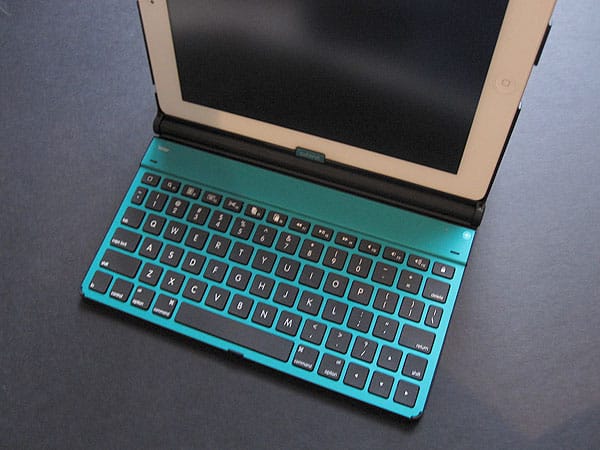
In 2012, Adonit released the most precise iPad styluses we’ve tested in Jot and Jot Mini, as well as an updated version of its earlier Writer keyboard case for iPads. Given that the market was flooded with OEM keyboard cases, we previously gave the company credit for its unique and obviously self-designed product, though the execution was less than stellar thanks to overly small keys and a need to swap AAA batteries to keep them powered. Thankfully Adonit fixed virtually all of the prior version’s issues and added a number of new features to Writer 2 Plus for iPad 2, a much-improved sequel that won one of iLounge’s Best of Show Awards at this year’s CES. It preserved all of these changes for Writer Plus for the new iPad, making only one tweak.

Most iPad keyboard cases are either leather or faux leather folios, usually with a somewhat ill-fitting frame that holds the tablet on the right while a rubber or plastic keyboard sits on the opposite side.
The original Writer was different that it has a hard plastic frame to hold the iPad, a nice but obviously plastic fabric covering the outside, and a scissor action keyboard inside with comparatively great tactile feedback. Because the keyboard and frame are attached to one another with a hinge, you could slide the iPad into a number of different viewing angles.


The basic setup remains pretty much the same on the newest iteration. As before, the tablet fits in a plastic frame that is partially attached to Writer Plus’s rear cover. It seems to be an identical frame, with a flat back that isn’t perfectly contoured to the curves of the iPad’s body, but pretty close. This time, instead of just plain black, you have a choice of colors. The hole along the right edge remains, making removal of the tablet incredibly easy; simply press through and the iPad pops right out. Auto-locking magnets are found in the front cover, enabling the iPad to turn on and off as Writer Plus is opened and shut; the iPad 2 version works with the second-generation iPad’s magnets, and the new iPad version works with the third-generation iPad’s for auto-locking features.
The lid sits almost completely flat when folded.

One of the most significant improvements from Writer to Writer Plus is the new keyboard. When using the original version, we commented that “our hands felt very cramped while using it, and our typing was consequently less accurate than on other models.” That is no longer the case with either version of Writer Plus. While the keys are still smaller than those on Apple’s Wireless Keyboard, they’re larger than on the first version and better spaced, while maintaining the great scissor action feel in an even thinner size. It’s still not perfect—you’ll still have a slight learning curve and a few mistakes as you learn to touch type with the keys, but it’s a big enough improvement on the prior version to make typing a lot easier. One downside: the power slider is located on the undercarriage of the keyboard and not labeled. If you follow Adonit’s directions, this may not be a problem, but the location’s otherwise not completely intuitive, especially since the Bluetooth sync button is on the top side of the keyboard.

As with Writer Plus for the iPad 2, this keyboard is removable. A simple snap-in mechanism holds it in place, making it very easy to pull off when necessary.











