
iLoungeiLounge
  • News
    • Apple
      • AirPods Pro
      • AirPlay
      • Apps
        • Apple Music
      • iCloud
      • iTunes
      • HealthKit
      • HomeKit
      • HomePod
      • iOS 13
      • Apple Pay
      • Apple TV
      • Siri
    • Rumors
    • Humor
    • Technology
      • CES
    • Daily Deals
    • Articles
    • Web Stories
  • iPhone
    • iPhone Accessories
  • iPad
  • iPod
    • iPod Accessories
  • Apple Watch
    • Apple Watch Accessories
  • Mac
    • MacBook Air
    • MacBook Pro
  • Reviews
    • App Reviews
  • How-to
    • Ask iLounge
Font ResizerAa
iLoungeiLounge
Font ResizerAa
Search
  • News
    • Apple
    • Rumors
    • Humor
    • Technology
    • Daily Deals
    • Articles
    • Web Stories
  • iPhone
    • iPhone Accessories
  • iPad
  • iPod
    • iPod Accessories
  • Apple Watch
    • Apple Watch Accessories
  • Mac
    • MacBook Air
    • MacBook Pro
  • Reviews
    • App Reviews
  • How-to
    • Ask iLounge
Follow US

Reviews

Reviews

Review: Adonit Jot Script 2

Last updated: May 19, 2021 9:37 pm UTC
By Phil Dzikiy
Review: Adonit Jot Script 2

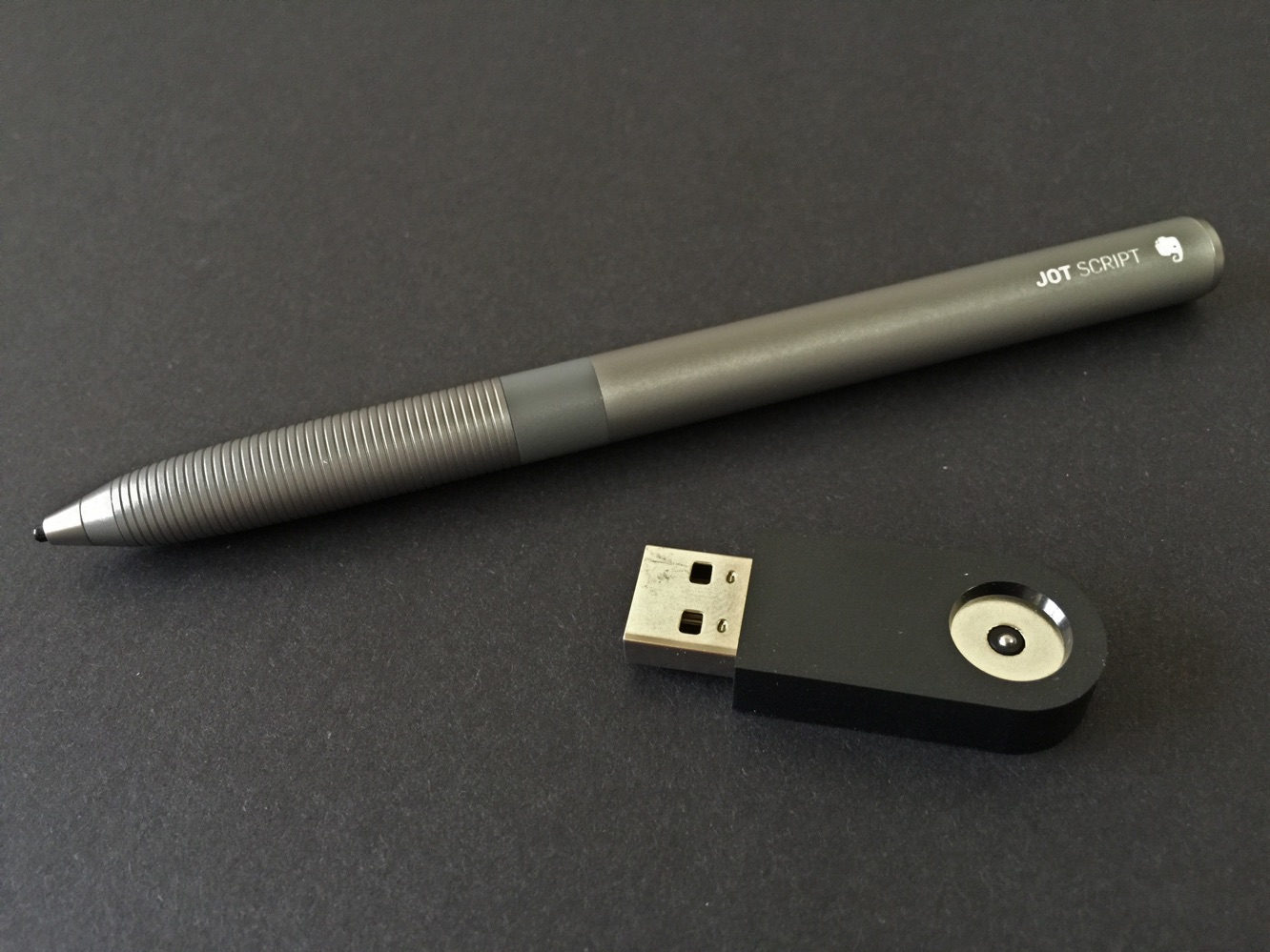
Adonit’s new Jot Script 2 ($75), also referred to as Jot Script 2 — Evernote Edition, is a slightly slimmer version of Adonit’s previous Jot Script. Whereas the prior Jot Script used a single AAA battery, Jot Script 2 recharges via an included USB-powered charging dock. According to Adonit, the rechargeable battery should last anywhere from 20 to 50 hours of use, depending on device — it’s said to get up to 30 hours of battery life when used with an iPad Air 2, which is the device we used for testing. Indeed, the Bluetooth Jot Script 2 offers full iPad Air 2 functionality, and though the stylus is said to work with any app, Adonit has offered a list of preferred apps to get the best out of Jot Script 2’s abilities.

Review: Adonit Jot Script 2

Jot Script 2 has a mostly aluminum body with a chrome-plated stainless steel tip. It’s about 5.5” long, but its barrel is now only about .41” in diameter — according to Adonit, it’s “designed to feel like a pen,” and that’s pretty accurate. The stylus also retains the tiny 1.9mm tip found on the original Jot Script. The recharging dock is also small — about 1.75” long and .69” wide.

Simply plug it into any USB port and place the Jot Script 2’s end inside — it holds magnetically, charging the stylus as it remains vertical. It’s an effective, clever solution, as long as you’ve got an open, accessible USB port.


Review: Adonit Jot Script 2

Connecting via Bluetooth is also a simple process. The stylus doesn’t require users to enter the iOS’ settings menu to connect. Rather, the button on the stylus is switched on, and then you pair from within one of the preferred apps. This way, if you’re done using the app, you can close it out and simply set the stylus aside.

As we found with the prior Jot Script, writing is mostly a pleasure. It’s accurate and quick, even though you’ll sometimes notice that the line you’re making is slightly trailing the point where the stylus currently is. And even though the experience was enjoyable, we did run into some rare occurrences of the stylus not getting any marks to show up at all when used with the Penultimate app.


A second attempt usually did the trick.

Review: Adonit Jot Script 2

Drawing was even more fun than writing. Using Adonit’s own Forge app, we had a good time drawing and creating. Both the Forge and Penultimate apps allow users to switch through stylus and sizes within the app — Jot Script 2 doesn’t offer shortcut buttons for doing so. For most people, this will be more than adequate.

Review: Adonit Jot Script 2

Taking notes quickly was a bit more of an issue. If you’re planning on writing hurriedly, your chicken scratch might be a bit more scratched up than you’d anticipate. Also, Adonit doesn’t advertise any pressure sensitivity for Jot Script 2 — if you’re looking for that as a specific feature, look to another (more expensive) stylus, such as Adonit’s own Jot Touch with Pixelpoint.

Review: Adonit Jot Script 2

Adonit claims the compatible apps have improved palm rejection. We’d describe the palm rejection as good, but not perfect.



Latest News
The Apple Watch Series 11 46mm GPS Is $100 Off
1 Min Read
Clamshell Style iPhone Being Looked Into By Apple
1 Min Read
Foldable iPhones May Have the Largest Battery Ever
1 Min Read
Apple and TSMC’s 10-Year Collaboration May Be Ending
1 Min Read
The 13-inch M5 iPad Pro 256GB Wi-Fi Is $149 Off
1 Min Read
M5 Pro and M5 Max Chips for the MacBook Pro could Roll Out with macOS 26.3
1 Min Read
Mac Ordering Process Revamped
1 Min Read
Check Signed By Steve Wozniak and Steve Jobs Sold For $2.4 Million
1 Min Read
The Anker 140W 4-Port GaN USB-C Charger is $35 Off
1 Min Read
No iPhone Air 2 This Year, according to Latest Report
1 Min Read
New Report Corroborates Split iPhone Release Dates
1 Min Read
Apple Losing More Researchers As They Plan To Release 2 Siri Versions
1 Min Read

iLounge logo

iLounge is an independent resource for all things iPod, iPhone, iPad, and beyond. iPod, iPhone, iPad, iTunes, Apple TV, and the Apple logo are trademarks of Apple Inc.

This website is not affiliated with Apple Inc.
iLounge © 2001 - 2025. All Rights Reserved.
  • Contact Us
  • Submit News
  • About Us
  • Forums
  • Privacy Policy
  • Terms Of Use
Welcome Back!

Sign in to your account

Lost your password?








